> For the complete documentation index, see [llms.txt](https://mariadb.com/docs/llms.txt). Markdown versions of documentation pages are available by appending `.md` to page URLs; this page is available as [Markdown](https://mariadb.com/docs/mariadb-cloud/quickstart/query-cache-gridgain-8.md).
# Query Result Cache
Query Result Cache adds an in-memory query result cache alongside your transactional MariaDB Cloud workload, serving repeated reads from memory behind MaxScale with no application changes.
Query Result Cache is a provisioning **add-on** for MariaDB Provisioned services that adds an in-memory cache for SQL query results. Repeated read queries are served from the cache instead of the underlying database, reducing read latency for read-intensive workloads with high query reuse. The add-on integrates with the Semi-Sync HA topology and uses the same MaxScale endpoint, so applications continue connecting to the existing MariaDB Cloud endpoint.
{% hint style="warning" %}
This feature requires **Semi-Sync HA** and **MaxScale 25.10.3 or later**, is available on Power and PowerPlus tiers only, and cannot be enabled on trial accounts.
{% endhint %}
{% hint style="info" %}
**Choose what you cache.** The cache adds a lookup to the read path, so it pays off for repeated reads that are genuinely expensive to run — aggregations, joins that scan, report queries. For reads MariaDB already answers from its buffer pool in a millisecond or two, that lookup can cost more than it saves.
This is what `queryresultcache_mxs_min_query_duration` is for: it keeps queries the server already answers quickly out of the cache. At the default of 100 ms, a query that takes 95 ms is not cached.
{% endhint %}
## Architecture Overview
The cache is positioned between MaxScale and MariaDB. MaxScale intercepts cacheable reads and checks the cache before querying the database; MariaDB remains the authoritative data store for all writes and for any read that is not served from cache. The cache engine is GridGain, running as a single in-memory node that is managed entirely by the platform.
### Simplified Technical View
```mermaid
---
title: Simplified Query Result Cache Architecture (Technical View)
---
%%{init: {"themeVariables": {"edgeLabelBackground": "#eef2ff"}}}%%
graph TD
accTitle: Simplified Query Result Cache Architecture (Technical View)
accDescr {
Two groups are drawn. Access & Routing holds Application Clients, MariaDB
Cloud endpoint and MaxScale. Storage & Cache holds MariaDB Primary +
replicas (authoritative data store) and GridGain (in-memory query result
cache). The MaxScale box reads: Cache Filter checks cache for cacheable
reads; fills on miss; applies TTL; bypasses to MariaDB if cache is down.
Application Clients and MariaDB Cloud endpoint are joined by a line with
no direction. An arrow leads from MariaDB Cloud endpoint to MaxScale.
Three numbered arrows follow: 1. Check cache, from MaxScale to GridGain.
2a. Hit: cached result, from GridGain back to MaxScale. 2b. Miss: run
query, then cache result, from MaxScale to MariaDB Primary + replicas.
}
subgraph Routing_Layer [Access & Routing]
App[Application Clients] --- Endpoint["MariaDB Cloud endpoint"]
Endpoint --> MS(MaxScale
Cache Filter
checks cache for cacheable reads;
fills on miss; applies TTL;
bypasses to MariaDB if cache is down)
end
subgraph Engine_Layer [Storage & Cache]
direction LR
DB_Primary["MariaDB Primary + replicas
(authoritative data store)"]
Cache["GridGain
in-memory query result cache"]
end
MS == "1. Check cache" ==> Cache
Cache -. "2a. Hit: cached result" .-> MS
MS -.->|"2b. Miss: run query, then cache result"| DB_Primary
classDef cacheNode fill:#fff,stroke:#8a6d00,stroke-width:2px,color:#8a6d00;
class Cache cacheNode;
linkStyle 3 stroke:#8a6d00,stroke-width:2px;
style Routing_Layer fill:#f9f9f9,stroke:#ddd,stroke-dasharray: 5 5
style Engine_Layer fill:#fff,stroke:#ddd
linkStyle default color:#111111
```
### Core Components
#### **MaxScale Cache Filter**
The endpoint and routing layer. It classifies cacheable reads, performs the cache lookup, applies the configured TTL when it fills the cache, and **fails through** to MariaDB on a miss or when the cache is unavailable.
#### **MariaDB Server**
The **OLTP** (online transactional processing) engine and the **authoritative data store**. All writes, and all reads that are not served from cache, run here. It is unchanged by adding the cache.
#### **GridGain (Cache Engine)**
A single-node, in-memory query result store. It holds cached `SELECT` results only, has **no persistence**, and is reachable only from MaxScale inside the service.
### Freshness and Consistency
#### **TTL-Bounded Freshness**
Cached results are **time-bounded**, not invalidated on every write. Each cached result lives for at most the configured hard TTL (`queryresultcache_mxs_hard_ttl`, see [Configuration Reference](#configuration-reference)), after which it is refreshed from the database on the next read.
#### **No Read-Your-Own-Writes From Cache**
The cache does not guarantee you will see a write you just made until the TTL expires and the result is refilled. Queries that must always reflect the latest write are **not** good caching candidates.
#### **Cache-Miss Fallthrough**
On a miss, MaxScale forwards the query to MariaDB, returns the result to the client application, and stores it for subsequent identical queries.
#### **Cache-Bypass Failover**
If the cache becomes unreachable, MaxScale routes reads directly to MariaDB. There are **no application errors**. You only lose the caching speed-up until the cache recovers. Because the cache is a single in-memory node with no persistence, losing it means a **cold cache, not data loss**; it re-warms as queries re-execute. A rolling restart behaves the same way: no errors, only a temporary drop in hit rate.
## Launching a Query Result Cache Service
Query Result Cache is enabled on a **MariaDB Provisioned** service that uses **Semi-Sync HA**. You can enable it at launch or add it to an existing service later.
### Via MariaDB Cloud Portal (UI)
1. In the [MariaDB Cloud portal](https://cloud.mariadb.com/), launch a new **Provisioned** service or open an existing one.
2. Under **High Availability**, choose **Semi-sync**, which Query Result Cache requires.
3. Under **Add-ons**, enable **Query Result Cache**.
4. Under **Instance Resources**, choose a **Cache Node Size** (**Sky-4x16** to **Sky-16x128**, Intel/AMD only).
5. Optionally, under **Advanced Options**, set the cache **TTL** and **Minimum Query Duration**.
A new service starts with the volatile-result exclusion already applied — see [Caching Rules](#caching-rules). Adjust it from **Manage** → **Query Result Cache** once the service is ready.
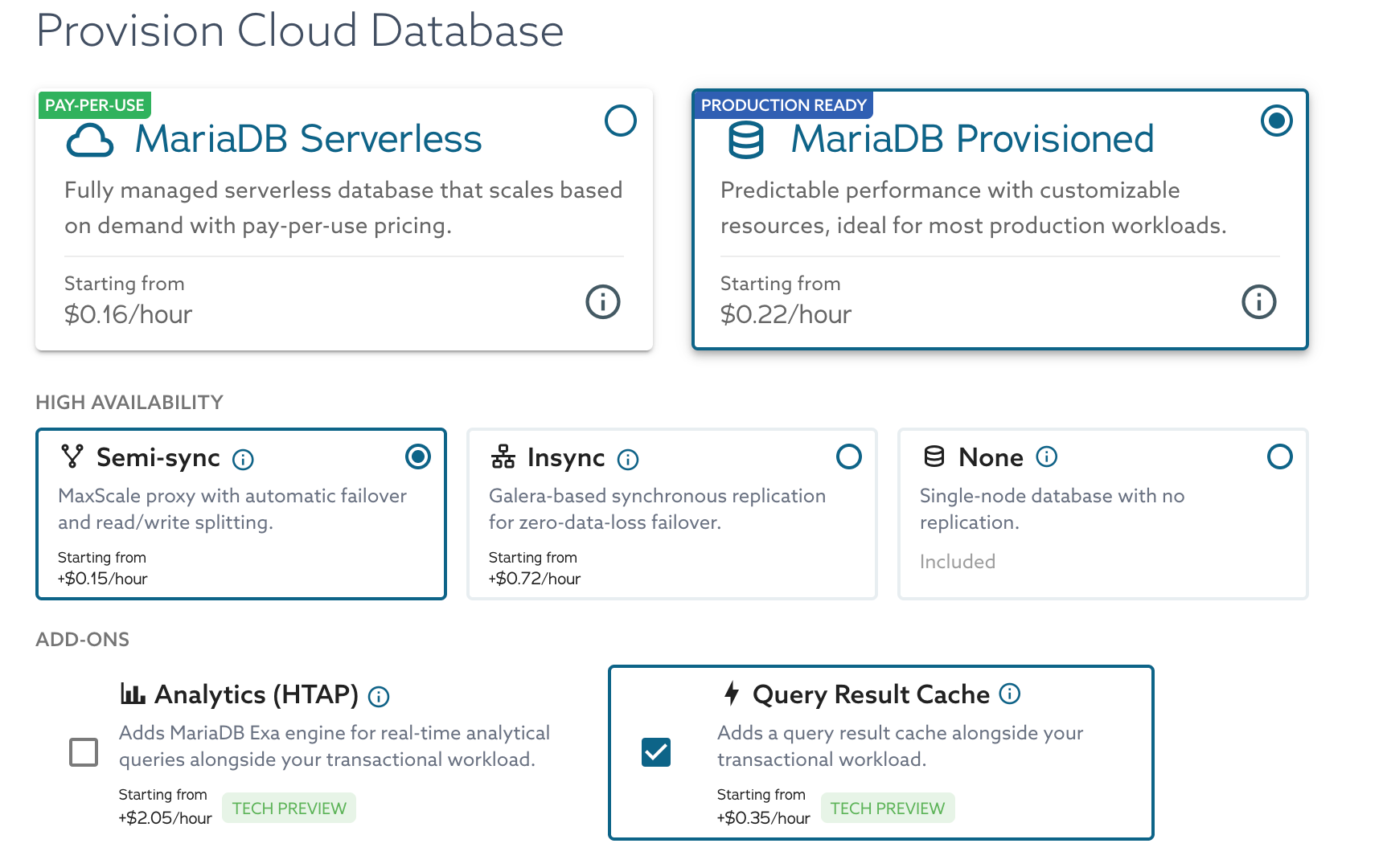 *Launch - Enable Query Result Cache*
Enabling the add-on adds a **Cache Node Size** picker beside the server's **Node Size**. The two catalogs are separate: here a `Sky-2x4` server defaults to a `Sky-4x16` cache.
*Launch - Enable Query Result Cache*
Enabling the add-on adds a **Cache Node Size** picker beside the server's **Node Size**. The two catalogs are separate: here a `Sky-2x4` server defaults to a `Sky-4x16` cache.
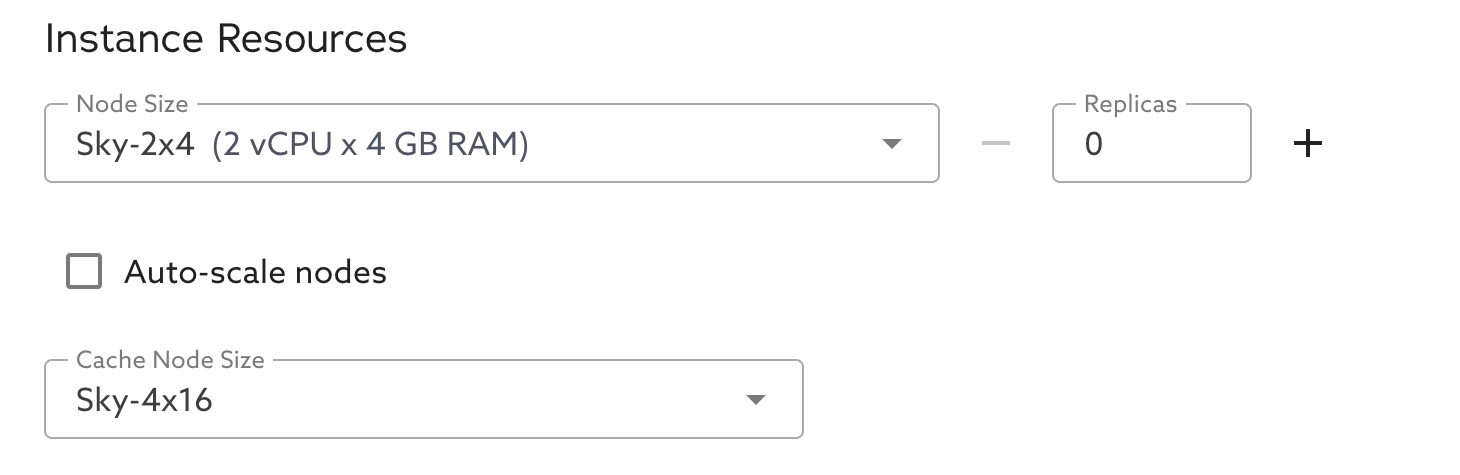 *Launch - Cache Node Size*
**Advanced Options** carries the cache's **TTL** and **Minimum Query Duration**, and states the rules a new service launches with.
*Launch - Cache Node Size*
**Advanced Options** carries the cache's **TTL** and **Minimum Query Duration**, and states the rules a new service launches with.
 *Launch - TTL and Minimum Query Duration*
### Via MariaDB Cloud REST API
For **API keys**, client IP **allow list**, checking service **`ready`** status, and fetching **credentials**, follow [Launch DB using the REST API](/docs/mariadb-cloud/quickstart/launch-db-using-the-rest-api.md). The [MariaDB Cloud REST API reference](/docs/mariadb-cloud/reference/rest-api-reference.md) and [API docs](https://apidocs.skysql.com/) cover the full request model.
**Query Result Cache fields** — On `POST /provisioning/v1/services`, set **`"cache_backend": "QueryResultCache"`** to provision the cache on top of the replicated **es-replica** (Semi-Sync HA) topology. Use **`amd64`** for `architecture` and a supported cache size, consistent with the portal. Optionally set `queryresultcache_size`, `queryresultcache_replicas`, `queryresultcache_mxs_hard_ttl`, `queryresultcache_mxs_min_query_duration`, and `queryresultcache_rules` (see [Configuration Reference](#configuration-reference)).
Example (adjust `tier`, `region`, `availability_zone`, `size`, `version`, and add **`allow_list`** or other required keys per the launch guide):
```bash
curl --location 'https://api.skysql.com/provisioning/v1/services' \
--header 'Content-Type: application/json' \
--header "X-API-Key: ${API_KEY}" \
--data '{
"tier": "power",
"service_type": "transactional",
"topology": "es-replica",
"provider": "aws",
"region": "us-east-2",
"availability_zone": "us-east-2b",
"name": "query-result-cache-test",
"nodes": 1,
"size": "sky-4x32",
"architecture": "amd64",
"storage": 100,
"version": "11.4.10-7.1-standard",
"ssl_enabled": true,
"cache_backend": "QueryResultCache",
"queryresultcache_size": "sky-4x32",
"queryresultcache_replicas": 1
}'
```
**Discover available cache sizes** — list the valid `queryresultcache_size` values for a provider and topology:
```bash
curl --location \
'https://api.skysql.com/provisioning/v1/sizes?type=queryresultcache&provider=aws&topology=es-replica' \
--header "X-API-Key: ${API_KEY}" | jq
```
**Add, modify, or remove the cache on an existing service** — use the `queryresultcache` sub-resource. Each call returns `202 Accepted`; the service moves to `pending_modifying` (or `pending_scale` when you resize an existing cache), then back to `ready`. The service must be `ready` before you call it.
{% tabs %}
{% tab title="Add cache" %}
```bash
# If queryresultcache_size is omitted, it defaults from the server size.
curl --location --request PATCH \
"https://api.skysql.com/provisioning/v1/services/${SERVICE_ID}/queryresultcache" \
--header 'Content-Type: application/json' --header "X-API-Key: ${API_KEY}" \
--data '{"queryresultcache_size": "sky-4x32"}'
```
{% endtab %}
{% tab title="Change TTL" %}
```bash
curl --location --request PATCH \
"https://api.skysql.com/provisioning/v1/services/${SERVICE_ID}/queryresultcache" \
--header 'Content-Type: application/json' --header "X-API-Key: ${API_KEY}" \
--data '{"queryresultcache_mxs_hard_ttl": 300}'
```
{% endtab %}
{% tab title="Resize" %}
```bash
curl --location --request PATCH \
"https://api.skysql.com/provisioning/v1/services/${SERVICE_ID}/queryresultcache" \
--header 'Content-Type: application/json' --header "X-API-Key: ${API_KEY}" \
--data '{"queryresultcache_size": "sky-8x64"}'
```
{% endtab %}
{% tab title="Remove" %}
```bash
# MariaDB and MaxScale keep running normally.
curl --location --request DELETE \
"https://api.skysql.com/provisioning/v1/services/${SERVICE_ID}/queryresultcache" \
--header "X-API-Key: ${API_KEY}"
```
{% endtab %}
{% endtabs %}
Omitting a field on `PATCH` keeps its stored value.
## Managing the Cache
Manage the cache from the service's **MANAGE** menu → **Manage Query Result Cache**. The dialog has two tabs.
On **Capacity & tuning**:
* **Enable or disable** the cache with the **Enable Query Result Cache** checkbox.
* **Change the TTL** in **TTL**, from 5 to 600 seconds (default 120).
* **Change the Minimum Query Duration**, from 1 to 60000 milliseconds (default 100). Queries that finish faster than this are not cached.
* **Resize the cache node** by selecting a size from **Sky-4x16** up to **Sky-16x128** to scale up or down.
On **Caching rules**, edit the rules that decide which queries are cached and who may read cached entries. See [Caching Rules](#caching-rules) below. The cache must already be enabled before you can set rules.
*Launch - TTL and Minimum Query Duration*
### Via MariaDB Cloud REST API
For **API keys**, client IP **allow list**, checking service **`ready`** status, and fetching **credentials**, follow [Launch DB using the REST API](/docs/mariadb-cloud/quickstart/launch-db-using-the-rest-api.md). The [MariaDB Cloud REST API reference](/docs/mariadb-cloud/reference/rest-api-reference.md) and [API docs](https://apidocs.skysql.com/) cover the full request model.
**Query Result Cache fields** — On `POST /provisioning/v1/services`, set **`"cache_backend": "QueryResultCache"`** to provision the cache on top of the replicated **es-replica** (Semi-Sync HA) topology. Use **`amd64`** for `architecture` and a supported cache size, consistent with the portal. Optionally set `queryresultcache_size`, `queryresultcache_replicas`, `queryresultcache_mxs_hard_ttl`, `queryresultcache_mxs_min_query_duration`, and `queryresultcache_rules` (see [Configuration Reference](#configuration-reference)).
Example (adjust `tier`, `region`, `availability_zone`, `size`, `version`, and add **`allow_list`** or other required keys per the launch guide):
```bash
curl --location 'https://api.skysql.com/provisioning/v1/services' \
--header 'Content-Type: application/json' \
--header "X-API-Key: ${API_KEY}" \
--data '{
"tier": "power",
"service_type": "transactional",
"topology": "es-replica",
"provider": "aws",
"region": "us-east-2",
"availability_zone": "us-east-2b",
"name": "query-result-cache-test",
"nodes": 1,
"size": "sky-4x32",
"architecture": "amd64",
"storage": 100,
"version": "11.4.10-7.1-standard",
"ssl_enabled": true,
"cache_backend": "QueryResultCache",
"queryresultcache_size": "sky-4x32",
"queryresultcache_replicas": 1
}'
```
**Discover available cache sizes** — list the valid `queryresultcache_size` values for a provider and topology:
```bash
curl --location \
'https://api.skysql.com/provisioning/v1/sizes?type=queryresultcache&provider=aws&topology=es-replica' \
--header "X-API-Key: ${API_KEY}" | jq
```
**Add, modify, or remove the cache on an existing service** — use the `queryresultcache` sub-resource. Each call returns `202 Accepted`; the service moves to `pending_modifying` (or `pending_scale` when you resize an existing cache), then back to `ready`. The service must be `ready` before you call it.
{% tabs %}
{% tab title="Add cache" %}
```bash
# If queryresultcache_size is omitted, it defaults from the server size.
curl --location --request PATCH \
"https://api.skysql.com/provisioning/v1/services/${SERVICE_ID}/queryresultcache" \
--header 'Content-Type: application/json' --header "X-API-Key: ${API_KEY}" \
--data '{"queryresultcache_size": "sky-4x32"}'
```
{% endtab %}
{% tab title="Change TTL" %}
```bash
curl --location --request PATCH \
"https://api.skysql.com/provisioning/v1/services/${SERVICE_ID}/queryresultcache" \
--header 'Content-Type: application/json' --header "X-API-Key: ${API_KEY}" \
--data '{"queryresultcache_mxs_hard_ttl": 300}'
```
{% endtab %}
{% tab title="Resize" %}
```bash
curl --location --request PATCH \
"https://api.skysql.com/provisioning/v1/services/${SERVICE_ID}/queryresultcache" \
--header 'Content-Type: application/json' --header "X-API-Key: ${API_KEY}" \
--data '{"queryresultcache_size": "sky-8x64"}'
```
{% endtab %}
{% tab title="Remove" %}
```bash
# MariaDB and MaxScale keep running normally.
curl --location --request DELETE \
"https://api.skysql.com/provisioning/v1/services/${SERVICE_ID}/queryresultcache" \
--header "X-API-Key: ${API_KEY}"
```
{% endtab %}
{% endtabs %}
Omitting a field on `PATCH` keeps its stored value.
## Managing the Cache
Manage the cache from the service's **MANAGE** menu → **Manage Query Result Cache**. The dialog has two tabs.
On **Capacity & tuning**:
* **Enable or disable** the cache with the **Enable Query Result Cache** checkbox.
* **Change the TTL** in **TTL**, from 5 to 600 seconds (default 120).
* **Change the Minimum Query Duration**, from 1 to 60000 milliseconds (default 100). Queries that finish faster than this are not cached.
* **Resize the cache node** by selecting a size from **Sky-4x16** up to **Sky-16x128** to scale up or down.
On **Caching rules**, edit the rules that decide which queries are cached and who may read cached entries. See [Caching Rules](#caching-rules) below. The cache must already be enabled before you can set rules.
 *Manage Query Result Cache*
The same operations are available through the REST API. See [Via MariaDB Cloud REST API](#via-mariadb-cloud-rest-api) above.
## Caching Rules
`queryresultcache_rules` is a JSON document that decides **which** queries are stored in the cache and **which users** may read cached entries.
Every new service starts with the **volatile-result exclusion** shown in [Rule Examples](#rule-examples) already applied. There is no rules editor at launch, so it is applied for you, and it is the default option in the guided editor afterwards.
{% hint style="warning" %}
**Rules are the only thing that excludes a query on the basis of what it does.** The cache does not inspect a query to judge whether its result is safe to reuse.
That is what the default is protecting you from. Without it, a query calling `NOW()`, `RAND()`, or `UUID()`, a query reading a session variable, and a locking read would all have their results cached like any other, and every identical query would be served that same value until the hard TTL expired. Keep the default entry in place unless you have a specific reason not to.
{% endhint %}
Rules do not replace the other limits. A result is stored only when **all** of these pass:
1. **Store rules** (`store[]`) allow it — an empty document allows everything.
2. **Use rules** (`use[]`) allow the requesting user to read cached entries — empty means all users.
3. The backend query took at least `queryresultcache_mxs_min_query_duration` (default 100 ms).
4. The result is at or below the 1 MB per-entry limit.
5. The query is not running inside a transaction. Queries in transactions are never cached.
6. The cached entry has not passed its hard TTL.
### Setting Rules in the Portal
Open **Manage** → **Query Result Cache** → **Caching rules**. The editor has two modes, and a tester alongside them.
**Guided** mode covers the common cases without writing JSON. Under **What gets stored in the cache**, choose one of:
* **Everything except queries whose results go stale immediately** — the default. Skips volatile functions, session variables, locking reads, and cache-defeating hints, using the single fixed pattern shown in [Rule Examples](#rule-examples).
* **Everything** — no query filtering. The minimum query duration and the TTL still decide what actually gets stored.
* **Only queries matching a pattern I give** — one pattern matched against the raw SQL text, as **Starts with**, **Contains**, or **Matches regex (RE2)**.
Under **Who can read from the cache**, list the database users allowed to read cached entries. Leave it empty to let every user read from the cache.
**Raw JSON** mode takes the full rules document described below. Guided mode is a deliberate subset, so the editor switches you to Raw JSON when a saved document is more specific than guided mode can represent — several rule sets, more than one `store` rule, an attribute or pattern guided mode cannot show, or `use` rules beyond a plain list of users.
Both modes show the **Resulting rules** — exactly what gets sent when you save — and flag rules that will not do what they appear to do. **Test a query** checks the rules currently in the editor, not the ones already saved.
*Manage Query Result Cache*
The same operations are available through the REST API. See [Via MariaDB Cloud REST API](#via-mariadb-cloud-rest-api) above.
## Caching Rules
`queryresultcache_rules` is a JSON document that decides **which** queries are stored in the cache and **which users** may read cached entries.
Every new service starts with the **volatile-result exclusion** shown in [Rule Examples](#rule-examples) already applied. There is no rules editor at launch, so it is applied for you, and it is the default option in the guided editor afterwards.
{% hint style="warning" %}
**Rules are the only thing that excludes a query on the basis of what it does.** The cache does not inspect a query to judge whether its result is safe to reuse.
That is what the default is protecting you from. Without it, a query calling `NOW()`, `RAND()`, or `UUID()`, a query reading a session variable, and a locking read would all have their results cached like any other, and every identical query would be served that same value until the hard TTL expired. Keep the default entry in place unless you have a specific reason not to.
{% endhint %}
Rules do not replace the other limits. A result is stored only when **all** of these pass:
1. **Store rules** (`store[]`) allow it — an empty document allows everything.
2. **Use rules** (`use[]`) allow the requesting user to read cached entries — empty means all users.
3. The backend query took at least `queryresultcache_mxs_min_query_duration` (default 100 ms).
4. The result is at or below the 1 MB per-entry limit.
5. The query is not running inside a transaction. Queries in transactions are never cached.
6. The cached entry has not passed its hard TTL.
### Setting Rules in the Portal
Open **Manage** → **Query Result Cache** → **Caching rules**. The editor has two modes, and a tester alongside them.
**Guided** mode covers the common cases without writing JSON. Under **What gets stored in the cache**, choose one of:
* **Everything except queries whose results go stale immediately** — the default. Skips volatile functions, session variables, locking reads, and cache-defeating hints, using the single fixed pattern shown in [Rule Examples](#rule-examples).
* **Everything** — no query filtering. The minimum query duration and the TTL still decide what actually gets stored.
* **Only queries matching a pattern I give** — one pattern matched against the raw SQL text, as **Starts with**, **Contains**, or **Matches regex (RE2)**.
Under **Who can read from the cache**, list the database users allowed to read cached entries. Leave it empty to let every user read from the cache.
**Raw JSON** mode takes the full rules document described below. Guided mode is a deliberate subset, so the editor switches you to Raw JSON when a saved document is more specific than guided mode can represent — several rule sets, more than one `store` rule, an attribute or pattern guided mode cannot show, or `use` rules beyond a plain list of users.
Both modes show the **Resulting rules** — exactly what gets sent when you save — and flag rules that will not do what they appear to do. **Test a query** checks the rules currently in the editor, not the ones already saved.
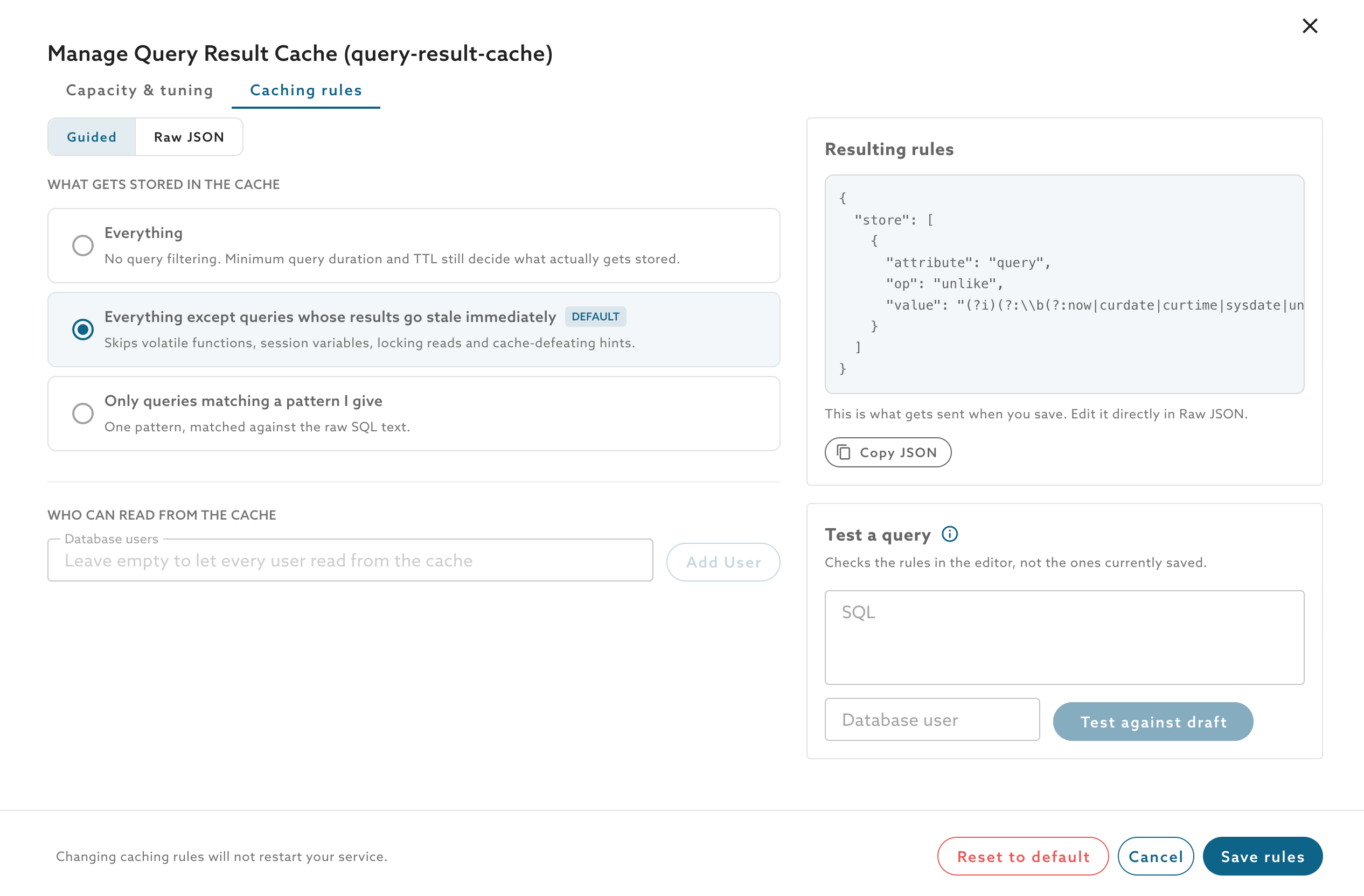 *Manage - Caching rules, Guided*
**Raw JSON** validates as you type and reports `Valid`, `Valid, with notes`, or `Not valid`, and **Load example** inserts a starting document.
*Manage - Caching rules, Guided*
**Raw JSON** validates as you type and reports `Valid`, `Valid, with notes`, or `Not valid`, and **Load example** inserts a starting document.
 *Manage - Caching rules, Raw JSON*
{% hint style="info" %}
Saving rules does not restart your service, and the cache is not emptied — MaxScale rereads the rules in place. Allow a few minutes for new rules to take effect.
**Reset to default** restores the volatile-result exclusion a new service starts with, replacing any rules you have saved. It does not disable the cache or remove any nodes.
{% endhint %}
### What the Default Excludes
The document a portal-launched service starts with excludes one class of `SELECT`: statements whose result cannot be reproduced from the SQL text alone, and statements whose execution has a side effect that serving from cache would skip. Everything else is cached.
| Category | Why it cannot be cached | Examples |
| ----------------------- | ---------------------------------------------------------------- | ----------------------------------------------- |
| Time | The result changes within the TTL window | `NOW`, `CURDATE`, `UTC_TIMESTAMP` |
| Session identity | Differs per connection, and the cache is shared between sessions | `USER`, `DATABASE`, `CURRENT_ROLE` |
| Connection state | Depends on what that connection did previously | `FOUND_ROWS`, `ROW_COUNT`, `LAST_INSERT_ID` |
| Randomness | The result is not reproducible | `RAND`, `UUID`, `RANDOM_BYTES` |
| Variables | Session or global state, not a function of the query text | `@var`, `@@var` |
| Locking reads | Serving from cache acquires no lock | `FOR UPDATE`, `LOCK IN SHARE MODE` |
| Side effects | Serving from cache skips the effect | `GET_LOCK`, `NEXTVAL`, `SETVAL`, `INTO OUTFILE` |
| Server-state waits | The result depends on replication state at execution time | `MASTER_POS_WAIT`, `MASTER_GTID_WAIT` |
| Explicit client opt-out | The client asked for no caching | `SQL_NO_CACHE` |
`SQL_CALC_FOUND_ROWS` is excluded too, because a cache hit would leave a following `FOUND_ROWS()` reporting a stale count.
### How Matching Works
A rule is a regular expression over the **raw SQL text**. It is not a parse of the statement, which has consequences worth knowing:
* **String literals and comments count.** `SELECT * FROM t WHERE note = 'for update'` is not cached, because the text contains `for update`.
* **Indirection is invisible.** A view or stored function whose body calls `NOW()` is not detected, because `NOW()` never appears in the statement you submit.
The exclusions are deliberately biased toward caching less: a rule that matches when it need not have only costs you a cache hit, whereas one that fails to match could serve a stale or cross-session result.
### Rule Grammar
The document is a single JSON object, or a non-empty array of objects, up to 64 KiB. The only allowed keys are `store` and `use`. Each entry is `{"attribute": "…", "op": "…", "value": "…"}`, with all three required and no extra keys.
| Section | Allowed `attribute` | Allowed `op` |
| ------- | -------------------------------------- | --------------------------- |
| `store` | `query`, `database`, `table`, `column` | `=`, `!=`, `like`, `unlike` |
| `use` | `user` | `=`, `!=`, `like`, `unlike` |
For the exact-match operators `=` and `!=`, a `database` value must not contain a dot, a `table` value may contain at most one, and a `column` value at most two.
{% hint style="danger" %}
**Saving rules replaces the whole document — it does not add to it.**
Because `store[]` is first-match-wins OR, a statement is cached if **any** store entry matches. So submitting one new entry on its own does not sit on top of the exclusions a portal-launched service starts with; it replaces them, and can re-admit the very queries they were keeping out.
To keep the default protection while adding a rule of your own, carry the default entry forward into the document you submit alongside your new entry. Never submit the new entry by itself.
{% endhint %}
{% hint style="warning" %}
**`store[]` is first-match-wins OR, not AND.** Each store entry you add **widens** what gets cached. There is no way to require that several conditions all hold.
**`like` and `unlike` values are regular expressions, and some syntax is rejected.** Lookahead, lookbehind, backreferences, and atomic groups fail validation, so you cannot express a conjunction with a lookahead.
**Start your own patterns with `(?i)`.** Matching is case-sensitive otherwise.
**Caching rules are not a reliable way to exclude a table.** `table`, `column`, and `database` matchers test existence, not universality, so a `JOIN` that mentions a listed table can still be cached even when another table in the same `JOIN` was meant to be excluded.
{% endhint %}
{% hint style="info" %}
Do not write a "`SELECT`s only" rule such as `^SELECT`. It also drops cacheable `SELECT` statements that begin with a comment or a common table expression.
{% endhint %}
### Rule Examples
{% tabs %}
{% tab title="Exclude volatile results (portal default)" %}
This is the document the portal sends for a new service, and what **Everything except queries whose results go stale immediately** produces in the guided editor. Send it yourself when you create a service through the API or Terraform.
```json
{
"store": [
{
"attribute": "query",
"op": "unlike",
"value": "(?i)(?:\\b(?:now|curdate|curtime|sysdate|unix_timestamp|convert_tz|session_user|system_user|user|database|schema|connection_id|found_rows|row_count|last_insert_id|nextval|lastval|setval|rand|random_bytes|uuid_short|uuid_v[0-9]|uuid|sys_guid|get_lock|release_all_locks|release_lock|is_free_lock|is_used_lock|master_pos_wait|master_gtid_wait|sleep|benchmark|load_file|encrypt)\\s*\\(|\\b(?:current_timestamp|current_date|current_time|current_user|current_role|localtimestamp|localtime|utc_timestamp|utc_date|utc_time)\\b|@@[a-z_]|[^\\w@$.'\"`%]@[a-z_$]|\\bfor\\s+update\\b|\\block\\s+in\\s+share\\s+mode\\b|\\binto\\s+(?:outfile|dumpfile)\\b|\\bsql_calc_found_rows\\b|\\bsql_no_cache\\b)"
}
]
}
```
It excludes the functions MaxScale treats as non-cacheable, the bare date and user keywords, system (`@@`) and user (`@`) variables, `FOR UPDATE` and `LOCK IN SHARE MODE`, `INTO OUTFILE` and `INTO DUMPFILE`, and the `SQL_CALC_FOUND_ROWS` and `SQL_NO_CACHE` hints.
{% endtab %}
{% tab title="No rules" %}
```json
{}
```
Excludes nothing, so volatile results are cached too — see the warning above. This is not the default; it is what you get only by deliberately clearing the rules.
{% endtab %}
{% tab title="Restrict readers" %}
```json
{
"use": [
{ "attribute": "user", "op": "=", "value": "app_user" }
]
}
```
{% endtab %}
{% endtabs %}
### Applying Rules
Update rules with a `PATCH` to the `queryresultcache` sub-resource:
```bash
curl --location --request PATCH \
"https://api.skysql.com/provisioning/v1/services/${SERVICE_ID}/queryresultcache" \
--header 'Content-Type: application/json' --header "X-API-Key: ${API_KEY}" \
--data '{"queryresultcache_rules":{"store":[{"attribute":"query","op":"unlike","value":"(?i)\\b(now|rand|uuid)\\b"}]}}'
```
A rules-only change does not restart MaxScale and does not empty the cache — MaxScale rereads the rules file in place. Allow up to about two minutes after the service returns to `ready` for new rules to take effect.
Changing the TTL or the minimum query duration **does** restart MaxScale, which leaves the cache cold until it refills.
### Validating and Testing Rules
Two endpoints check a rules document without saving anything:
{% tabs %}
{% tab title="Validate" %}
```bash
curl --location --request POST \
'https://api.skysql.com/provisioning/v1/queryresultcache/rules/validate' \
--header 'Content-Type: application/json' --header "X-API-Key: ${API_KEY}" \
--data '{"queryresultcache_rules":{"store":[{"attribute":"query","op":"unlike","value":"(?i)\\b(now|rand)\\b"}]}}'
```
Returns `valid` and any `warnings` — for example, when the document holds ten or more `store` and `use` entries combined.
{% endtab %}
{% tab title="Test a query" %}
```bash
curl --location --request POST \
'https://api.skysql.com/provisioning/v1/queryresultcache/rules/test' \
--header 'Content-Type: application/json' --header "X-API-Key: ${API_KEY}" \
--data '{"queryresultcache_rules":{"store":[{"attribute":"query","op":"unlike","value":"(?i)\\b(now|rand)\\b"}]},"query":"SELECT 1 FROM orders"}'
```
Returns `would_store`, plus `matched_rule` when a `store` entry decided it.
{% endtab %}
{% endtabs %}
The tester evaluates `store` rules against the query text only. `would_store` is `null` when a `database`, `table`, or `column` rule would be needed to decide, because that needs the SQL to be parsed. When the document also has `use` rules, `unevaluated` includes `user` — the tester does not evaluate users, so cache reads may still be restricted in ways it does not show.
## Configuration Reference
| Field | Meaning | Values |
| ----------------------------------------- | -------------------------------------------------------------------------- | ------------------------------------------------------------------------- |
| `cache_backend` | Enables Query Result Cache | `QueryResultCache` |
| `queryresultcache_size` | Cache node size (its own catalog, `type=queryresultcache`) | `sky-4x16`, `sky-4x32`, `sky-8x32`, `sky-8x64`, `sky-16x64`, `sky-16x128` |
| `queryresultcache_replicas` | Number of cache nodes | Must be `1` (locked in Tech Preview) |
| `queryresultcache_mxs_hard_ttl` | Cache freshness bound, in seconds | 5–600, default 120 |
| `queryresultcache_mxs_min_query_duration` | Minimum backend execution time, in milliseconds, before a result is cached | 1–60000, default 100 |
| `queryresultcache_rules` | Caching rules document. Defaults to the volatile-result exclusion | Object or array of objects, up to 64 KiB |
A `GET` on the service also returns two read-only fields: `queryresultcache_available`, which reports whether the cache can be newly enabled on that service, and `queryresultcache_unavailable_reason`, which explains why it cannot. A service that already has the cache enabled stays available even if its MaxScale is older than 25.10.3.
### Cache Sizes
Cache sizes are **not** server sizes. For example, `sky-2x8` is a valid server size but not a valid `queryresultcache_size`. When you add the cache without specifying a size, it defaults from the server size:
| MariaDB server size | Default cache size |
| ------------------------------ | ------------------ |
| Up to and including `sky-8x64` | `sky-4x16` |
| `sky-16x64` to `sky-32x256` | `sky-8x32` |
| Larger | `sky-16x64` |
You can still choose any size from the cache catalog.
### Common API Errors
| Case | Response |
| ------------------------------------------------------------- | ------------------------------------------------------------------------------- |
| Modify or remove while the service is not `ready` | `409 Conflict` |
| Empty request body / no effective change | `400` "query result cache configuration is unchanged" |
| `queryresultcache_replicas` other than `1` | `400` "queryresultcache\_replicas must be 1" |
| Invalid `queryresultcache_size` (including server-size names) | `400` "invalid queryresultcache\_size" |
| TTL out of range | `400` "queryresultcache\_mxs\_hard\_ttl must be between 5 and 600" |
| Minimum query duration out of range | `400` "queryresultcache\_mxs\_min\_query\_duration must be between 1 and 60000" |
| Invalid rules document | `400` "queryresultcache\_rules is invalid" |
| MaxScale older than 25.10.3 when enabling | `400` "query result cache requires MaxScale 25.10.3 or later" |
| Architecture other than `amd64` | `400` "query result cache is not supported for the requested architecture" |
| Trial account | `400` "query result cache is not available on trial accounts" |
| Remove when the cache is not enabled | `409` "query result cache is not enabled on this service" |
## Observability
When the cache is enabled, the service's **Monitoring** view gains a **Query Result Cache** dashboard (select it in the top-right of the Monitoring tab). It shows the health of the cache over the selected time interval:
*Manage - Caching rules, Raw JSON*
{% hint style="info" %}
Saving rules does not restart your service, and the cache is not emptied — MaxScale rereads the rules in place. Allow a few minutes for new rules to take effect.
**Reset to default** restores the volatile-result exclusion a new service starts with, replacing any rules you have saved. It does not disable the cache or remove any nodes.
{% endhint %}
### What the Default Excludes
The document a portal-launched service starts with excludes one class of `SELECT`: statements whose result cannot be reproduced from the SQL text alone, and statements whose execution has a side effect that serving from cache would skip. Everything else is cached.
| Category | Why it cannot be cached | Examples |
| ----------------------- | ---------------------------------------------------------------- | ----------------------------------------------- |
| Time | The result changes within the TTL window | `NOW`, `CURDATE`, `UTC_TIMESTAMP` |
| Session identity | Differs per connection, and the cache is shared between sessions | `USER`, `DATABASE`, `CURRENT_ROLE` |
| Connection state | Depends on what that connection did previously | `FOUND_ROWS`, `ROW_COUNT`, `LAST_INSERT_ID` |
| Randomness | The result is not reproducible | `RAND`, `UUID`, `RANDOM_BYTES` |
| Variables | Session or global state, not a function of the query text | `@var`, `@@var` |
| Locking reads | Serving from cache acquires no lock | `FOR UPDATE`, `LOCK IN SHARE MODE` |
| Side effects | Serving from cache skips the effect | `GET_LOCK`, `NEXTVAL`, `SETVAL`, `INTO OUTFILE` |
| Server-state waits | The result depends on replication state at execution time | `MASTER_POS_WAIT`, `MASTER_GTID_WAIT` |
| Explicit client opt-out | The client asked for no caching | `SQL_NO_CACHE` |
`SQL_CALC_FOUND_ROWS` is excluded too, because a cache hit would leave a following `FOUND_ROWS()` reporting a stale count.
### How Matching Works
A rule is a regular expression over the **raw SQL text**. It is not a parse of the statement, which has consequences worth knowing:
* **String literals and comments count.** `SELECT * FROM t WHERE note = 'for update'` is not cached, because the text contains `for update`.
* **Indirection is invisible.** A view or stored function whose body calls `NOW()` is not detected, because `NOW()` never appears in the statement you submit.
The exclusions are deliberately biased toward caching less: a rule that matches when it need not have only costs you a cache hit, whereas one that fails to match could serve a stale or cross-session result.
### Rule Grammar
The document is a single JSON object, or a non-empty array of objects, up to 64 KiB. The only allowed keys are `store` and `use`. Each entry is `{"attribute": "…", "op": "…", "value": "…"}`, with all three required and no extra keys.
| Section | Allowed `attribute` | Allowed `op` |
| ------- | -------------------------------------- | --------------------------- |
| `store` | `query`, `database`, `table`, `column` | `=`, `!=`, `like`, `unlike` |
| `use` | `user` | `=`, `!=`, `like`, `unlike` |
For the exact-match operators `=` and `!=`, a `database` value must not contain a dot, a `table` value may contain at most one, and a `column` value at most two.
{% hint style="danger" %}
**Saving rules replaces the whole document — it does not add to it.**
Because `store[]` is first-match-wins OR, a statement is cached if **any** store entry matches. So submitting one new entry on its own does not sit on top of the exclusions a portal-launched service starts with; it replaces them, and can re-admit the very queries they were keeping out.
To keep the default protection while adding a rule of your own, carry the default entry forward into the document you submit alongside your new entry. Never submit the new entry by itself.
{% endhint %}
{% hint style="warning" %}
**`store[]` is first-match-wins OR, not AND.** Each store entry you add **widens** what gets cached. There is no way to require that several conditions all hold.
**`like` and `unlike` values are regular expressions, and some syntax is rejected.** Lookahead, lookbehind, backreferences, and atomic groups fail validation, so you cannot express a conjunction with a lookahead.
**Start your own patterns with `(?i)`.** Matching is case-sensitive otherwise.
**Caching rules are not a reliable way to exclude a table.** `table`, `column`, and `database` matchers test existence, not universality, so a `JOIN` that mentions a listed table can still be cached even when another table in the same `JOIN` was meant to be excluded.
{% endhint %}
{% hint style="info" %}
Do not write a "`SELECT`s only" rule such as `^SELECT`. It also drops cacheable `SELECT` statements that begin with a comment or a common table expression.
{% endhint %}
### Rule Examples
{% tabs %}
{% tab title="Exclude volatile results (portal default)" %}
This is the document the portal sends for a new service, and what **Everything except queries whose results go stale immediately** produces in the guided editor. Send it yourself when you create a service through the API or Terraform.
```json
{
"store": [
{
"attribute": "query",
"op": "unlike",
"value": "(?i)(?:\\b(?:now|curdate|curtime|sysdate|unix_timestamp|convert_tz|session_user|system_user|user|database|schema|connection_id|found_rows|row_count|last_insert_id|nextval|lastval|setval|rand|random_bytes|uuid_short|uuid_v[0-9]|uuid|sys_guid|get_lock|release_all_locks|release_lock|is_free_lock|is_used_lock|master_pos_wait|master_gtid_wait|sleep|benchmark|load_file|encrypt)\\s*\\(|\\b(?:current_timestamp|current_date|current_time|current_user|current_role|localtimestamp|localtime|utc_timestamp|utc_date|utc_time)\\b|@@[a-z_]|[^\\w@$.'\"`%]@[a-z_$]|\\bfor\\s+update\\b|\\block\\s+in\\s+share\\s+mode\\b|\\binto\\s+(?:outfile|dumpfile)\\b|\\bsql_calc_found_rows\\b|\\bsql_no_cache\\b)"
}
]
}
```
It excludes the functions MaxScale treats as non-cacheable, the bare date and user keywords, system (`@@`) and user (`@`) variables, `FOR UPDATE` and `LOCK IN SHARE MODE`, `INTO OUTFILE` and `INTO DUMPFILE`, and the `SQL_CALC_FOUND_ROWS` and `SQL_NO_CACHE` hints.
{% endtab %}
{% tab title="No rules" %}
```json
{}
```
Excludes nothing, so volatile results are cached too — see the warning above. This is not the default; it is what you get only by deliberately clearing the rules.
{% endtab %}
{% tab title="Restrict readers" %}
```json
{
"use": [
{ "attribute": "user", "op": "=", "value": "app_user" }
]
}
```
{% endtab %}
{% endtabs %}
### Applying Rules
Update rules with a `PATCH` to the `queryresultcache` sub-resource:
```bash
curl --location --request PATCH \
"https://api.skysql.com/provisioning/v1/services/${SERVICE_ID}/queryresultcache" \
--header 'Content-Type: application/json' --header "X-API-Key: ${API_KEY}" \
--data '{"queryresultcache_rules":{"store":[{"attribute":"query","op":"unlike","value":"(?i)\\b(now|rand|uuid)\\b"}]}}'
```
A rules-only change does not restart MaxScale and does not empty the cache — MaxScale rereads the rules file in place. Allow up to about two minutes after the service returns to `ready` for new rules to take effect.
Changing the TTL or the minimum query duration **does** restart MaxScale, which leaves the cache cold until it refills.
### Validating and Testing Rules
Two endpoints check a rules document without saving anything:
{% tabs %}
{% tab title="Validate" %}
```bash
curl --location --request POST \
'https://api.skysql.com/provisioning/v1/queryresultcache/rules/validate' \
--header 'Content-Type: application/json' --header "X-API-Key: ${API_KEY}" \
--data '{"queryresultcache_rules":{"store":[{"attribute":"query","op":"unlike","value":"(?i)\\b(now|rand)\\b"}]}}'
```
Returns `valid` and any `warnings` — for example, when the document holds ten or more `store` and `use` entries combined.
{% endtab %}
{% tab title="Test a query" %}
```bash
curl --location --request POST \
'https://api.skysql.com/provisioning/v1/queryresultcache/rules/test' \
--header 'Content-Type: application/json' --header "X-API-Key: ${API_KEY}" \
--data '{"queryresultcache_rules":{"store":[{"attribute":"query","op":"unlike","value":"(?i)\\b(now|rand)\\b"}]},"query":"SELECT 1 FROM orders"}'
```
Returns `would_store`, plus `matched_rule` when a `store` entry decided it.
{% endtab %}
{% endtabs %}
The tester evaluates `store` rules against the query text only. `would_store` is `null` when a `database`, `table`, or `column` rule would be needed to decide, because that needs the SQL to be parsed. When the document also has `use` rules, `unevaluated` includes `user` — the tester does not evaluate users, so cache reads may still be restricted in ways it does not show.
## Configuration Reference
| Field | Meaning | Values |
| ----------------------------------------- | -------------------------------------------------------------------------- | ------------------------------------------------------------------------- |
| `cache_backend` | Enables Query Result Cache | `QueryResultCache` |
| `queryresultcache_size` | Cache node size (its own catalog, `type=queryresultcache`) | `sky-4x16`, `sky-4x32`, `sky-8x32`, `sky-8x64`, `sky-16x64`, `sky-16x128` |
| `queryresultcache_replicas` | Number of cache nodes | Must be `1` (locked in Tech Preview) |
| `queryresultcache_mxs_hard_ttl` | Cache freshness bound, in seconds | 5–600, default 120 |
| `queryresultcache_mxs_min_query_duration` | Minimum backend execution time, in milliseconds, before a result is cached | 1–60000, default 100 |
| `queryresultcache_rules` | Caching rules document. Defaults to the volatile-result exclusion | Object or array of objects, up to 64 KiB |
A `GET` on the service also returns two read-only fields: `queryresultcache_available`, which reports whether the cache can be newly enabled on that service, and `queryresultcache_unavailable_reason`, which explains why it cannot. A service that already has the cache enabled stays available even if its MaxScale is older than 25.10.3.
### Cache Sizes
Cache sizes are **not** server sizes. For example, `sky-2x8` is a valid server size but not a valid `queryresultcache_size`. When you add the cache without specifying a size, it defaults from the server size:
| MariaDB server size | Default cache size |
| ------------------------------ | ------------------ |
| Up to and including `sky-8x64` | `sky-4x16` |
| `sky-16x64` to `sky-32x256` | `sky-8x32` |
| Larger | `sky-16x64` |
You can still choose any size from the cache catalog.
### Common API Errors
| Case | Response |
| ------------------------------------------------------------- | ------------------------------------------------------------------------------- |
| Modify or remove while the service is not `ready` | `409 Conflict` |
| Empty request body / no effective change | `400` "query result cache configuration is unchanged" |
| `queryresultcache_replicas` other than `1` | `400` "queryresultcache\_replicas must be 1" |
| Invalid `queryresultcache_size` (including server-size names) | `400` "invalid queryresultcache\_size" |
| TTL out of range | `400` "queryresultcache\_mxs\_hard\_ttl must be between 5 and 600" |
| Minimum query duration out of range | `400` "queryresultcache\_mxs\_min\_query\_duration must be between 1 and 60000" |
| Invalid rules document | `400` "queryresultcache\_rules is invalid" |
| MaxScale older than 25.10.3 when enabling | `400` "query result cache requires MaxScale 25.10.3 or later" |
| Architecture other than `amd64` | `400` "query result cache is not supported for the requested architecture" |
| Trial account | `400` "query result cache is not available on trial accounts" |
| Remove when the cache is not enabled | `409` "query result cache is not enabled on this service" |
## Observability
When the cache is enabled, the service's **Monitoring** view gains a **Query Result Cache** dashboard (select it in the top-right of the Monitoring tab). It shows the health of the cache over the selected time interval:
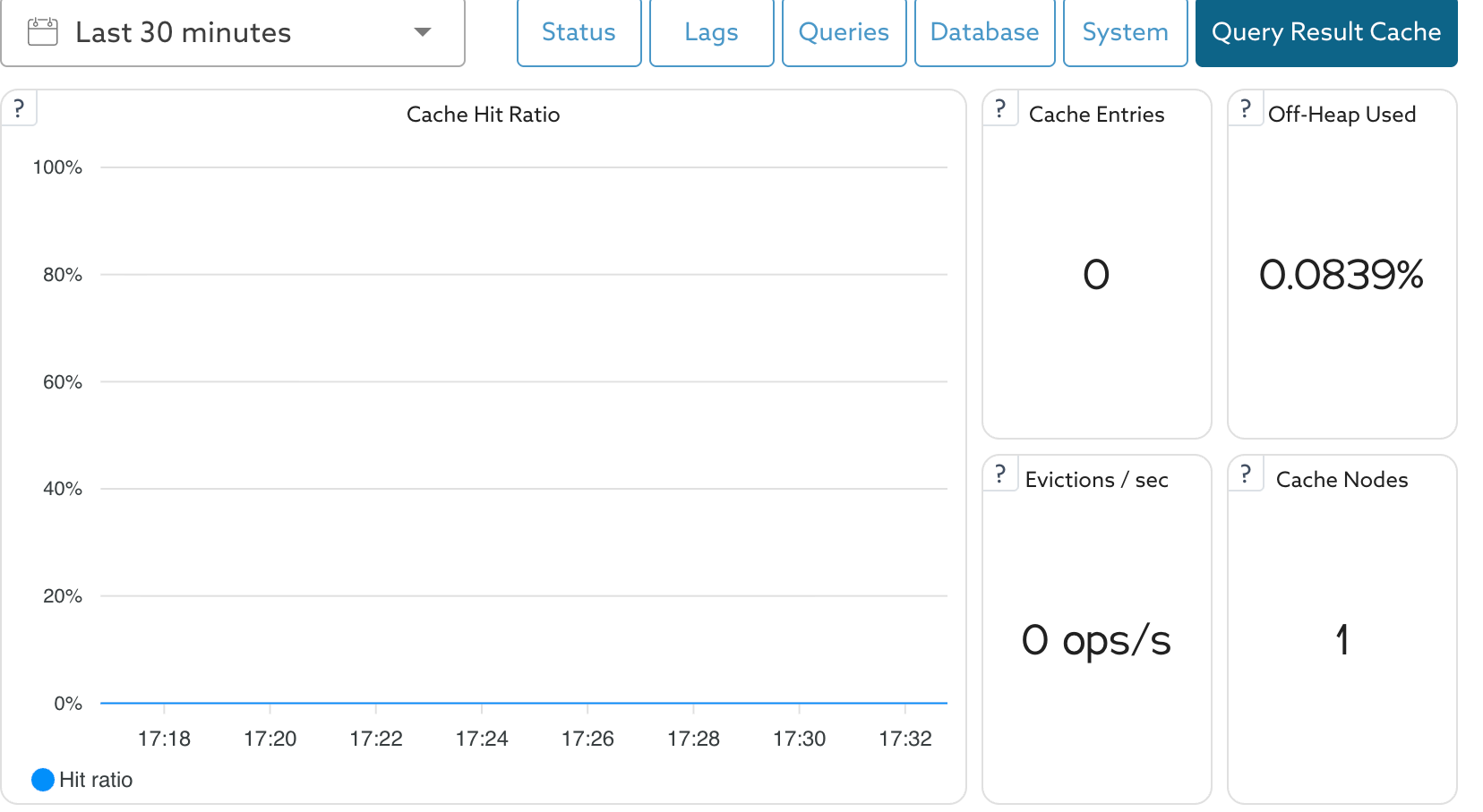 *Monitoring - Query Result Cache*
| Panel | What it shows |
| ------------------ | ---------------------------------------------------------------------------------------------------- |
| Cache Hit Ratio | Share of cache reads served from the cache; the main measure of cache effectiveness |
| Cache Entries | Number of entries currently held in the cache |
| Off-Heap Used | Share of the cache data region's off-heap memory allocated. Sustained values above 90% mean pressure |
| Evictions / sec | Rate of entries evicted. Sustained non-zero values mean the cache is over capacity |
| Cache Nodes | Number of cache nodes in the cluster topology. Below the expected count, a node has left |
| Cache Throughput | Cache gets, hits, and misses per second |
| Data Region Memory | Off-heap memory allocated for cached data against the data region's configured maximum |
These panels cover the whole service. Selecting the cache node in the list on the left shows the same panels for that node alone, with two differences: there is no **Cache Nodes** panel, and an **Eviction Rate** panel charts over time the same eviction metric that **Evictions / sec** reports as a single figure.
For the full list of panels, see [Service Monitoring Panels](/docs/mariadb-cloud/cloud-usage/service-monitoring-panels.md). The same metrics are also available through the [Observability](/docs/mariadb-cloud/cloud-management/observability.md) API.
{% hint style="info" %}
A low or zero hit rate usually means the TTL is too short for your workload, the minimum query duration is too high, the result sets are too large to cache, the queries run inside transactions, or your rules are too strict. A rising eviction rate, or Data Region Memory sitting near its maximum, means the cache is undersized for your hot dataset. Consider a larger `queryresultcache_size`.
{% endhint %}
## Known Issues and Limitations
The Tech Preview scopes Query Result Cache to the following:
* **Requires Semi-Sync HA.** The cache is not available on the Insync (Galera) or None HA options, or on Serverless.
* **Requires MaxScale 25.10.3 or later** to enable. Services that already have the cache are unaffected.
* **Freshness is TTL-bounded.** Cached results may be stale for up to the configured hard TTL because there is no per-write invalidation.
* **Large results are not cached.** Result sets larger than the per-entry limit (1 MB) are retrieved directly from MariaDB instead of being cached.
* **Queries in transactions are not cached.**
* **Single cache node.** `queryresultcache_replicas` is locked to 1. Cached data is not replicated. If the cache node becomes unavailable, requests are served from MariaDB until the cache is repopulated.
* **Single availability zone.** The cache runs in the same AZ as MaxScale; multi-AZ is planned for a later phase.
* **No persistence or backups** for the cache; it is in-memory only.
* **No autoscaling.** The initial release supports a single cache node only. The node can be vertically resized independently of the MariaDB Server.
* **Fixed memory layout.** The JVM heap and off-heap memory allocation are determined by the selected node size and cannot be customized.
* **No direct GridGain access.** GridGain is not exposed to customers. Direct access to GridGain features such as key-value operations, SQL, Compute, Transactions, or Data Streamer is not supported. The GridGain version is managed by the platform and is not user-configurable.
*This page is: Copyright © 2026 MariaDB. All rights reserved.*
*Monitoring - Query Result Cache*
| Panel | What it shows |
| ------------------ | ---------------------------------------------------------------------------------------------------- |
| Cache Hit Ratio | Share of cache reads served from the cache; the main measure of cache effectiveness |
| Cache Entries | Number of entries currently held in the cache |
| Off-Heap Used | Share of the cache data region's off-heap memory allocated. Sustained values above 90% mean pressure |
| Evictions / sec | Rate of entries evicted. Sustained non-zero values mean the cache is over capacity |
| Cache Nodes | Number of cache nodes in the cluster topology. Below the expected count, a node has left |
| Cache Throughput | Cache gets, hits, and misses per second |
| Data Region Memory | Off-heap memory allocated for cached data against the data region's configured maximum |
These panels cover the whole service. Selecting the cache node in the list on the left shows the same panels for that node alone, with two differences: there is no **Cache Nodes** panel, and an **Eviction Rate** panel charts over time the same eviction metric that **Evictions / sec** reports as a single figure.
For the full list of panels, see [Service Monitoring Panels](/docs/mariadb-cloud/cloud-usage/service-monitoring-panels.md). The same metrics are also available through the [Observability](/docs/mariadb-cloud/cloud-management/observability.md) API.
{% hint style="info" %}
A low or zero hit rate usually means the TTL is too short for your workload, the minimum query duration is too high, the result sets are too large to cache, the queries run inside transactions, or your rules are too strict. A rising eviction rate, or Data Region Memory sitting near its maximum, means the cache is undersized for your hot dataset. Consider a larger `queryresultcache_size`.
{% endhint %}
## Known Issues and Limitations
The Tech Preview scopes Query Result Cache to the following:
* **Requires Semi-Sync HA.** The cache is not available on the Insync (Galera) or None HA options, or on Serverless.
* **Requires MaxScale 25.10.3 or later** to enable. Services that already have the cache are unaffected.
* **Freshness is TTL-bounded.** Cached results may be stale for up to the configured hard TTL because there is no per-write invalidation.
* **Large results are not cached.** Result sets larger than the per-entry limit (1 MB) are retrieved directly from MariaDB instead of being cached.
* **Queries in transactions are not cached.**
* **Single cache node.** `queryresultcache_replicas` is locked to 1. Cached data is not replicated. If the cache node becomes unavailable, requests are served from MariaDB until the cache is repopulated.
* **Single availability zone.** The cache runs in the same AZ as MaxScale; multi-AZ is planned for a later phase.
* **No persistence or backups** for the cache; it is in-memory only.
* **No autoscaling.** The initial release supports a single cache node only. The node can be vertically resized independently of the MariaDB Server.
* **Fixed memory layout.** The JVM heap and off-heap memory allocation are determined by the selected node size and cannot be customized.
* **No direct GridGain access.** GridGain is not exposed to customers. Direct access to GridGain features such as key-value operations, SQL, Compute, Transactions, or Data Streamer is not supported. The GridGain version is managed by the platform and is not user-configurable.
*This page is: Copyright © 2026 MariaDB. All rights reserved.*