> For the complete documentation index, see [llms.txt](https://mariadb.com/docs/llms.txt). Markdown versions of documentation pages are available by appending `.md` to page URLs; this page is available as [Markdown](https://mariadb.com/docs/tools/enterprise/mariadb-enterprise-manager.md).
# MariaDB Enterprise Manager
Overview of MariaDB Enterprise Manager, a centralized observability and management solution offering topology-aware monitoring, visual schema management, and query editing via an integrated workspace.
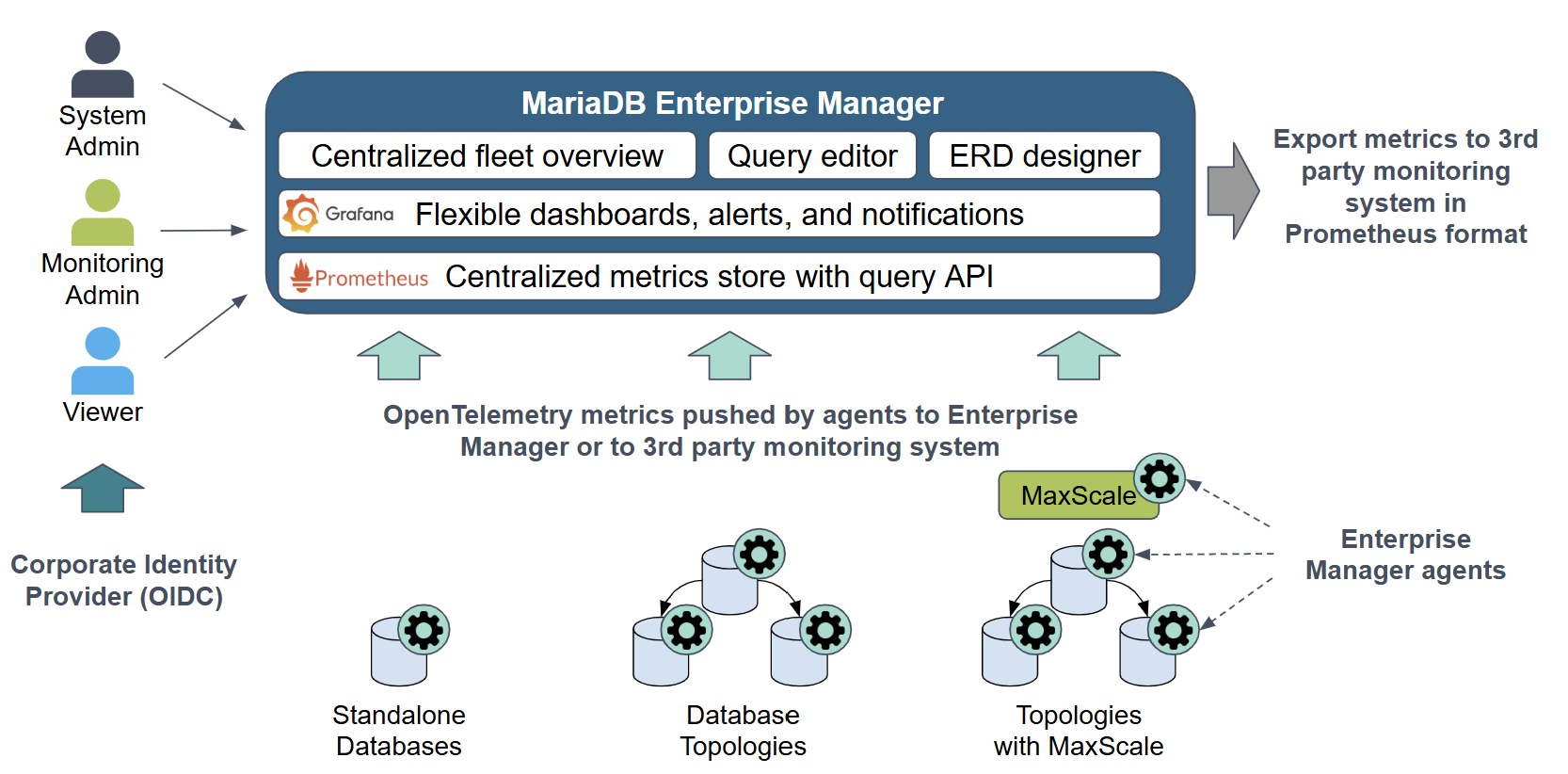
MariaDB Enterprise Manager is a comprehensive observability and management solution designed for your entire database fleet. It provides advanced, topology-aware monitoring and a powerful suite of visual tools for query development and schema management, all from a single, centralized interface.
At its core, Enterprise Manager uses lightweight agents to collect deep telemetry from your standalone databases, replicated topologies, and MaxScale clusters via the OpenTelemetry standard. This foundation powers the integrated **Grafana** dashboards, which come pre-packaged with production-ready visualizations and alerts. Beyond monitoring, the [**Workspace**](#workspace) provides a shared environment for developers and DBAs with an advanced **Query Editor** and a visual **ERD Designer**. The entire system is secured with role-based access control, audit logging, and can integrate with your corporate **identity provider (OIDC)** for single sign-on.
 ## Key Capabilities at a Glance
### **Advanced Monitoring**
Leverage the power of a built-in **Grafana** instance, complete with pre-packaged dashboards and production-ready alerts. The platform provides the flexibility to create custom [dashboards](/docs/tools/enterprise/mariadb-enterprise-manager/usage/monitoring/dashboards.md), define [unique alert rules](/docs/tools/enterprise/mariadb-enterprise-manager/usage/monitoring/alerts-and-notifications/built-in-alert-rules.md), and route notifications to a wide range of destinations.
### **Integration with Other Observability Solutions**
Built on open standards, Enterprise Manager uses **OpenTelemetry** for metrics collection. Its integrated **Prometheus** time-series database exposes a query API, allowing you to seamlessly export metrics and integrate with your existing observability stack.
### **Centralized Management**
Gain a topology-based, centralized view of your entire database fleet. Enterprise Manager **discovers and visualizes** your replication and clustering setups, providing the ability to drill down into a specific [**MaxScale UI** ](/docs/maxscale/maxscale-management/maxgui.md)through a seamless single sign-on (SSO) experience.
### **Workspace**
The Workspace provides a powerful suite of tools for developers and DBAs. It features a rich [**Query Editor**](/docs/tools/enterprise/mariadb-enterprise-manager/usage/workspace/query-editor.md) for running and debugging SQL and a visual [**ERD Designer**](/docs/tools/enterprise/mariadb-enterprise-manager/usage/workspace/erd-designer.md) for schema management and modeling across multiple database connections.
### **Enterprise Security**
Secure your management layer with robust security features. Authenticate users with your corporate [**identity provider (OIDC)**](/docs/tools/enterprise/mariadb-enterprise-manager/administration/user-management/configure-openid-connect-identity-provider.md), enforce granular permissions with [**role-based access control (RBAC)**](/docs/tools/enterprise/mariadb-enterprise-manager/administration/user-management.md), and maintain compliance with a comprehensive **audit log** for all administrative actions.
*This page is: Copyright © 2026 MariaDB. All rights reserved.*
{% @marketo/form formId="4316" %}
## Key Capabilities at a Glance
### **Advanced Monitoring**
Leverage the power of a built-in **Grafana** instance, complete with pre-packaged dashboards and production-ready alerts. The platform provides the flexibility to create custom [dashboards](/docs/tools/enterprise/mariadb-enterprise-manager/usage/monitoring/dashboards.md), define [unique alert rules](/docs/tools/enterprise/mariadb-enterprise-manager/usage/monitoring/alerts-and-notifications/built-in-alert-rules.md), and route notifications to a wide range of destinations.
### **Integration with Other Observability Solutions**
Built on open standards, Enterprise Manager uses **OpenTelemetry** for metrics collection. Its integrated **Prometheus** time-series database exposes a query API, allowing you to seamlessly export metrics and integrate with your existing observability stack.
### **Centralized Management**
Gain a topology-based, centralized view of your entire database fleet. Enterprise Manager **discovers and visualizes** your replication and clustering setups, providing the ability to drill down into a specific [**MaxScale UI** ](/docs/maxscale/maxscale-management/maxgui.md)through a seamless single sign-on (SSO) experience.
### **Workspace**
The Workspace provides a powerful suite of tools for developers and DBAs. It features a rich [**Query Editor**](/docs/tools/enterprise/mariadb-enterprise-manager/usage/workspace/query-editor.md) for running and debugging SQL and a visual [**ERD Designer**](/docs/tools/enterprise/mariadb-enterprise-manager/usage/workspace/erd-designer.md) for schema management and modeling across multiple database connections.
### **Enterprise Security**
Secure your management layer with robust security features. Authenticate users with your corporate [**identity provider (OIDC)**](/docs/tools/enterprise/mariadb-enterprise-manager/administration/user-management/configure-openid-connect-identity-provider.md), enforce granular permissions with [**role-based access control (RBAC)**](/docs/tools/enterprise/mariadb-enterprise-manager/administration/user-management.md), and maintain compliance with a comprehensive **audit log** for all administrative actions.
*This page is: Copyright © 2026 MariaDB. All rights reserved.*
{% @marketo/form formId="4316" %}