



Key takeaways
- Affordable Resilience: MariaDB Cloud replaces expensive, idle secondary data centers with “right-sized” disaster recovery instances that only scale up when an actual emergency occurs.
- Streamlined Setup: You can quickly build a global safety net by taking a simple snapshot of your production data and replicating it to a different region or cloud provider in just five steps.
- Automated Continuity: By using built-in monitoring and intelligent connectors, your applications can automatically switch to a backup site during an outage to prevent data loss and keep your business running.
Recent global events remind us of a difficult truth: infrastructure failures rarely happen at convenient times.
From geopolitical conflicts and natural disasters to even large-scale cloud service disruptions, modern applications must assume that something will eventually fail somewhere. When your database is the system of record for customer transactions, financial operations, or digital services, downtime isn’t just inconvenient, it’s existential.
Unfortunately, disaster recovery strategies offered by vendors including the hyperscalers are often difficult to implement and expensive to maintain. Secondary environments sit idle, replication takes complex configuration, and failover procedures require manual intervention.
This is where MariaDB Cloud changes the equation. Rather than treating disaster recovery as an afterthought, MariaDB Cloud provides a cloud-native architecture designed for resilience, allowing organizations to deploy and manage disaster recovery environments without the traditional complexity or cost.
In this blog we’ll cover:
- Why disaster recovery must be part of every modern database strategy
- How MariaDB Cloud improves database resilience
- A step-by-step guide to setting up a disaster recovery cluster in MariaDB Cloud
The New Reality: Disaster Recovery Is a Business Requirement
For many organizations, databases underpin revenue-generating applications, customer platforms, and operational systems. When outages occur, the impact is immediate:
- Customer transactions fail
- Data loss becomes a real possibility
- Brand reputation suffers
A robust disaster recovery strategy helps organizations ensure:
- Minimal downtime – Automated failover and replication ensure systems can recover quickly from failures.
- Data integrity – Frequent backups and replication reduce the risk of permanent data loss.
- Business continuity – Applications can continue running even during regional outages or infrastructure disruptions.
Traditional DR architectures require maintaining an entire secondary data center — a costly and operationally intensive approach. MariaDB Cloud provides a cloud-native alternative that is easier to deploy and significantly more cost efficient.
Why Choose MariaDB Cloud for Your Database Disaster Recovery
MariaDB Cloud introduces several architectural capabilities that simplify disaster recovery compared with traditional managed database services.
- Cost-Effective: Traditional approaches require maintaining a secondary environment that mirrors the full size of the production cluster. With MariaDB Cloud, DR cluster can run on a smaller instance size until the need arises.
- Auto-Scaling: In the event of a failure, MariaDB Cloud’s auto-scaling capabilities allow your DR instance to scale rapidly, ensuring minimal downtime and uninterrupted service for your applications.
- Multi-Cloud Recovery: By setting up DR with a different cloud provider in the same region, you can protect your data from specific cloud provider outages with equivalent low latency.
- Ease of Management: MariaDB Cloud’s API and intuitive UI simplify the entire process, from backups to failover, making it easier for teams to manage their DR setup.
A Step-by-Step Guide to Setting Up Disaster Recovery in MariaDB Cloud
If your primary database already runs in MariaDB Cloud, creating a disaster recovery cluster is straightforward. The steps below demonstrate using MariaDB Cloud Portal. These steps can also be performed using our robust APIs. In the following example, we have a production database “acme-production” that will act as the source for a new remote DR replica ‘acme-drsite’ in a separate region..
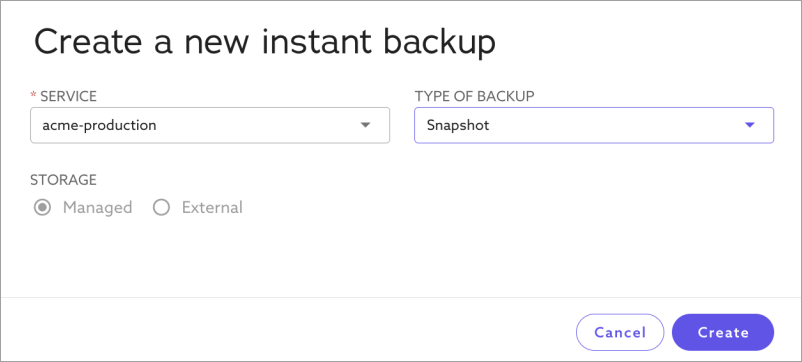
Step 1: Take a One-time Snapshot Backup
Use MariaDB Cloud’s Backup service to take a one-time snapshot of the database:

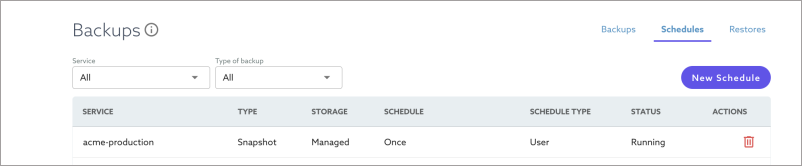
Use the ‘Schedules’ tab in the Backup service to track the status of snapshot:
Step 2: Setup the DR Database in a Different Region
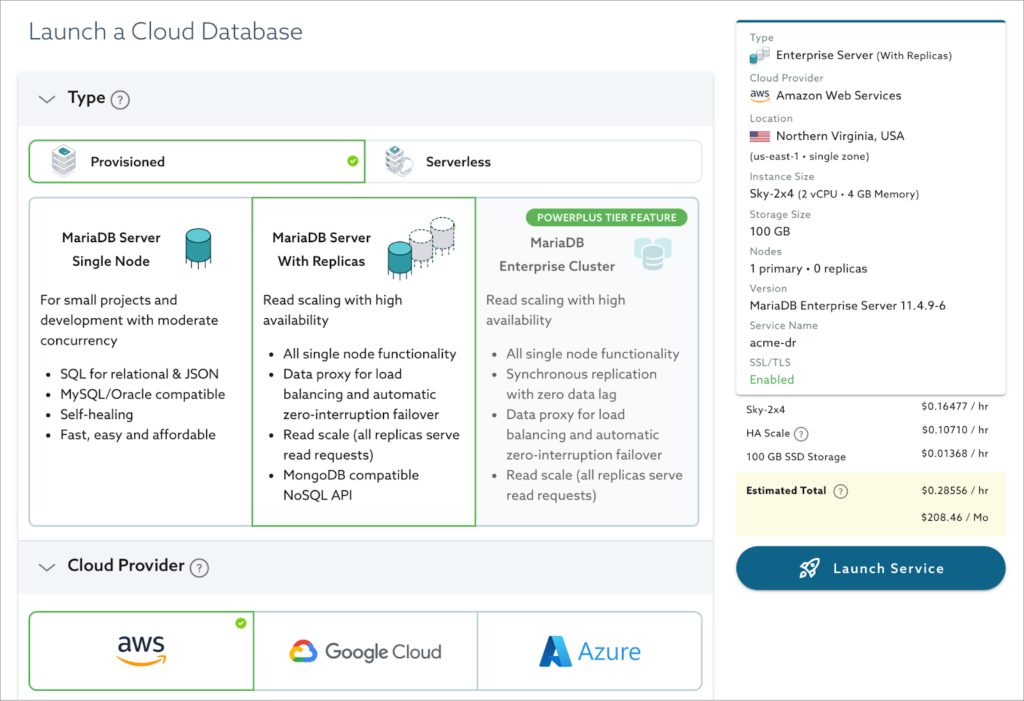
Launch a new database in MariaDB Cloud in the desired region where you want to establish your DR site. To save costs, this instance can be smaller than your production database and can later be scaled up if a failover occurs.
Step 3: Restore the DR Database with Production Snapshot
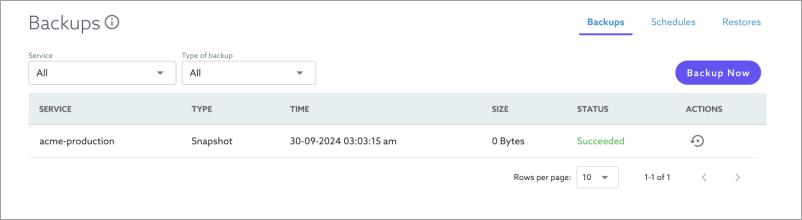
Once the DR database “acme-drsite” is ready, use the Backup service to restore the snapshot from the “acme-production” database.
- Click the ‘Action’ button on the ‘Backup’ tab next to the “acme-production” Snapshot.
- Select “acme-drsite” as the target service for the restore.
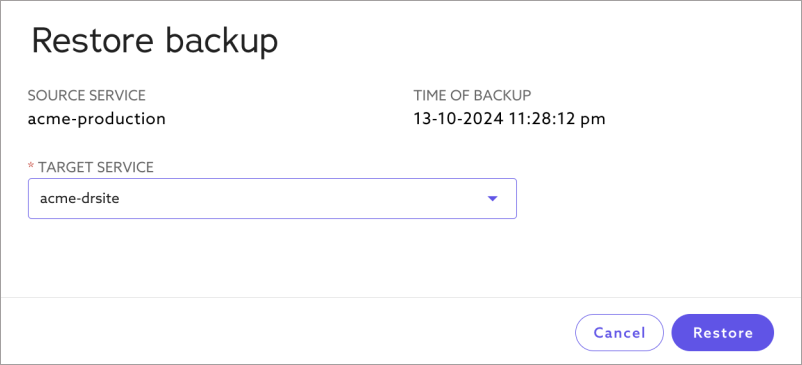
You can track progress of the restore operation in the ‘Restores’ tab:

Step 4: Setup Replication Between Production and DR Databases
Configure replication between “acme-production” and “acme-drsite” databases to replicate changes from Production to the DR database.
First, you need to add the outbound IP address of the “acme-drsite” database to the allowlist of your “acme-production” database for the replication process to connect to the Production database. You can obtain the outbound IP using the ‘Service Detail’ page in MariaDB Cloud.
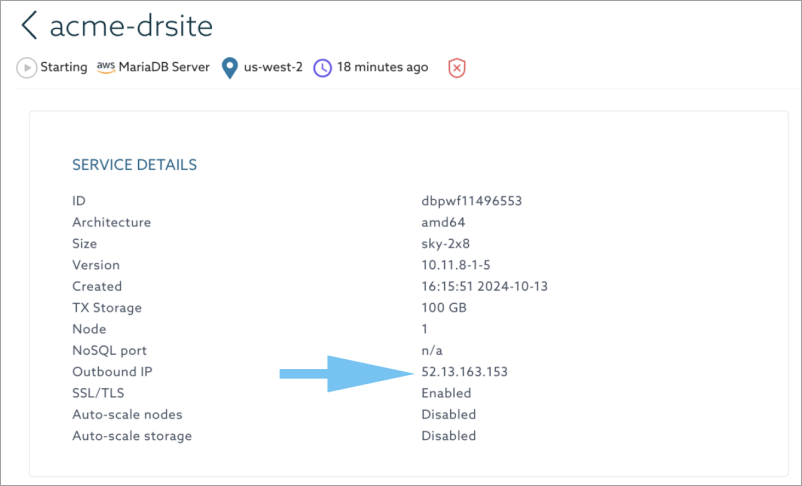
Next, use the following stored procedure on the “acme-production” database to retrieve ‘gtid_binlog_pos’ value:
MariaDB> CALL sky.gtid_status();
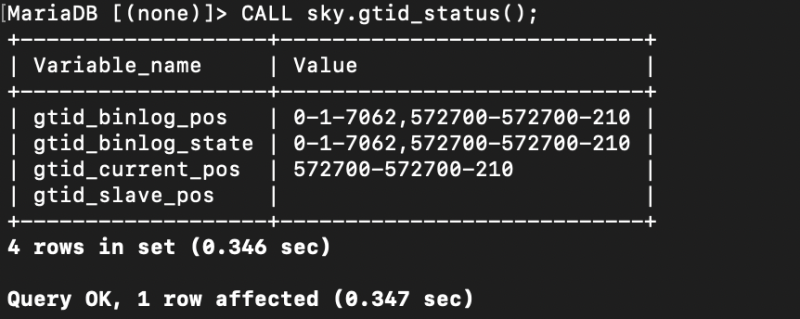
Next, configure replication on “acme-drsite” database using the following stored procedure:
MariaDB> CALL sky.change_external_primary_gtid(acme-production-hostname, port,gtid_binlog_pos)
Running this procedure will show a grant statement that needs to be executed on the “acme-production” database. Once done, start replication by executing the following stored procedure on “acme-drsite” database:
MariaDB> CALL sky.start_replication();
Finally, use the following procedure to monitor the status of replication:
MariaDB> CALL sky.replication_status();
Step 5: Monitor Replication and Configure Alerts
MariaDB Cloud provides monitoring tools to check for replication status and lag. Use these tools to ensure that the DR instance is consistently updated.
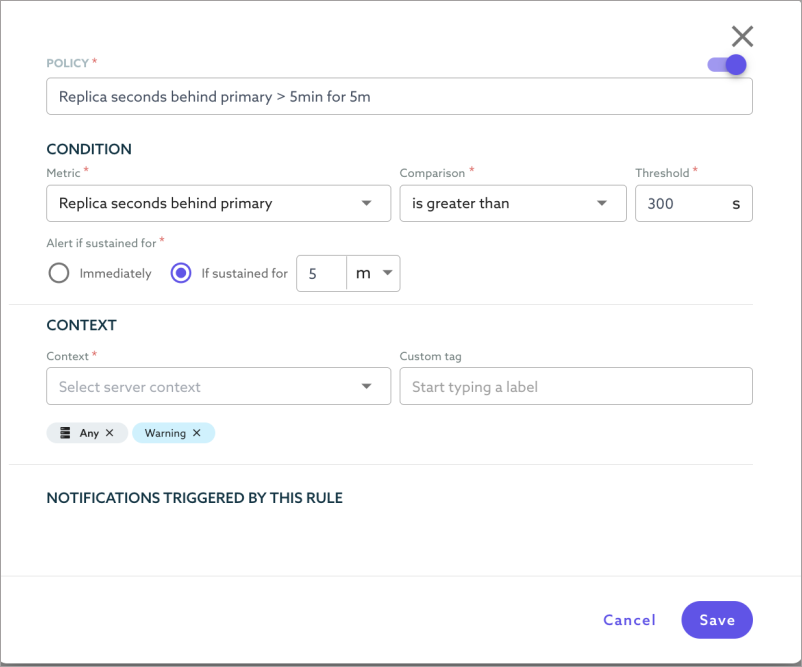
Step 6: Configure Failover using MariaDB Connector
If you are using MariaDB Connector, you can configure automatic failover to the DR database. Refer to MariaDB Connector documentation for details on failover behavior and examples.
Conclusion: Resilient Recovery for the Modern Enterprise
Infrastructure failures and regional outages are inevitable, but they don’t have to result in permanent data loss or prolonged downtime. The difference between a minor setback and a business-ending event is a verified, repeatable disaster recovery plan.
By moving your disaster recovery strategy to MariaDB Cloud, you eliminate the complexity of traditional “cold standby” sites. You gain the ability to replicate data across global regions and different cloud providers, ensuring that even if an entire cloud footprint goes offline, your data remains safe and restorable.
Secure Your Safety Net Today
Don’t wait for a regional outage to find the gaps in your recovery strategy. Experience how MariaDB Cloud simplifies cross-region replication and snapshot restoration to keep your business running, no matter what happens to the underlying infrastructure.
Sign up for a free trial and deploy your first disaster recovery cluster in minutes: