> For the complete documentation index, see [llms.txt](https://mariadb.com/docs/llms.txt). Markdown versions of documentation pages are available by appending `.md` to page URLs; this page is available as [Markdown](https://mariadb.com/docs/tools/enterprise/mariadb-enterprise-manager/usage/monitoring/dashboards/mariadb-maxscale.md).
# MariaDB MaxScale
Dedicated dashboard for monitoring MaxScale proxies, detailing service status, query routing efficiency, client connections, and resource usage across the proxy layer.
This dashboard shows MaxScale’s health and load, how backend servers are seen by each MaxScale, and the traffic/query volume flowing through it—plus cache efficiency from the Query Classifier.
### **Topology Overview**
Provides a visual representation of the entire system's architecture and connectivity.
 | Section | Description |
| ------------------------------- | ------------------------------------------------------------------------------------------------------------------------------------------------------------------------------------------------------- |
| **Project** | Displays the currently selected project label. |
| **Name** | Shows the selected database/topology name. |
| **Version** | Shows MaxScale version. |
| **Topology Info** | Count of nodes grouped by type (e.g., server, MaxScale). |
| **Backend Server States** | Timeline of each backend server’s role and health as seen by each MaxScale. Values are color-mapped to: Read, Write, Up, Down. Use this to spot failovers, read/write role flips, or outages over time. |
| **Maxscale Uptime by Instance** | Uptime in seconds for each MaxScale instance. |
### System Metrics
**System Metrics** provide comprehensive insights into the performance and health of individual system resources.
| Section | Description |
| ------------------------------- | ------------------------------------------------------------------------------------------------------------------------------------------------------------------------------------------------------- |
| **Project** | Displays the currently selected project label. |
| **Name** | Shows the selected database/topology name. |
| **Version** | Shows MaxScale version. |
| **Topology Info** | Count of nodes grouped by type (e.g., server, MaxScale). |
| **Backend Server States** | Timeline of each backend server’s role and health as seen by each MaxScale. Values are color-mapped to: Read, Write, Up, Down. Use this to spot failovers, read/write role flips, or outages over time. |
| **Maxscale Uptime by Instance** | Uptime in seconds for each MaxScale instance. |
### System Metrics
**System Metrics** provide comprehensive insights into the performance and health of individual system resources.
 | Metric | Description |
| ------------------- | -------------------------------------------------------------------------------------------------------------------------------- |
| **CPU Utilisation** | Effective CPU usage (%) per instance, excluding idle/iowait/guest time. |
| **Memory Usage** | Working memory in use (%) per instance (total minus free/buffers/cache/slab). |
| **Network Traffic** | Per-interface throughput (bits/s). Transmit is plotted below the axis (negative-Y), receive above—making direction easy to read. |
### MaxScale Metrics
**Query Classifier Cache Metrics** help in analyzing and optimizing query routing efficiency by tracking cache hits/misses and monitoring cache size.
| Metric | Description |
| ------------------- | -------------------------------------------------------------------------------------------------------------------------------- |
| **CPU Utilisation** | Effective CPU usage (%) per instance, excluding idle/iowait/guest time. |
| **Memory Usage** | Working memory in use (%) per instance (total minus free/buffers/cache/slab). |
| **Network Traffic** | Per-interface throughput (bits/s). Transmit is plotted below the axis (negative-Y), receive above—making direction easy to read. |
### MaxScale Metrics
**Query Classifier Cache Metrics** help in analyzing and optimizing query routing efficiency by tracking cache hits/misses and monitoring cache size.
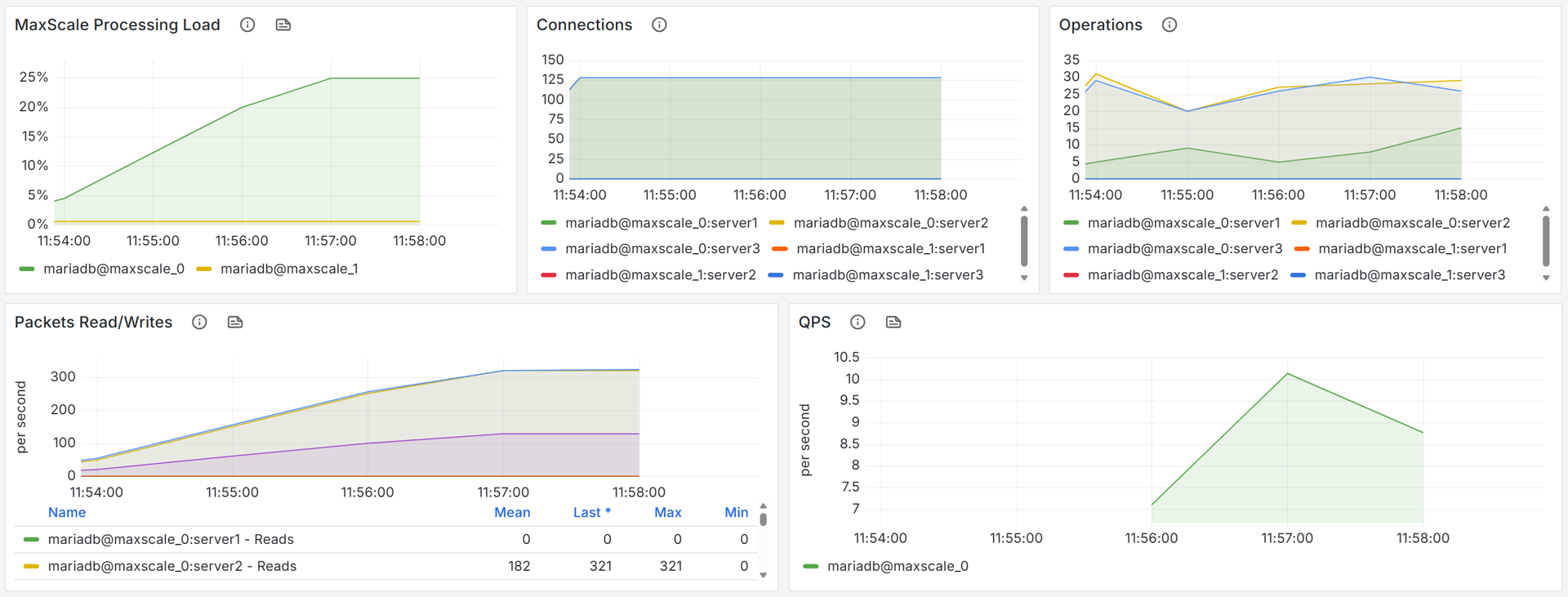 | Metric | Description |
| ------------------------ | ------------------------------------------------------------------------------------------------------- |
| MaxScale Processing Load | Percentage of total CPU time consumed by the MaxScale process over time (a direct view of router load). |
| Connections | Active backend connections per server as observed by MaxScale. |
| Operations | Active operations per backend server (ongoing requests tracked by MaxScale). |
| Packets Read/Writes | Per-server packet read and write rates (packets/s). Useful for spotting uneven load distribution. |
| QPS | Queries per second passing through MaxScale across the selected instances (overall routing throughput). |
### Query Classifier Cache Metrics
Evaluate query routing efficiency by tracking and optimizing cache metrics like hits, misses, and cache size.
| Metric | Description |
| ------------------------ | ------------------------------------------------------------------------------------------------------- |
| MaxScale Processing Load | Percentage of total CPU time consumed by the MaxScale process over time (a direct view of router load). |
| Connections | Active backend connections per server as observed by MaxScale. |
| Operations | Active operations per backend server (ongoing requests tracked by MaxScale). |
| Packets Read/Writes | Per-server packet read and write rates (packets/s). Useful for spotting uneven load distribution. |
| QPS | Queries per second passing through MaxScale across the selected instances (overall routing throughput). |
### Query Classifier Cache Metrics
Evaluate query routing efficiency by tracking and optimizing cache metrics like hits, misses, and cache size.
 | Metric | Description |
| ------------------------ | ----------------------------------------------------------------------------------------------------------- |
| **Cache Hits vs Misses** | Per-second hits and misses in the Query Classifier cache. Analyze the relationship to assess effectiveness. |
| **Cache Size** | Current size of the Query Classifier cache (bytes). Monitor growth with Hits/Misses for tuning insights. |
*This page is: Copyright © 2026 MariaDB. All rights reserved.*
{% @marketo/form formId="4316" %}
| Metric | Description |
| ------------------------ | ----------------------------------------------------------------------------------------------------------- |
| **Cache Hits vs Misses** | Per-second hits and misses in the Query Classifier cache. Analyze the relationship to assess effectiveness. |
| **Cache Size** | Current size of the Query Classifier cache (bytes). Monitor growth with Hits/Misses for tuning insights. |
*This page is: Copyright © 2026 MariaDB. All rights reserved.*
{% @marketo/form formId="4316" %}