> For the complete documentation index, see [llms.txt](https://mariadb.com/docs/llms.txt). Markdown versions of documentation pages are available by appending `.md` to page URLs; this page is available as [Markdown](https://mariadb.com/docs/tools/enterprise/mariadb-enterprise-manager/usage/monitoring/dashboards/mariadb-server.md).
# MariaDB Server
Comprehensive dashboard for monitoring MariaDB Server instances, covering topology overviews, replication health, InnoDB metrics, query performance, and active connections.
This dashboard provides a unified view of a database topology. It combines topology information, system health, replication or cluster metrics, and query performance in one place. Administrators can use it to monitor availability, troubleshoot issues, and optimize performance.
## Topology Overview
Summarizes the overall topology, showing which servers are active, their versions, and how they are organized.
 * Name — Displays the name of the MariaDB topology currently being monitored.
* Project — Shows the associated project or environment label.
* Primary/Replica — A table with:
* Instance: Server hostname.
* Type: Instance role.
* Seconds behind primary: Replication delay value.
* Status: Availability of the node.
* Topology Info — Count of nodes grouped by type (e.g., server, MaxScale).
* MariaDB Server Uptime by Instance — Uptime in seconds for each server instance.
## System Metrics
* Name — Displays the name of the MariaDB topology currently being monitored.
* Project — Shows the associated project or environment label.
* Primary/Replica — A table with:
* Instance: Server hostname.
* Type: Instance role.
* Seconds behind primary: Replication delay value.
* Status: Availability of the node.
* Topology Info — Count of nodes grouped by type (e.g., server, MaxScale).
* MariaDB Server Uptime by Instance — Uptime in seconds for each server instance.
## System Metrics
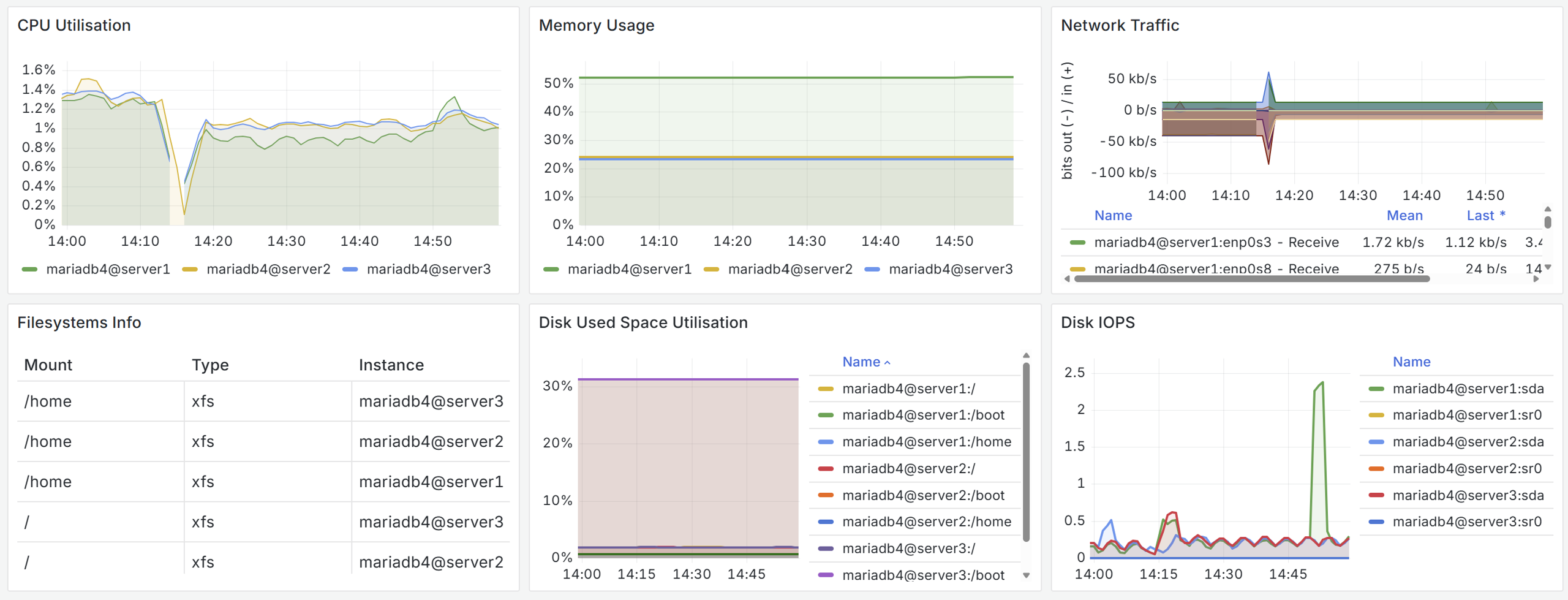 Monitors server resource usage to detect bottlenecks in CPU, memory, network, and storage.
| Feature | Description |
| --------------------------- | ------------------------------------------------------------------------------ |
| CPU Utilisation | Line graph of CPU usage percentage per instance. |
| Memory Usage | Percentage of used memory per instance (excluding cache/buffers). |
| Network Traffic | Time-series of receive and transmit throughput per instance (bits per second). |
| Filesystems Info | Table with filesystem type, mount point, capacity, and instance. |
| Disk Used Space Utilisation | Graph of percentage disk space used per mount point. |
| Disk IOPS | Reads and writes per second per storage device. |
## Replication / Cluster Metrics
Monitors server resource usage to detect bottlenecks in CPU, memory, network, and storage.
| Feature | Description |
| --------------------------- | ------------------------------------------------------------------------------ |
| CPU Utilisation | Line graph of CPU usage percentage per instance. |
| Memory Usage | Percentage of used memory per instance (excluding cache/buffers). |
| Network Traffic | Time-series of receive and transmit throughput per instance (bits per second). |
| Filesystems Info | Table with filesystem type, mount point, capacity, and instance. |
| Disk Used Space Utilisation | Graph of percentage disk space used per mount point. |
| Disk IOPS | Reads and writes per second per storage device. |
## Replication / Cluster Metrics
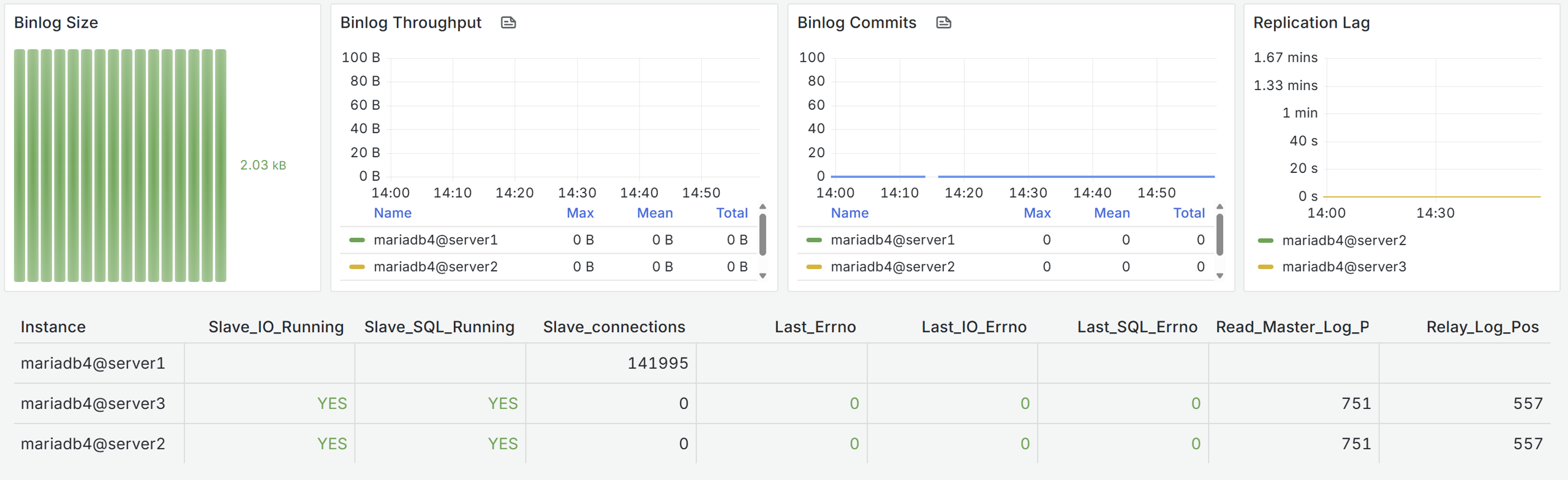 Provides insight into replication and cluster-related activity, including binary log usage, commit rates, and delay measurements.
| Metric | Description |
| ----------------- | -------------------------------------------------- |
| Binlog Size | Current binary log size per instance. |
| Binlog Throughput | Bytes written to binary logs per second. |
| Binlog Commits | Rate of commit operations recorded in binary logs. |
| Replication Lag | Replication delay value reported in seconds. |
**Replication Status Table**
This table provides a consolidated view of the health status of replication across instances.
| Field Name | Description |
| ---------------------- | -------------------------------------------------------------- |
| Slave\_connections | Number of replication I/O connections to the upstream source. |
| Retried\_transactions | Total replicated transactions retried due to transient errors. |
| Slave\_IO\_Running | Status flag indicating if the I/O thread is fetching events. |
| Slave\_SQL\_Running | Status flag indicating if the SQL thread is applying events. |
| Last\_Errno | Most recent numeric error code for replication issues overall. |
| Last\_IO\_Errno | Most recent numeric error code reported by the I/O thread. |
| Last\_SQL\_Errno | Most recent numeric error code reported by the SQL thread. |
| Read\_Master\_Log\_Pos | Current read position in the source’s binary log. |
| Relay\_Log\_Pos | Last executed position in the local relay log. |
## Query Metrics
Provides insight into replication and cluster-related activity, including binary log usage, commit rates, and delay measurements.
| Metric | Description |
| ----------------- | -------------------------------------------------- |
| Binlog Size | Current binary log size per instance. |
| Binlog Throughput | Bytes written to binary logs per second. |
| Binlog Commits | Rate of commit operations recorded in binary logs. |
| Replication Lag | Replication delay value reported in seconds. |
**Replication Status Table**
This table provides a consolidated view of the health status of replication across instances.
| Field Name | Description |
| ---------------------- | -------------------------------------------------------------- |
| Slave\_connections | Number of replication I/O connections to the upstream source. |
| Retried\_transactions | Total replicated transactions retried due to transient errors. |
| Slave\_IO\_Running | Status flag indicating if the I/O thread is fetching events. |
| Slave\_SQL\_Running | Status flag indicating if the SQL thread is applying events. |
| Last\_Errno | Most recent numeric error code for replication issues overall. |
| Last\_IO\_Errno | Most recent numeric error code reported by the I/O thread. |
| Last\_SQL\_Errno | Most recent numeric error code reported by the SQL thread. |
| Read\_Master\_Log\_Pos | Current read position in the source’s binary log. |
| Relay\_Log\_Pos | Last executed position in the local relay log. |
## Query Metrics
 Focuses on query execution and workload behavior, highlighting concurrency, throughput, and inefficiencies.
| Metric | Description |
| ----------------------- | --------------------------------------------- |
| Current Threads Running | Number of threads actively executing queries. |
| Questions (QPS) | Queries per second executed on each instance. |
| Slow Queries | Rate of queries exceeding `long_query_time`. |
| Created Tmp Disk Tables | On-disk temporary tables created per second. |
## Connections
Focuses on query execution and workload behavior, highlighting concurrency, throughput, and inefficiencies.
| Metric | Description |
| ----------------------- | --------------------------------------------- |
| Current Threads Running | Number of threads actively executing queries. |
| Questions (QPS) | Queries per second executed on each instance. |
| Slow Queries | Rate of queries exceeding `long_query_time`. |
| Created Tmp Disk Tables | On-disk temporary tables created per second. |
## Connections
 This section provides visibility into how clients connect to the server and whether connection limits or failures are occurring.
| Metric | Description |
| ------------------------ | ------------------------------------------------------------------------------------------------------- |
| Number of Connections | Current number of active client connections (`Threads_connected`). |
| Connection Utilization | Share of connections in use compared to the configured maximum (`Threads_connected / max_connections`). |
| % of Aborted Connections | Percentage of connection attempts that failed or were aborted (`aborted_connects / connections`). |
## Range Metrics
This section provides visibility into how clients connect to the server and whether connection limits or failures are occurring.
| Metric | Description |
| ------------------------ | ------------------------------------------------------------------------------------------------------- |
| Number of Connections | Current number of active client connections (`Threads_connected`). |
| Connection Utilization | Share of connections in use compared to the configured maximum (`Threads_connected / max_connections`). |
| % of Aborted Connections | Percentage of connection attempts that failed or were aborted (`aborted_connects / connections`). |
## Range Metrics
 Highlights query access patterns where range operations or scans are used.
| Metric | Description |
| ---------------------- | --------------------------------------------------------------------------------------------------------------- |
| Select Range Scan | Number of `SELECT` operations performing range scans. |
| Select Full Range Join | Number of queries that performed a full range join. Indicates potential suboptimal indexing or join conditions. |
| Select Range Check | Number of `SELECT` operations requiring range checks. |
## InnoDB Metrics
Highlights query access patterns where range operations or scans are used.
| Metric | Description |
| ---------------------- | --------------------------------------------------------------------------------------------------------------- |
| Select Range Scan | Number of `SELECT` operations performing range scans. |
| Select Full Range Join | Number of queries that performed a full range join. Indicates potential suboptimal indexing or join conditions. |
| Select Range Check | Number of `SELECT` operations requiring range checks. |
## InnoDB Metrics
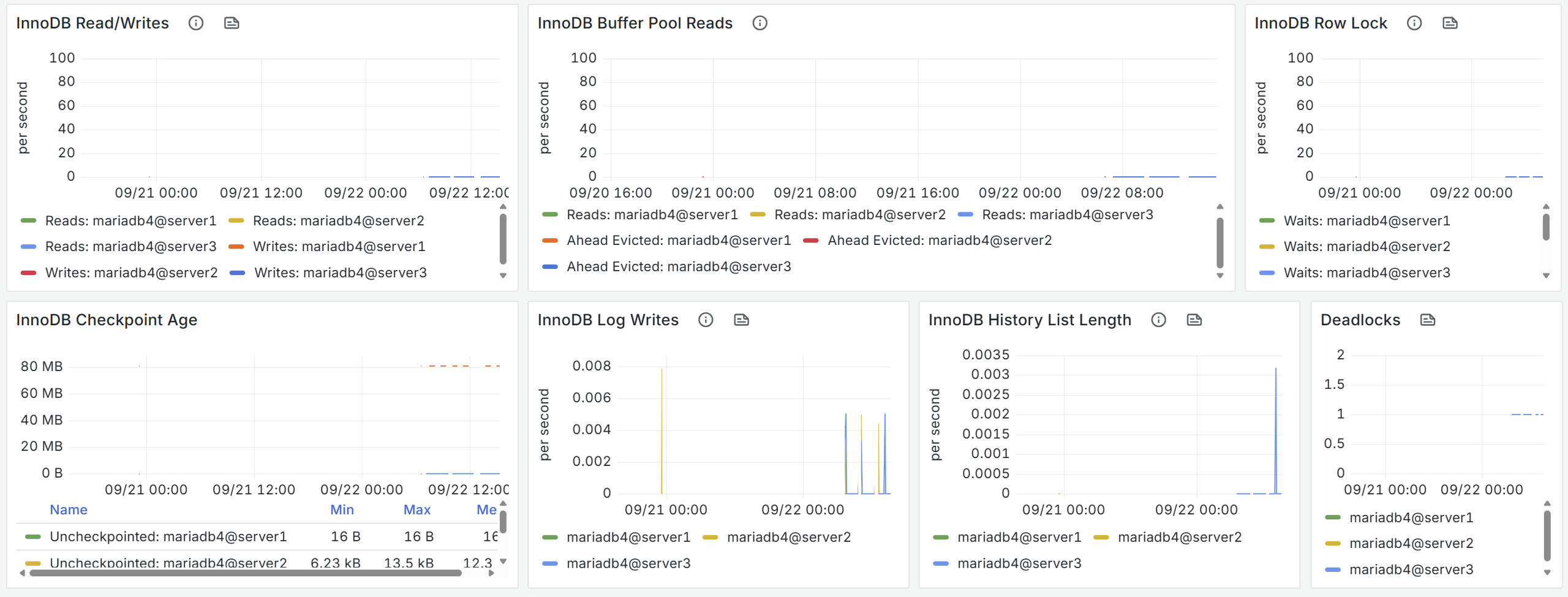 Shows activity within the InnoDB storage engine.
| Metric | Description |
| -------------------------- | ----------------------------------------------------------------------------------------------------------------- |
| InnoDB Read/Writes | Rate of physical read and write operations by InnoDB per second. Reads are disk fetches, writes are disk flushes. |
| InnoDB Buffer Pool Reads | Logical reads from the buffer pool vs. evicted or read-ahead pages, indicating buffer pool efficiency. |
| InnoDB Row Lock | Number of row lock waits in InnoDB, with high values indicating contention or poor indexing. |
| InnoDB Checkpoint Age | Size of uncheckpointed redo log data in bytes, with large sizes signaling risk of long crash recovery times. |
| InnoDB Log Writes | Number of write operations to the InnoDB redo log per second, reflecting redo logging activity. |
| InnoDB History List Length | Length of the undo log history list, with growth indicating long-running transactions preventing purge. |
| Deadlocks | Number of detected deadlocks, where transactions block each other and require one to be rolled back. |
## Processlist
Shows information about active sessions and thread states collected from `information_schema.processlist`.
* Processlist Count — Table view showing:
* Instance: Database node.
* Client: Client host connected.
* Value: Number of processes/threads from that client.
*This page is: Copyright © 2026 MariaDB. All rights reserved.*
{% @marketo/form formId="4316" %}
Shows activity within the InnoDB storage engine.
| Metric | Description |
| -------------------------- | ----------------------------------------------------------------------------------------------------------------- |
| InnoDB Read/Writes | Rate of physical read and write operations by InnoDB per second. Reads are disk fetches, writes are disk flushes. |
| InnoDB Buffer Pool Reads | Logical reads from the buffer pool vs. evicted or read-ahead pages, indicating buffer pool efficiency. |
| InnoDB Row Lock | Number of row lock waits in InnoDB, with high values indicating contention or poor indexing. |
| InnoDB Checkpoint Age | Size of uncheckpointed redo log data in bytes, with large sizes signaling risk of long crash recovery times. |
| InnoDB Log Writes | Number of write operations to the InnoDB redo log per second, reflecting redo logging activity. |
| InnoDB History List Length | Length of the undo log history list, with growth indicating long-running transactions preventing purge. |
| Deadlocks | Number of detected deadlocks, where transactions block each other and require one to be rolled back. |
## Processlist
Shows information about active sessions and thread states collected from `information_schema.processlist`.
* Processlist Count — Table view showing:
* Instance: Database node.
* Client: Client host connected.
* Value: Number of processes/threads from that client.
*This page is: Copyright © 2026 MariaDB. All rights reserved.*
{% @marketo/form formId="4316" %}