



Key takeaways
- MariaDB Migrator is a new, scriptable, automated tool for MySQL-to-MariaDB migrations.
- Plan-First Approach: A non-destructive assessment phase identifies compatibility issues before you move a single row of data.
- Four Pathways: Choose from offline, streaming, or replication modes to match your downtime tolerance.
Migrating from MySQL to MariaDB is not considered to be an overly complex process. After all, the two databases share the same DNA, as MariaDB was born as a fork initiated by MySQL. Organizations can often make the switch without the complex code rewrites or architectural overhauls required when migrating to entirely different database systems like, say PostgreSQL.
However, as MySQL and MariaDB have matured along independent paths, migrating workloads could require some tooling to handle the differences that have emerged as part of the fork. Hidden schema incompatibilities, configuration differences, and user privilege structures can add complexity.
Why Migrate from MySQL to MariaDB
You may be asking, what are the reasons to migrate from MySQL to MariaDB in the first place. The answers are compelling. Many companies are looking for new solutions to MySQL for the following reasons:
- Support new AI and analytics workloads: MariaDB adds capabilities for vector search, RAG, real-time analytics, and more advanced analytics.
- Modernize without a full rewrite: MariaDB gives MySQL teams a familiar path forward, using the SQL, tools, drivers, and skills they already know.
- Reduce end-of-life risk: Staying on an aging MySQL version can expose applications to security, support, and compliance gaps.
- Protect existing application investments: You do not have to throw away years of MySQL development just to move to a database with a stronger future.
- Keep deployment options open: MariaDB can run on-premises, in the cloud, across clouds, or in managed environments, giving teams more control over where workloads live.
- Lower long-term cost and complexity: Reducing extra systems, custom pipelines, and specialized services can make the database environment easier to operate and less expensive to scale.
What is the MariaDB Migrator?
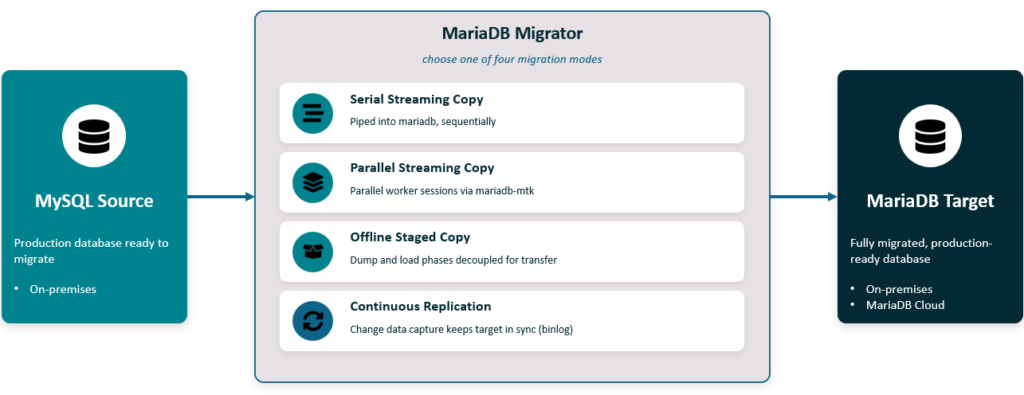
Today, we are thrilled to announce the Beta release of MariaDB Migrator. We built this tool to make your transition from MySQL to MariaDB predictable and efficient, whether you are migrating a single schema or cutting over an entire fleet of production databases. Core features at a glance:
- Mariadb-mtk: The parallel migration engine runs concurrent worker sessions, performs restartable chunked loading, and validates row counts automatically. It includes retry logic for transient, recoverable errors.
- Fully Scriptable: The entire workflow is driven by a YAML configuration file—no interactive prompts required. This makes the tool ideal for CI/CD pipelines and repeatable rehearsals.
- Automated my.cnf Translation: An optional, mode-agnostic tool translates existing MySQL configurations into MariaDB-compatible formats up-front.
- Plugin-Aware User Migration: Users and roles migrate automatically, respecting their authentication plugins (e.g.,
native_password,caching_sha2_password). Account statuses are flagged in the migration report so you know exactly which users transition where.
How to Simplify Your MySQL Migration
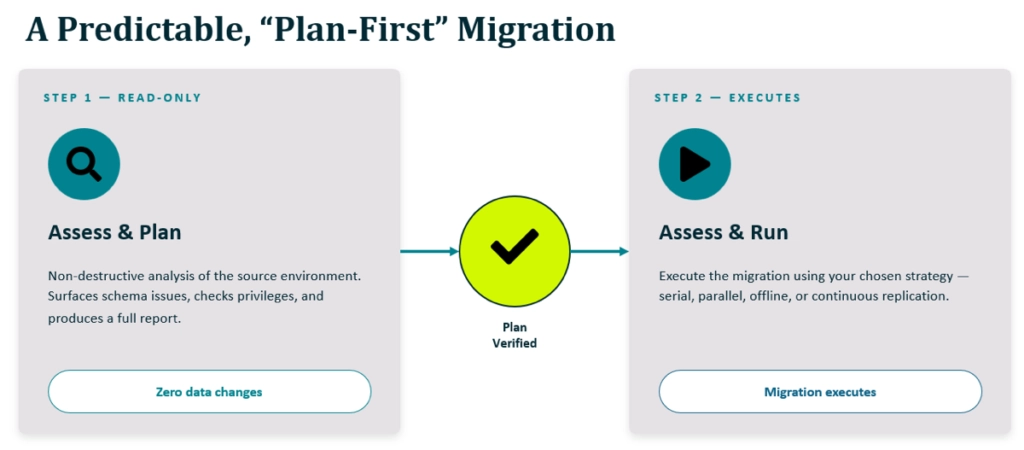
The biggest source of migration anxiety is the unknown. To provide peace of mind before you alter a single production row, Mariadb-migrator is structured in two distinct phases:
- Assess & Plan: This non-destructive phase reads the source environment, surfaces compatibility issues, and produces a comprehensive report. It includes preparatory steps like adjusting binary-log settings or verifying privileges.
- Assess & Run: Only once the plan is verified do you execute the migration using your chosen strategy.
Four Automated Strategies for MySQL Migration
Every infrastructure setup is unique. We provide four distinct modes tailored to your operational constraints:
| Migration Mode | Best For | Mechanism |
|---|---|---|
| Serial Streaming Copy | Smaller databases | Streams sequentially using mariadb_dump | mariadb |
| Parallel Streaming Copy | Large datasets | Uses parallel worker sessions via mariadb-mtk |
| Offline Staged Copy | Air-gapped environments | Decouples dump and load phases for secure transfer |
| Continuous Replication | Mission-critical cutovers | Keeps target in sync via change data capture (binlog) |
Get Started
MariaDB Migrator is available now as streamlined release archives, eliminating the need for complex builds. Grab the package, define your connection parameters, and run the Assess & Plan phase to see exactly what the tool identifies in your environment.
Next Steps for MariaDB Migration Tool
- Download MariaDB Migration Tool here on the downloads page.
- You can read the documentation for the MariaDB Migration Tool here.
- Join the MariaDB Migration Tool Slack channel for feedback and support.
Looking Ahead: The Future of the Tool
While this initial release marks a significant milestone, we are just getting started and soliciting feedback on improvements. Our current focus is mariadb-mtk, where we’re investing in improvements to areas that matter most for large databases: restartable loads and parallel loading of very large tables within datasets, pushing throughput well beyond what’s possible today.
Alongside that, we’re continuing to harden the tool across cloud sources and target combinations as well as parallel dump and import for Offline Copy.
If you’re staring down a MySQL-to-MariaDB move and weighing your options, MariaDB Migrator is built to meet you wherever you are on the downtime-versus-effort curve – from a one-pass copy to a near-zero-downtime replication cutover.
Frequently Asked Questions
MariaDB Migrator is a tool designed to simplify the transition from MySQL to MariaDB. It’s used to ease the migration for database professionals who are making the switch, no matter how complex the environment.
The tool supports four modes: Serial Streaming, Parallel Streaming, Offline Staged Copy, and Continuous Replication. These are designed to work in most live migration scenarios. It really doesn’t matter if you’re shutting down your database to move data, or if you need to keep both old and new systems running. There’s support for any type of move.
Yes. The tool automatically migrates users and roles, handling authentication plugins transparently. It flags accounts that require password updates in the migration report.
Yes. For production cutovers requiring minimal downtime, the Continuous Replication (binlog) mode allows you to keep the target in sync until you are ready to cut over.
This phase is non-destructive. It performs a read-only analysis of your source database, checks for schema incompatibilities, and verifies configuration requirements, producing a report before any data is altered.
Absolutely. MariaDB provides several tiers of support to ensure a successful transition:
– Professional Migration Services: Get expert guidance from architects and migration managers who assist with architecture design, performance testing, and code reviews.
– MariaDB Enterprise Subscriptions: Includes 24/7 technical support with 30-minute response times for critical (S1) issues, priority bug fixes, and security patches.
– Dedicated Remote DBA Teams: Available for daily database management, incident response, and ongoing optimization.
– Community Resources: For self-guided help, access the MariaDB Slack channel, DBA Stack Exchange, and the MariaDB Knowledge Base.