

White paper
MariaDB Enterprise: Security Overview
01Introduction
Security is one of the most important aspects to keep in mind when deploying and configuring
a database, and one of the most difficult to get right. There is a wide range of concerns, from
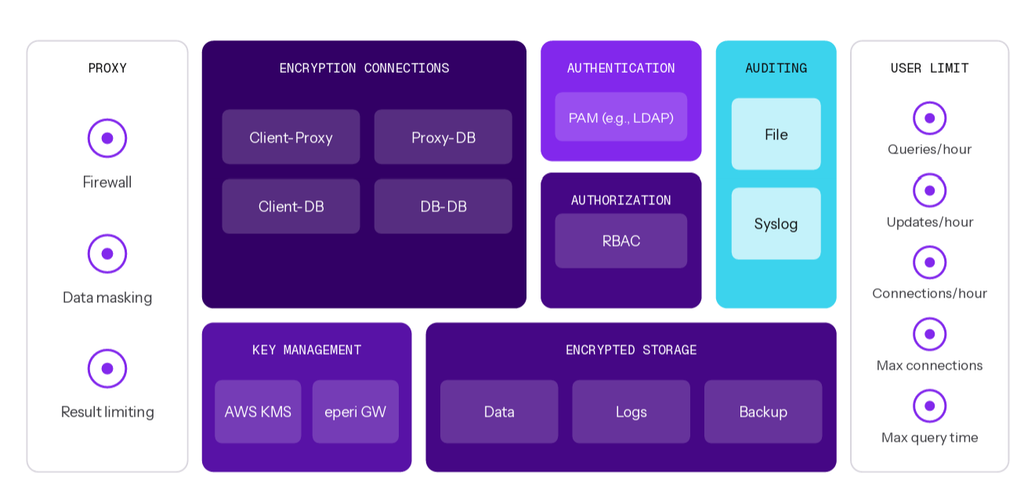
infrastructure and networking to applications and users. This overview explains the primary attack vectors and threat types enterprises face, and covers a four-pronged approach to mitigating threats and securing your data with MariaDB Enterprise, the first enterprise open source database management system to offer the kinds of features previously available only in costly proprietary databases from Oracle, Microsoft and IBM.
A Four-Pronged Database
When considering how to protect a database, it’s important to understand the attack vectors and threats. Threats can be classified as internal or external, depending on whether the attacker was supposed to have access. Internal threats include bad actors and human error, whereas common external threats include denial-of-service attacks and SQL injection attacks.
Four essential security measures protect you from internal and external threats – ranging from packet sniffing, man-in-the-middle attacks, denial-of-service attacks, and SQL injection attacks to bad actors and human error. With encryption, a powerful database proxy with firewall, comprehensive user management, and robust auditing, MariaDB Enterprise keeps your data safe and your applications running.
| Strategy | Details | Threat type |
|---|---|---|
| Encryption | TLS for encrypted connections AES for encrypted storage | Man-in-the-middle attacks Packet sniffing Compromised infrastructure Internal bad actors |
| Database proxy | Query whitelisting/blacklisting Data masking | Denial-of-service attacks SQL injection Application spoofing |
| Database proxy | LDAP user and group mapping Role-based access control PAM authentication Password validation | Compromised application servers Human error Bad actors |
| Auditing | Local audit logs Remote, centralized audit logs | Lack of visibility in security breaches Unmet compliance regulations |
TABLE 1 Threat types and mitigation strategies
02Encryption
Connections
If the connections between database clients, database proxies and database servers are not secure, data breaches can occur due to man-in-the-middle attacks or packet sniffing. MariaDB Enterprise supports secure connections using TLS encryption and either local, file-based key management or external key management services – there are plugins for AWS KMS and eperi Gateway – to prevent these types of attacks.
Tip
MariaDB Enterprise can require the use of encrypted connections. The GRANT statement can be used with the REQUIRE clause to require TLS encryption, valid X.509 certificates, specific issuers and subjects and specific ciphers
Storage
If the data is written to unsecured storage, data breaches can occur from internal bad actors copying the underlying files – compromising infrastructure. MariaDB Enterprise supports secure storage using AES to encrypt the data in InnoDB tables, InnoDB logs and the binary log (binlog) to prevent these types of attacks.
Fill in the form to read the rest
In the digital era, data is one of the most valuable assets of an organization – and the primary target of cybertheft attacks. If left unprotected, it will be stolen and exposed, resulting in the next major data breach. This white paper provides an overview of modern database attacks, and the security features available in MariaDB TX to stop them – everything from encryption and data masking to denial of service protection.
This white paper covers:
- Modern database threats and attacks
- Encrypted communication and storage
- Database firewalls and data masking
- Denial-of-service protection
- RBAC, PAM (LDAP/Kerberos) and user/group mapping
- Auditing and database event monitoring
03Database Proxy
Denial of service (DoS) or distributed denial of service (DDoS) attacks use compromised or spoofed applications to send a lot of queries, overloading the database and preventing legitimate queries from being executed. However, DoS attacks can rely less on the number of queries being sent and more on the cost of executing them – sending queries that take a long time to execute and/or return a lot of results.
SQL injection attacks occur when applications create queries based on user input in an unsafe manner, enabling attackers to modify and/or insert queries. These attacks may attempt to read sensitive data or modify/delete data. MariaDB Enterprise includes an advanced database proxy,
MariaDB MaxScale, to prevent these types of attacks by accepting or rejecting queries based on firewall rules, limiting result sets based on size and masking data on a percolumn basis.
Firewall
The firewall filter accepts or rejects queries based on the rules configured. The rules can identify queries based on user, time, type and syntax. To accept or block queries based on syntax, rules can be configured to identify queries that contain a wildcard character, have specific column names, are missing the WHERE clause or match a regular expression.
In addition, the firewall filter can block queries based on frequency. This is done by configuring the time frame in seconds, the number of times a query can be sent within the time frame and how long the query should be blocked if the frequency threshold is exceeded.
Tip
Rules can be combined to create more complex ones. For example, block all queries from user u to database d for 5 minutes if more than 50 SELECT statements without a WHERE clause are sent within 30 seconds
Result Limiting
The maxrows filter limits the results of queries. This is done by configuring the maximum number of rows and/or maximum amount of data allowed for query results. If the query results exceed the limits, an empty result will be returned.
Data Masking and Obfuscation
The masking filter protects personal data with data masking for pseudonymization and data obfuscation for anonymization. This is done by specifying the columns to mask, the value to replace the data with, and the users to whom data masking/obfuscation applies (or does not).
For example, protecting credit card numbers:
SELECT name, ssn FROM person;
Without data masking
| Feature | Statement |
|---|---|
| John Doe | 5555-5555-5555-5555 |
| John Doe | 4444-4444-4444-4444 |
Without data masking
| Feature | Statement |
|---|---|
| John Doe | XXXX-XXXX-XXXX-5555 |
| John Doe | XXXX-XXXX-XXXX-4444 |
With full data masking
| Feature | Statement |
|---|---|
| John Doe | XXXX-XXXX-XXXX-XXXX |
| John Doe | XXXX-XXXX-XXXX-XXXX |
04User Management
The human component is often the least secure. With user error, social engineering and internal bad actors increasingly becoming security concerns, user management is critical to securing databases. However, when user management is tedious and time consuming, mistakes and shorts (e.g., permissive access and weak passwords) can become prevalent, compromising security. MariaDB Enterprise supports role-based access control (RBAC), pluggable authentication modules (PAM), LDAP user and group mapping, password validation and user resource limits to help simplify user management.
RBAC
MariaDB Enterprise provides RBAC, which is less error prone and much easier to maintain than managing per-user privileges. RBAC groups privileges into roles, with roles being assigned to users. The abstraction of roles allows operators to work at a level that makes more sense for the domain at hand as opposed to forcing them to always derive the meaning of a list of privileges from a user. In addition, MariaDB Enterprise supports multiple privilege levels. They can be set globally, for an entire database, for an individual table or routine, or for individual columns.
Tip
Rules can be combined to create more complex ones. For example, block all queries from user u to database d for 5 minutes if more than 50 SELECT statements without a WHERE clause are sent within 30 seconds
Privileges
| Privilege level | Example privileges |
|---|---|
| Global | CREATE USER, FILE, PROCESS, SHUT DOWN |
| Database | CREATE, CREATE ROUTINE, DROP, LOCK TABLES |
| Table | ALTER, CREATE, DROP, INDEX, TRIGGER |
| Column | INSERT, REFERENCES, SELECT, UPDATE |
| Function | ALTER ROUTINE, EXECUTE, GRANT OPTION |
| Procedure | ALTER ROUTINE, EXECUTE, GRANT OPTION |
| Proxy | PROXY |
PAM and Kerberos
MariaDB Enterprise uses PAM to support different forms of authentication (e.g., /etc/shadow, LDAP, ssh passphrases, one-time passwords and two-factor authentication) as well as password expiration, user name mapping, time and date restrictions and logging. In addition, the dialog plugin enables GUI applications to prompt users for interactive authentication (e.g., challenge/response or multiple questions). In addition, GSSAPI/SSPI is supported for Kerberos and NTLM authentication on Linux and Windows servers.
User/Group Mapping
MariaDB Enterprise supports LDAP and Linux user/group mapping via PAM – mapping external users or groups to MariaDB users. For example, system administrators can create an LDAP or Linux group for database administrators (DBAs), add users to it and map the group to a single MariaDB user rather than creating a separate MariaDB user for each DBA. When combined with RBAC, user/group mapping simplifies user management by allowing it to be centralized and managed outside of the database.
Password Validation
MariaDB Enterprise includes password validation, using the simple password check and cracklib password check plugins, to require strong passwords. While the simple password check plugin validates password strength using basic requirements (e.g., length), the cracklib password check plugin uses the CrackLib library and its word dictionaries to prevent the use of simple patterns and common words as passwords.
Tip
The simple password check and cracklib password check plugins can be used together.
SIMPLE PASSWORD CHECK PLUGIN – VARIABLES
| Variable | Description |
|---|---|
| simple_password_check_digits | Minimum # of digits required |
| simple_password_check_letters_same_case | Minimum # of upper- and lowercase letters required |
| simple_password_check_letters_same_case | Minimum # of characters |
| simple_password_check_other_characters | Minimum # of non-digit, non-letter characters |
Resource Limits
MariaDB Enterprise can leverage user resource limits to stop and/or reduce the damage caused by an attacker who’s employing compromised user credentials. These limits can prevent an attacker from creating too many connections, sending too many queries and more – removing unfettered access to the database. There are five types of user resource limits.
PER-USER RESOURCE LIMITS – VARIABLES
| Variable | Description |
|---|---|
| MAX_QUERIES_PER_HOUR | Minimum # of digits required |
| MAX_UPDATES_PER_HOUR | Minimum # of upper- and lowercase letters required |
| MAX_CONNECTIONS_PER_HOUR | Minimum # of characters |
| MAX_USER_CONNECTIONS | Minimum # of non-digit, non-letter characters |
| MAX_STATEMENT_TIME | Timeout, in seconds, for statements executed |
05Auditing
When attacks are attempted, it’s important to have information about what happened. An audit log details the database events, including those leading up to and during an attack. It can be used to identify the security changes necessary to prevent future attacks or, at the very least, to reduce or eliminate the damage future attacks may case. In addition, audit logs can be monitored for specific events with alerts set up to notify database administrators of suspicious activity, enabling them to stop attacks before any damage is done.
Events
MariaDB Enterprise provides comprehensive auditing via the audit plugin, logging information about connections, queries and affected tables. It can be used to detect attempts at unauthorized access. The audit plugin can log six types of events. It can be configured to log all events for complete visibility, or to log specific events for minimal resource usage. In addition, the audit plugin can be configured to exclude specific users.
EVENTS – TYPES
| Event | Description |
|---|---|
| CONNECT | Connections, disconnections and failed connections with error codes |
| QUERY | Queries and their results, including failed queries due to syntax/permissions |
| TABLE | Tables affected by a query |
| QUERY_DDL | CREATE, ALTER, DROP, RENAME and TRUNCATE |
| QUERY_DML | DO, CALL, LOAD, DELETE/INSERT/UPDATE/REPLACE and HANDLER |
| QUERY_DCL | CREATE|DROP|RENAME USER, GRANT, REVOKE and SET PASSWORD |
Local and Remote Files
The audit plugin writes to local log files by default. When writing to local files, it automatically rotates and cleans up old log files to prevent unbounded growth. This is done by configuring the maximum file size and number of files.
Optionally, the audit plugin can write to the syslog for more secure audit logs. In addition, when a remote syslog is used (e.g., rsyslog), it is possible to ship audit logs from multiple databases to a single remote server and aggregate them. This not only increases durability because audit logs will not be lost in the event of a hardware failure on the database server; it also increases ease of use because events from multiple databases will be stored in a single location, making them easier to view/search.
Tip
Events may contain sensitive information, and because the audit plugin uses plain text and does not encrypt local log files, writing to the syslog is recommended for secure audit logs.
06Conclusion
Database security is paramount, and security features need to be easy to configure and capable of preventing modern data breaches. To do so, MariaDB offers end-to-end encryption for data in motion and data at rest. To mitigate SQL injection and DoS/DDoS attacks, MariaDB Enterprise provides an advanced database proxy with a firewall and data masking plugins: MariaDB MaxScale. To ease the complexity and tedium of user management, MariaDB Enterprise includes role-based access control, pluggable authentication modules, user and group mapping and password validation. To increase the visibility of potential, ongoing or past security breaches, MariaDB Enterprise supports comprehensive auditing via local or remote files for future analysis and alerting.