

Whitepaper
MariaDB Enterprise Platform Migration Guide for Oracle
01Introduction
While Oracle is one of the world’s most popular databases, many developers and organizations decide to move away from Oracle Database for one or more of the following reasons:
- Minimize vendor lock-in and the inherent risks that come with it
- Enable cloud migration with new technologies
- Leverage open source community innovation, reduce maintenance costs and tap into larger developer talent bases
Consequently, migrating from Oracle Database to MariaDB Enterprise Platform is a well-traveled path. MariaDB Enterprise Platform even offers an Oracle compatibility mode to minimize code and query changes. Before comparing data types and dialects, several other decisions must be made.
MariaDB Enterprise Platform offers several distinct options tailored to your application needs. Developers needing a readscale transactional database should choose MariaDB Enterprise Platform. Those migrating from Oracle RAC or Exadata that require larger data sizes, read/write scalability, multi-zone availability or multi-region replication should also choose MariaDB Enterprise Platform. Analytical applications benefit from MariaDB ColumnStore, which is included in the MariaDB Enterprise Platform. In cases where applications require both transactional and analytical capabilities, ColumnStore provides columnar indexes for operational analytics. Deploying MariaDB Enterprise Platform with ColumnStore is recommended. Additionally, the rise of artificial intelligence (AI) and machine learning (ML) has created a demand for databases that can efficiently handle both structured and unstructured data. MariaDB Enterprise Platform meets this demand by integrating vector search directly into its core database engine.
Moreover, MariaDB Enterprise Platform offers its products in both on-premises and cloud editions. Database teams can choose to host their databases on premises, deploy them fully in a single cloud, or use hybrid cloud deployments. In all cases, MariaDB Enterprise Platform offers service and support to assist you in your journey. MariaDB also offers a managed service, where our experts ensure that your database runs optimally, freeing you from the tasks of monitoring and maintaining your environment. This guide serves as a starting point, providing an overview of the process and highlighting the essential tools and resources necessary to ensure a successful migration.
02Lower TCO without lowering standards: Migrate to MariaDB Enterprise Platform from Oracle Database
Built on over 20 years of open source engineering and production use, MariaDB Enterprise Platform is designed for transactional, analytical, semi-structured and/or AI/ML workloads at scale. MariaDB Server is the foundation of MariaDB Enterprise Platform, an integrated suite of enterprise-grade products for storing and accessing data. MariaDB Enterprise Platform also includes MariaDB MaxScale, an advanced database proxy; MariaDB Enterprise Cluster, which provides an active-active, multi-master synchronous replication solution; and MariaDB Enterprise Kubernetes Operator, to automate deployment management.
MariaDB Enterprise Platform offers a comprehensive suite of enterprise features, fully equipped to meet the enterprise-grade demands traditionally associated with proprietary databases. This includes Oracle Database compatibility (e.g., PL/SQL compatibility), temporal tables, sharding, point-in-time rollback, transparent data encryption, load balancing, query throttling, multiple replication options and more. This all comes at a much lower total cost of ownership (TCO) than Oracle.
MariaDB Enterprise Platform is used on premises and on public and private cloud infrastructure platforms, serving as a trusted, proven and reliable replacement for proprietary databases. The MariaDB Server component has displaced MySQL as the leading database in Linux distributions, including Red Hat Enterprise Linux (RHEL) and SUSE Linux Enterprise Server (SLES).
Fill in the form to read the rest
03Total cost of ownership and scaling benefits
MariaDB Enterprise Platform frees companies from the costs, constraints and complexity of proprietary databases, enabling them to reinvest in what matters most: rapidly developing innovative, customer-facing applications.
Trusted by organizations such as DBS Bank, Red Hat, ServiceNow, Virgin Media O2 and Nokia, MariaDB Enterprise Platform meets the same core requirements as proprietary databases, but at a fraction of the cost. Many organizations report savings of up to 90% on their overall database expenses by migrating from Oracle Database to the MariaDB Enterprise Platform.
Oracle Database is expensive and inflexible, with a high total cost of ownership and rigid licensing policies. Even simple features, such as replication, can require complex licenses for specific functionalities. In contrast, MariaDB Enterprise Platform employs a straightforward licensing model, with a support subscription providing access to all its features.
With MariaDB Enterprise Platform, deployments are easier, faster and more cost-effective. MariaDB Enterprise Platform enables architectural consolidation, simplifies deployments and maintains consistent functionality throughout the ecosystem. With performance scale-out through hardware and all the enterprise-grade features you need, it’s a cost-effective solution.
Saving money with MariaDB
The following estimates for each database are calculated using available prices based on a minimal configuration that meets standard enterprise requirements. After three years running on three on-premises servers, each with two 16-core processors:
- The total cost of Oracle is approximately 82% higher than that of MariaDB Enterprise Platform for high availability
- Organizations can save as much as $3.8 million after three years by choosing MariaDB Enterprise Platform
1The estimated costs and savings are based on several assumptions as of June 2025, including product list prices, typical assumed discounts and configuration. This calculation is based on MariaDB Enterprise Platform with premium support for high-availability applications and Oracle Enterprise Edition with annual support and the following add-ons: Advanced Security, Partitioning, Real Application Clusters, Diagnostics Pack, Tuning Pack, Label Security, Database Vault and Advanced Compression. Information and assumptions regarding Oracle pricing are based on publicly available list prices.
04On premises, in the cloud or hybrid
One of the first choices database teams face is whether to host their instances of MariaDB Enterprise Platform or use a public cloud. Hosting on premises gives the team more control but also more responsibility. Many teams opt to host on premises due to legal and regulatory requirements, industry-specific latency constraints (e.g., manufacturing shop floor systems), or to leverage existing infrastructure.
MariaDB Enterprise Platform can be deployed on various public clouds, including Amazon Web Services (AWS), Microsoft Azure and Google Cloud Platform (GCP). There are multiple advantages to using a public cloud. For example, MariaDB Enterprise Platform can also be deployed with multiple read replicas to provide fast failover, completely automating network setup.
MariaDB also offers MariaDB Cloud (formerly SkySQL), a fully managed database-as-a-service (DBaaS)that offers two robust architectures: provisioned for consistent performance and serverless for on-demand elastic scaling. Built on the full power of MariaDB Server, the platform delivers mission-critical resilience, integrated AI and multicloud freedom right out of the box. We handle the underlying operational complexity so you can focus on what matters most: building your next great application. It is designed to ensure uptime and resilience. It combines an advanced, self-healing architecture with intelligent, automated failover, enabling zero-downtime recovery, to protect your database from both small-scale failures and large-scale outages.
For applications with spiky or unpredictable traffic, MariaDB Cloud offers a serverless model designed for automatic, on-demand scaling. It is the ideal architecture for production workloads, such as e-commerce and payment processing, as well as for costeffective development and testing. Outstanding application performance starts with a database that delivers both raw speed and the ability to scale under load. MariaDB Cloud is engineered to provide both, with the high throughput and elastic scalability needed to power demanding services.
05Migration methodology
MariaDB brings proven expertise to help you modernize from legacy database systems to the MariaDB Enterprise Platform. Our specialists possess a deep understanding of the platform, encompassing PL/SQL compatibility and advanced enterprise features, thereby ensuring a well-defined upgrade path. With dedicated migration roles, a coordinated team effort and proven practices, we strive to provide a successful migration outcome.
The success of a database migration depends on company-wide alignment and participation throughout the organization. Engaging all key stakeholders throughout the upgrade process is essential. These include legacy and MariaDB DBAs, project managers (PMs), system administrators, application developers, product owners and quality assurance (QA) teams. Equally important are business stakeholders and executive leadership, whose support ensures strategic alignment and organizational readiness for the transition.
Applications that utilize well-documented database interfaces, such as Oracle with Java, C++ or PHP, and for which the source code is available, are strong candidates for migration. Likewise, vendor-neutral and commercial off-the-shelf (COTS) applications with clearly documented interfaces, database driver support and compatibility with MySQL or MariaDB are also well-suited for migration to the MariaDB Enterprise Platform.
The process to upgrade to MariaDB Enterprise Platform involves five steps.
- Exploration
The exploration phase establishes the foundation for a cost-optimized, strategically guided migration that aligns with transformation objectives. It includes a review of the application portfolio, alignment with IT strategy, consideration of open source versus proprietary technologies and the development of a business case aligned with organizational goals.
Actions undertaken in the exploration phase include:- Evaluate scope and feasibility
- Define value proposition
- Select approach
- Define proof of concept with success criteria
- Architecture
With alignment from the exploration phase, the architecture phase focuses on prioritizing applications and defining the migration approach, which can be achieved through lift-and-shift, replatforming or restructuring. Functional and nonfunctional requirements are established, and a high-level solution architecture is developed. This phase also includes effort estimation.
The architecture step includes the following actions:- Define system design
- Identify integration requirements
- Develop the migration strategy and operating practices
- Migration
The migration phase executes the planned transition from Oracle to MariaDB Enterprise Platform, involving the conversion of schema and database code, as well as the migration of data via snapshots, change data capture (CDC) or a hybrid approach. Application interfaces (JDBC, ODBC, OCI and .NET) and embedded SQL are re-platformed accordingly. Supporting components, including reports, utilities and scripts, are transitioned similarly. Comprehensive testing and quality assurance ensure the completeness, consistency and performance of the new environment.
Activities managed through the migration phase include:- Deploy architectures
- Convert schemas and migrate data
- Develop automation runbooks
- Initiate quality testing and assurance process
- Integration
The integration phase validates and optimizes the new environment, involving comprehensive data, functional and performance validation, as well as integration across applications and with all upstream/downstream systems. Security configurations are rigorously verified, and performance is tuned to ensure production readiness and alignment with operational requirements.
Integration activities include:- Integrate application(s)
- Optimize and calibrate performance
- Enhance security posture
- Prepare for production readiness
- Operation
The operation phase deploys the validated and optimized MariaDB Enterprise Platform to production, enabling Oracle decommissioning. This final stage involves comprehensive tuning (database, query, application), CDC completion and verification of high availability, disaster recovery and security. A go/no-go assessment precedes cutover, supported by rollback planning and a long-term strategy for continuous optimization and operational stability.
The operation phase covers the following activities:- Deploy to production
- Conduct a smooth handoff to operations
- Determine long-term optimization strategy
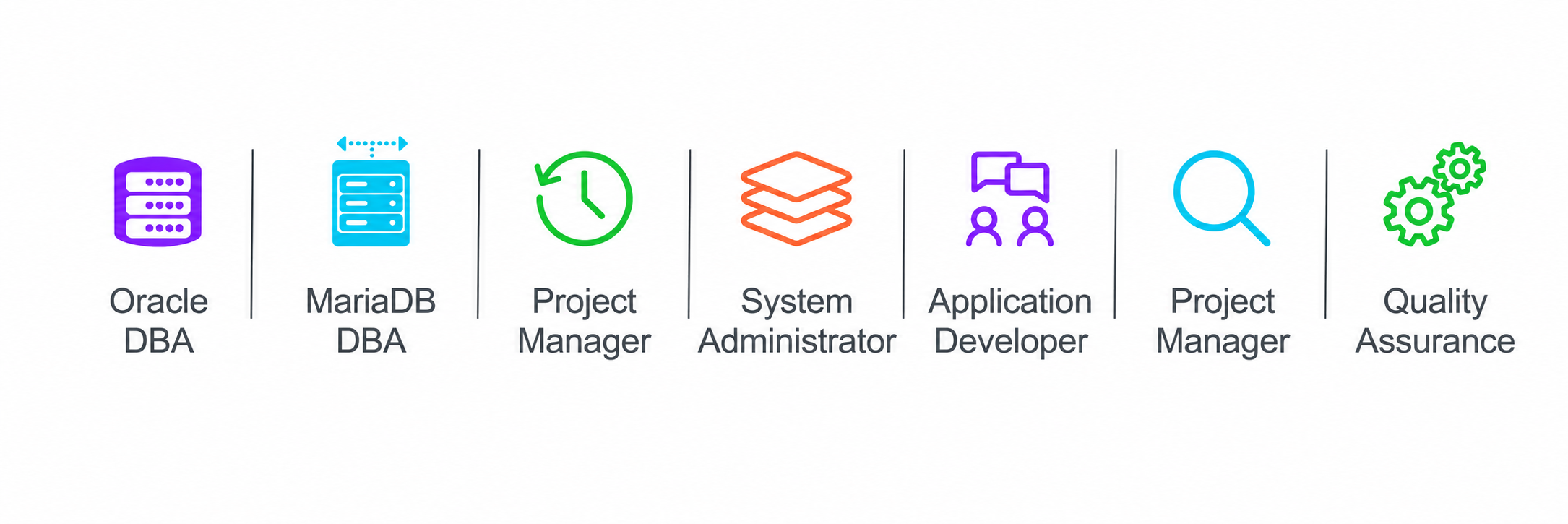
Multiple stakeholders are involved in the migration process. These stakeholders fulfill the following roles:
- Oracle Database Administrator (DBA) – This is a key resource whose expertise on the existing environment is invaluable. This individual plays a critical role in the project, particularly for data migration strategies such as replication or a gradual cutover, and also carries the potential to administer and define a future-state administration model.
- MariaDB Database Administrator (DBA) – Often, the Oracle DBA ends up becoming the MariaDB DBA. To facilitate this transition, MariaDB provides specialized training for Oracle DBAs who wish to learn about the MariaDB Enterprise Platform. In cases where MariaDB DBA expertise is established, our SMEs collaborate closely for joint success.
- Project Manager (PM) – Maintains the schedule, manages tasks and tracks risks.
- System Administrator – Ensures system configuration and DevOps practices are followed.
- Application Developer – Ensures the correct database connector is used, the ORM is configured, and any necessary code changes are made.
- Product Manager – Ensures the system meets the business needs.
- Quality Assurance (QA) – Tests that the application works correctly, the system meets performance requirements, and the migrated data is correct.
On many teams, the same person may hold multiple roles. Frequently, DBAs also serve as system administrators, and some product managers assume the role of product owner. What is crucial is to ensure that all stakeholders are aware of the process and their respective roles within it.
06Migration assessment tool
To assess the feasibility and requirements for migration, visit https://customers.mariadb.com/migration-portal/select and click on Get Started under Oracle Database. The MariaDB Migration Assessment Tool analyzes DDL files, along with other requirements, to determine the best solution and migration steps.
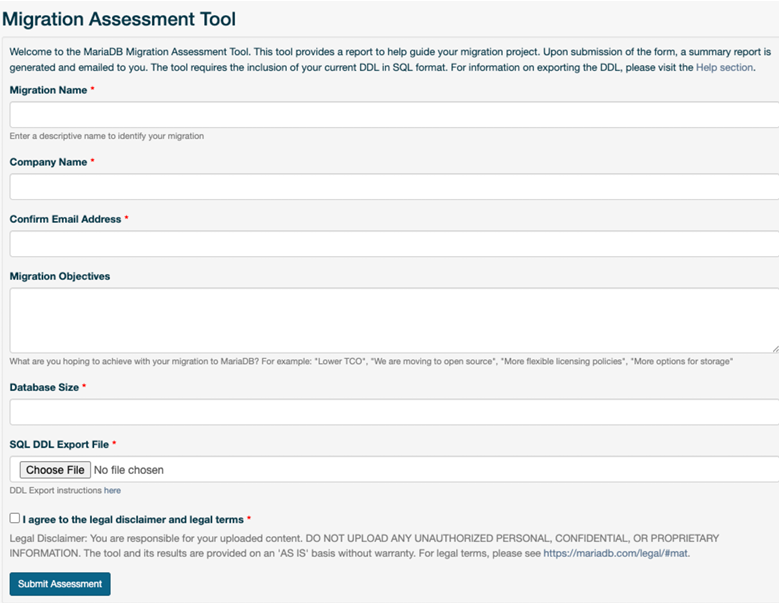
The Migration Assessment Tool requires a DDL file and the database size requirements. A DBA can generate the DDL based on the instructions in our customer portal.
Once the form is submitted, your migration assessment report will be sent to you via email.
07Migration assessment report: Content overview
This summary report outlines the anticipated changes required to facilitate a smooth migration. Any content with a link provides additional details on the item in question. Common sections in the report include:
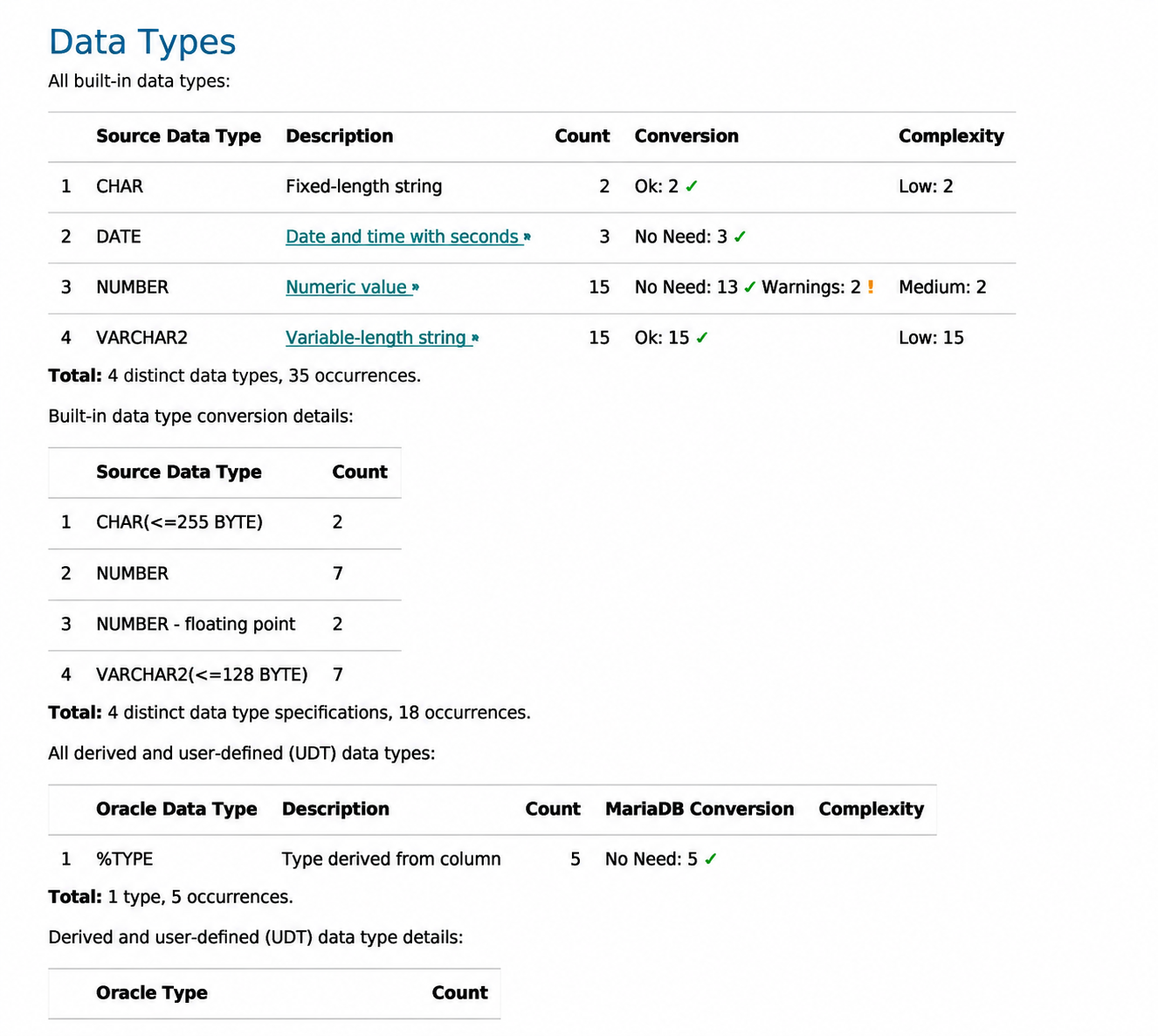
This section of the report covers any updates required for data types used by Oracle that differ slightly from those used by MariaDB Enterprise Platform. For example, if the following table is created:
 CREATE TABLE "specs"
  (
   cnt1 DATE
  );
Then, SHOW CREATE TABLE is run on the newly created table, and MariaDB Enterprise Server returns:
CREATE TABLE “specs” (
  “cnt1” datetime DEFAULT NULL
  )
This is because the Oracle DATE data type is represented as the native DATETIME data type in MariaDB.
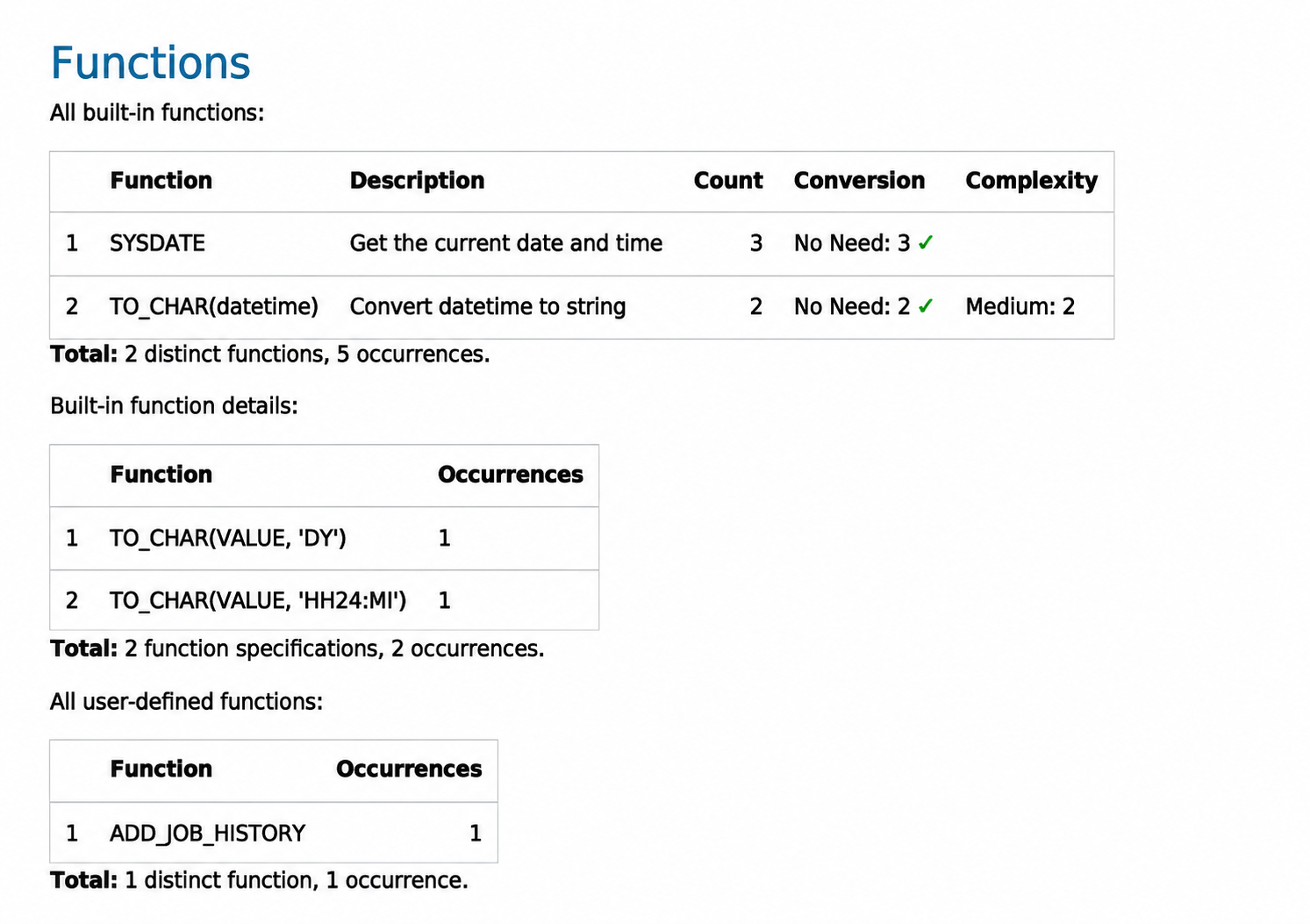
Information presented here covers any required changes to existing functions. In the given example, all functions in use are listed, and none require any changes to operate correctly in the target environment.
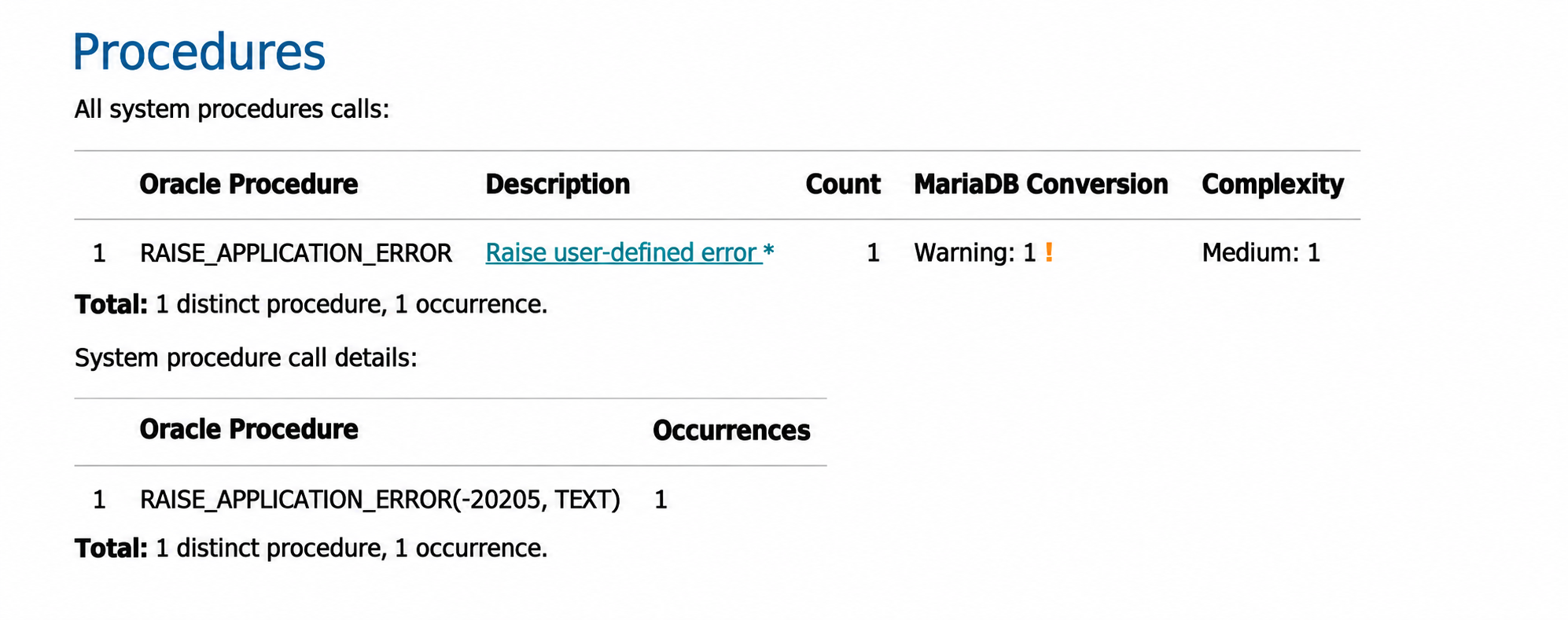
All system procedures are reviewed and included in this section. For example, in Oracle, the RAISE_APPLICATION_ERROR procedure allows you to raise a user-defined error with the error number in the negative range from -20000 to -20999.
In Oracle compatibility mode, MariaDB Enterprise Server uses the SIGNAL statement with the recommended SQLSTATE value ‘45000’ for user-defined exceptions. MariaDB Enterprise Server will support RAISE_APPLICATION_ERROR in a future release. The original statement in Oracle is:
CREATE OR REPLACE PROCEDURE error1
  IS
  BEGIN
    RAISE_APPLICATION_ERROR (-20205, ‘Some error message’);
  END;
  /
MariaDB Enterprise Server automatically converts this to:
CREATE OR REPLACE PROCEDURE error1
  IS
  BEGIN
    SIGNAL SQLSTATE ‘45205’ SET MESSAGE_TEXT = ‘Some error message’;
  END;
  //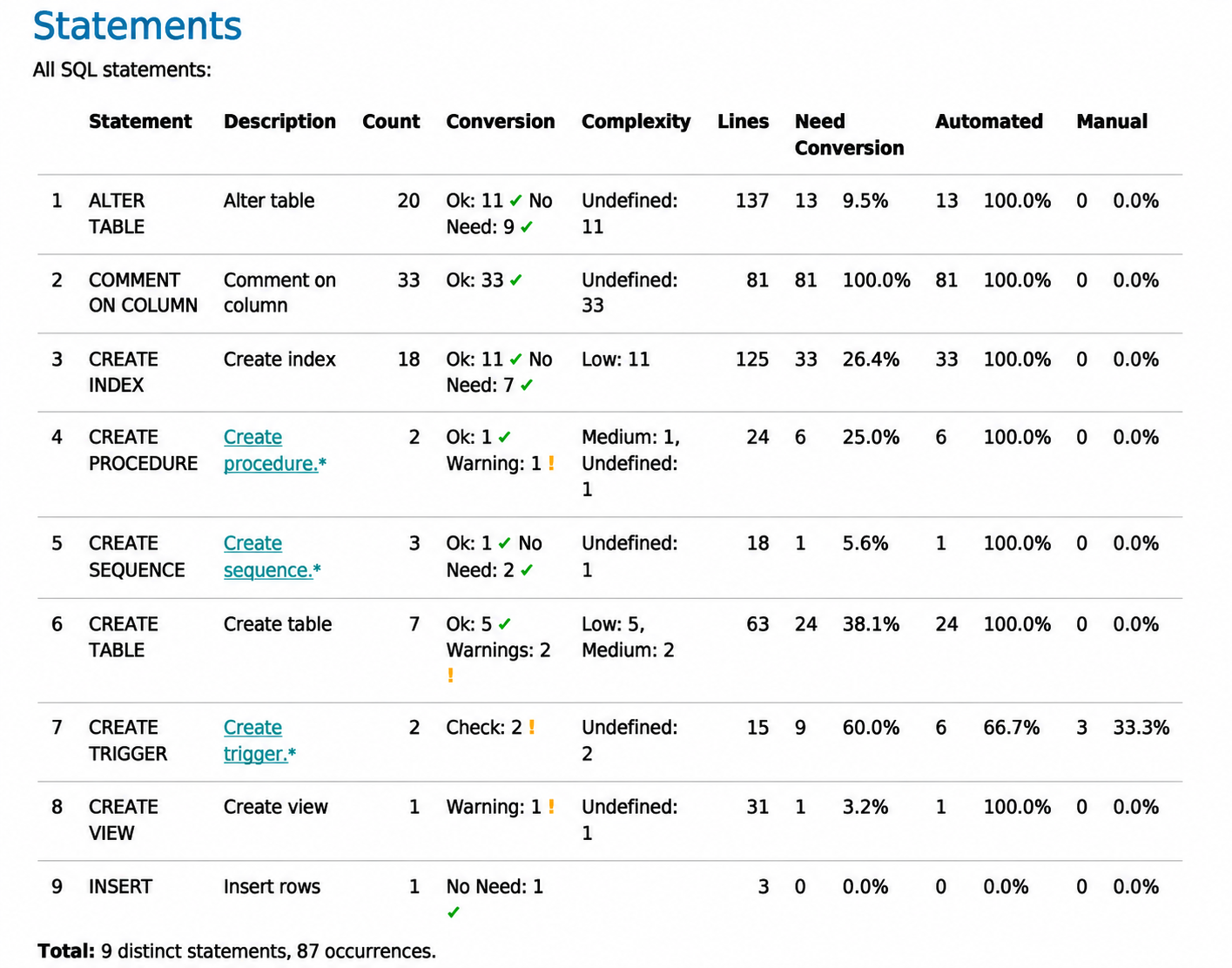
All SQL statements in use in the source database are listed here, along with information on the conversion needs. For example, CREATE TRIGGER requires a validation check. This is due to subtle differences in the statement implementation between the source and target databases, since MariaDB Enterprise Server requires a delimiter within a CREATE OR REPLACE TRIGGER statement, while Oracle does not need one.
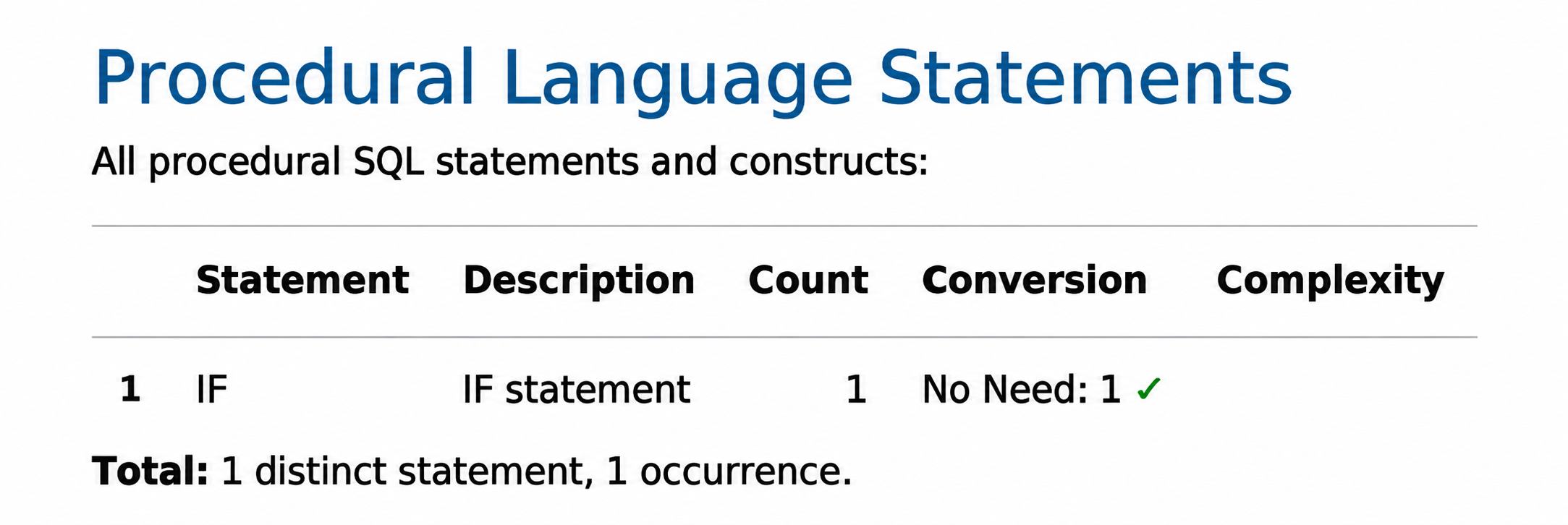
All procedural statements found in the source database are listed here, along with information detailing any necessary changes to function in MariaDB. This includes stored procedures, stored functions, variable declarations, control flow statements, cursors, handlers and transaction control statements. Some of these items have a subtly different usage in MariaDB, and required changes will be listed here.
The report also analyzes several other areas for compatibility with MariaDB and makes appropriate recommendations to resolve any concerns.
The migration assessment tool not only generates a compatibility report but also serves as a good starting point for determining the viability and effort required for the migration, since it provides details on some of the changes needed for a successful migration. It serves as the basis for creating a complete project plan.
08Data migration options
While schema and code migration are important aspects of database migration, data migration is equally, if not more, essential. How to migrate the data depends on two key questions:
- How much data is there?
- How long can the system remain offline?
The steps may be simple for smaller databases where an outage can be tolerated. Back up the existing database into DML files, convert them if necessary (running in Oracle compatibility mode to minimize the need), restore them to MariaDB Enterprise Platform, QA the results and test the application.
Larger databases that cannot tolerate outages require a more complex strategy. This may involve starting with the baseline backup and restore, then using a replication technology to ensure that writes and updates are propagated to both databases. QA can occur concurrently against the new database, and then a cutover can take place when the application tests adequately. Additional tools may be required for this strategy.
09Downstream dependencies
In addition to database size and tolerance for downtime, teams must also consider downstream dependencies. In these cases, it may be necessary to use database replication and transformation tools to feed both systems and the downstream system, thereby decoupling it from either the source or target system. Alternatively, it may be possible to replicate to MariaDB Enterprise Platform and then move the downstream systems to the new MariaDB environment. Once those systems are tested and operating correctly, the final cutover of source systems can happen.
10Navigating common Oracle migration considerations
Most Oracle functionality is available in MariaDB Enterprise Platform. Along with our Oracle compatibility mode, MariaDB offers tools and documentation to make the migration easier and address some of the most common Oracle migration challenges:
- Oracle Exadata – Oracle’s scale-out custom hardware architecture. Databases on this platform tend to be larger and require higher throughput. Often, they include analytical queries. ColumnStore should be considered for these systems. MariaDB Enterprise Platform delivers a scale-out architecture that can handle larger databases, write scale, throughput and operational analytics. ColumnStore is a dedicated columnar storage engine designed to handle petabytes of data and support longer-running analytical queries.
- Oracle RAC – Oracle’s database clustering technology. It scales well for read-mostly workloads. MariaDB Enterprise Platform, with multiple read replicas, is sufficient for most databases.
- Use of table partitions – MariaDB Enterprise Platform offers partitioning, but it works differently from Oracle’s. Some adjustments may be necessary to the overall scheme.
- PL/SQL – MariaDB Enterprise Platform provides compatibility with a subset of PL/SQL using SQL/PL. For databases that use PL/SQL, use SET SQL_MODE=ORACLE. The migration tool can assess which PL/SQL features, if any, are not supported.
- Wrapped queries – Wrapped queries are encrypted, and the code is not exported in a dump. To access them, the team requires the password or an understanding of what the queries do. If the queries cannot be decrypted, they must be rewritten.
- Oracle Advanced Queues (AQ/MQ) – Oracle Advanced Queues are not supported as they extensively use wrapped queries. However, similar event-based functionality can be created using MariaDB’s Kafka connector.
- Database links – Links to other databases should be understood. MariaDB’s Spider storage engine can provide similar functionality to those other databases, but it requires more setup, and the syntax will need to be migrated.
These are some factors that require more consideration when migrating to a different database. However, none of these should be considered a roadblock. Instead, these items necessitate a closer look during the migration process.
11Tools and technologies
A variety of other tools may be used to facilitate the migration. Oracle offers some helpful tools for schema export and data dumping, and MariaDB provides similar tools for ingestion, along with an Oracle compatibility mode. However, additional tools may be beneficial to facilitate more complex migrations with larger datasets. These tools include:
- SQLines, Data and Analytics Platform Migration provides scalable, highperformance data transfer, schema conversion and validation for Oracle to MariaDB migrations.
- JumpMind, SymmetricDS provides automatic recovery, synchronization and support for on-premises to cloud migration.
- Striim, Platform or Cloud provides similar functionality to JumpMind, with continuous sync of Oracle as the source and MariaDB Enterprise Platform as the target, in real-time data integration scenarios (including CDC).
- Fivetran, HVR provides functionality similar to the other tools above, particularly Striim; however, it emphasizes high-speed bulk loading for data replication and integration.
- Qlik Replicate offers similar functionality to HVR, focusing on large, routine bulk transfers, CDC synchronization and distribution to target databases, along with extensive visualization capabilities.
- Debezium open source distributed platform for change data capture.
In general, our professional services, customer engineering and third-party partners typically use more than one tool as they address overlapping but different migration requirements, including, but not limited to, the following:
- Estimate the time required for migration
- Provide automation for assessment and actual migration for key migration steps such as:
- Schema mapping and conversion
- Data export from sources and ingestion at the target ˚ Data type, statement and procedure conversions
- Creation of new table schemas and population of database tables
- Support change data capture (CDC)
- Provide parallel support for application migration
12Let our experts guide your migration
MariaDB provides dedicated professional services to ensure a seamless migration from Oracle Database to MariaDB Enterprise Platform. Our team has extensive experience, successfully handling numerous transitions and a wide array of other complex data transformation projects.
To learn more, please watch this webinar on How to Lower Oracle Costs for a closer look at what goes into migration.
13About MariaDB
MariaDB seeks to eliminate the constraints and complexity of proprietary databases, enabling organizations to reinvest in what matters most – rapidly developing innovative, customer-facing applications. Enterprises can depend on a single complete database for all their needs, that can be deployed in minutes for transactional, analytical and hybrid use cases. Trusted by organizations such as Deutsche Bank, DBS Bank, Red Hat, ServiceNow and Samsung – MariaDB delivers customer value without the financial burden of legacy database providers. For more information, please mariadb.com.
14DBS Bank: Largest bank in Southeast Asia migrates to MariaDB
DBS, the largest bank in Southeast Asia, successfully migrated from proprietary Oracle databases to MariaDB Enterprise Platform. Seeking a cost-effective and flexible open-source solution, DBS started with a single application and expanded to over 30, including some that are mission-critical. They also had a goal of moving to a more technology-focused customer experience.
The key results were:
- Cost Savings: 30% to 70% reduction in database costs.
- Increased Flexibility: A more agile open-source platform.
- Enhanced Compliance: Access to essential features like data-at-rest encryption and user auditing.
This migration solidified DBS’s position as a leader in open-source technology within the financial services sector. Reference: “DBS: MariaDB Customer Story,” MariaDB Corporation.