Key takeaways
- Write at Every Site: Use CD&R to handle conflicts in multi-writer deployments using standard asynchronous or semi-synchronous replication.
- Detect Five Conflict Types: MariaDB detects conflicting inserts, updates, and deletes across sites and runs the SQL trigger you define for each conflict type.
- Resolve It Your Way: Keep the winning row, such as the later write, merge changes field by field, add up counters, skip the incoming row event, or stop replication for investigation.
- Keep Every Node in Agreement: Design rules that produce the same result regardless of arrival order. In our six four-way update races, all four nodes picked the same winner.
- Recover Without Intervention: Sites can continue accepting local writes while disconnected; CD&R handles supported conflicts when replication resumes. In our test, all 12 channels were running again in about four seconds without operator intervention.
The link between your London and Singapore data centers goes down. Mary reports her phone stolen, so London suspends her line. Meanwhile, Singapore updates her location, still showing her line as active. When the sites reconnect, which changes should they keep?
Both sites kept serving customers, but now hold different versions of Mary’s record. Without conflict handling, those competing updates can interrupt replication or leave the sites disagreeing, requiring manual investigation and reconciliation.
MariaDB Enterprise Server 12.3 addresses this with Conflict Detection and Resolution (CD&R). MariaDB detects conflicts and invokes SQL triggers containing your resolution rules so you can decide which changes to retain or merge without manual intervention.
We tested this on the layout a telecom operator asked for: four data centers, each serving its own region, and subscriber records that any site can update. We put it through conflicting updates, a site outage and a burst of concurrent writes. This post shows you how to configure the sites, write a CD&R trigger, and verify that every node reaches the same result.
What is conflict detection and resolution (CD&R)?
CD&R lets you resolve conflicting replicated writes using SQL triggers on standard asynchronous or semi-synchronous replication in deployments where multiple sites accept writes. It’s available only in MariaDB Enterprise Server 12.3 and later, which is a core component of MariaDB Enterprise Platform.
In an active-active deployment, MariaDB detects a conflict and runs your resolution rule. Rules designed to produce consistent results bring nodes into agreement without manual intervention. A site that loses its link keeps accepting writes and catches up when the network returns.
What conflicts can CD&R detect?
A conflict occurs when a replicated change encounters a row that already exists, is missing, or differs from the values the change expects. CD&R distinguishes five types:
| Conflict type | What it means |
| INSERT_INSERT | An incoming insert finds a row with the same primary key already present—for example, two sites independently create the same customer record. |
| UPDATE_UPDATE | An incoming update finds a row whose values differ from its expected before-image—for example, two sites change the same customer’s address |
| DELETE_UPDATE | An incoming delete finds a row that has changed locally—for example, one site deletes a customer record while another updates it. |
| UPDATE_DELETE | An incoming update finds the row missing—for example, another site has already deleted the customer record. |
| DELETE_DELETE | An incoming delete finds the row already missing—for example, both sites delete the same customer record. |
How can you resolve a conflict?
Your business rules determine what happens when CD&R detects a conflict. A trigger can choose one of four outcomes:
- Write a resolved row: define the values to retain, for example by combining a locally updated address with an incoming phone-number change.
- Accept the default action: let MariaDB apply the default for that conflict type. For
UPDATE_UPDATE, the incoming row replaces the local row. - Keep the local state: skip the incoming row event and continue replication.
- Stop for investigation: halt the replication SQL thread with an error when the conflict needs human review.
You can combine these outcomes to implement your rule. Last-writer-wins, for example, accepts the incoming row if it has the later timestamp and skips it if the local row is newer. A merge rule instead preserves selected changes from both rows. The CD&R documentation describes each type and outcome in detail.
In multi-writer deployments, design rules that produce the same result regardless of which site receives a change or the order updates arrive.
What does an active-active, four-site telecom use case look like?
In our telecom use case, subscriber records can be updated from any of four regional data centers, and every data center takes writes locally. You can model your own multi-site design on the same simple layout: one node per data center, with each node replicating from the other three, which works out to 12 replication channels and four GTID domains, one per site. Per-site replicas are outside the test scope; we focused on conflicts between sites.
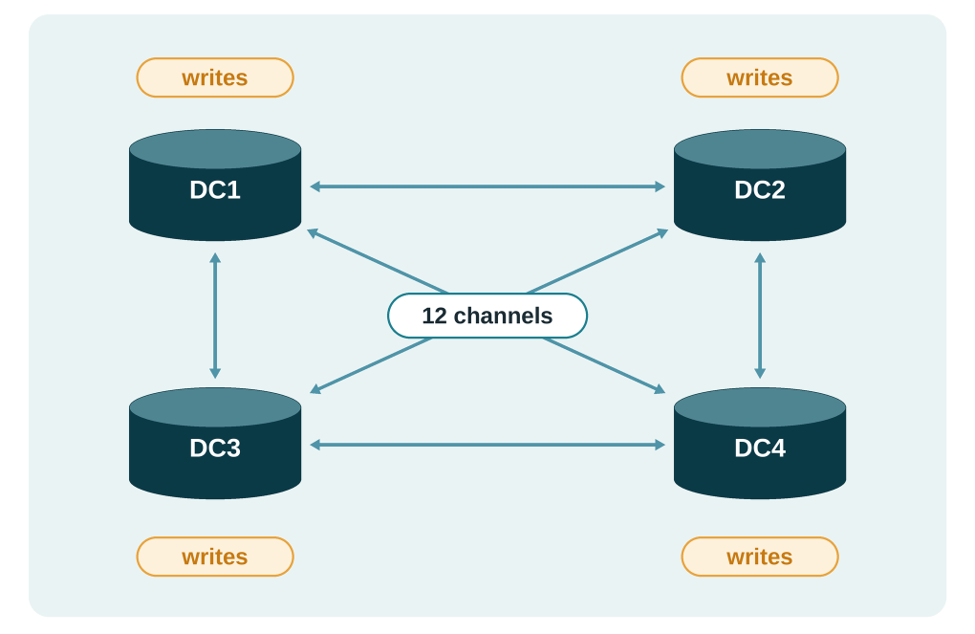
The test table stores subscriber records keyed by phone number, with status and location columns, plus a timestamp and originating server ID used by our resolution rule.
| Phone number | Subscriber | Status | Location | Timestamp | Server ID |
| 555-0101 | Mary | active | Denver | 09:15:02.481233 | 3 |
| 555-0102 | Raj | active | Austin | 09:42:11.007512 | 1 |
Suppose DC1 updates Mary’s location from Denver to New York, while DC2 changes it to Chicago before receiving DC1’s update. Both writes succeed locally, leaving two different locations for the same subscriber. Let’s see what happens without CD&R, and then with CD&R.
What happens without CD&R?
Without CD&R, a conflict can stop replication with an error, or replication can keep running while your sites quietly hold different data. We first ran the following scenarios without CD&R triggers to establish a baseline:
| Conflict scenario | Observed result in our test | Replication error? |
| Duplicate insert | Six of the twelve replication channels stopped | Yes |
| Update and delete race | Three replication channels stopped | Yes |
| Update race | Replication continued, but the sites held different data | No |
The first two scenarios produce explicit errors that require investigation. The update race is the one to worry about, because it’s easy to miss: every channel showed Slave_SQL_Running: Yes (Replica_SQL_Running will also work, read more on when to use replica here) yet checksum comparisons revealed three different row versions across four nodes.
CD&R closes that gap: it detects the conflict and runs your rule on every node. The next sections show how to set it up.
How do you set up CD&R on a mesh?
On a mesh, apply these settings to every node. For the full reference, see the CD&R documentation.
Set slave_run_triggers_for_rbr to ENFORCE on every node. On an all-active mesh, each node marks the row events it writes as “triggers already ran on the primary,” so a node set to YES skips its own triggers. ENFORCE makes every node run them, so every conflict reaches your rule. Set it before your sites start writing, and add it to the config file so it survives a restart.
Then confirm the rest of the supported configuration:
- Use
binlog_format=ROW, and setbinlog_row_image=FULLon every node. - Set
slave_exec_modetoSTRICT. - Give every table that has conflict triggers a primary key, so every conflict can reach your rule.
- Avoid system-versioned tables, which CD&R triggers don’t support.
- On a full mesh, also set
log_slave_updates=ON,gtid_strict_mode=1,gtid_ignore_duplicates=ON, and one GTID domain per site. - Install the same conflict-resolution rules on all nodes.
With the settings in place, you’re ready to write the CD&R trigger.
What does a CD&R trigger look like?
A CD&R trigger contains the SQL logic that tells a replica how to handle a conflicting replicated change. Instead of a regular trigger event such as BEFORE UPDATE, you bind it to a conflict type.
For a conflict, your trigger can compare three row images:
NEWinitially contains the incoming replicated row; your trigger can modify it to define the resolved row.OLDis the row currently on the replica.ORGis the row as the originating node had it before its change.
Our rule is last-writer-wins: the later timestamp wins, and the higher originating server ID breaks timestamp ties. Back to Mary: DC1 moves her to New York, and DC2 moves her to Chicago before it sees DC1’s change. When each site then receives the other’s change, it sees an UPDATE_UPDATE conflict, and the trigger asks three questions in order:
- Is the incoming row identical to the local row? If so, skip the event, because there’s nothing to change.
- Is the local row newer, or does it have the higher server ID when the timestamps match? If so, skip the event and keep the local row.
- Otherwise, the incoming row wins. The trigger finishes without changes, and the default action writes the incoming row.
Here’s the trigger:
CREATE TRIGGER lww_upd_upd
  FOR CONFLICT UPDATE_UPDATE ON subscriber
  FOR EACH ROW
BEGIN
  -- Skip an incoming version identical to the local row.
  IF NEW.status <=> OLD.status
     AND NEW.location <=> OLD.location
     AND NEW.`server ID` <=> OLD.`server ID`
     AND NEW.`timestamp` <=> OLD.`timestamp` THEN
    SIGNAL SQLSTATE '02TRG';
  END IF;

  -- Keep the local row if its timestamp is later,
  -- or its server ID is higher when timestamps match.
  IF OLD.`timestamp` > NEW.`timestamp`
     OR (OLD.`timestamp` = NEW.`timestamp`
         AND OLD.`server ID` > NEW.`server ID`) THEN
    SIGNAL SQLSTATE '02TRG';
  END IF;

  -- Otherwise, apply the incoming row.
END
Here’s the result for Mary’s location. At DC1, DC2’s incoming change has the later timestamp, so it wins and the trigger lets it through. At DC2, DC1’s incoming change is older, so the trigger skips it. Both sites end with Chicago.
| Field | Write at DC1 | Write at DC2 | Result on every site |
| Location | New York | Chicago | Chicago |
| Timestamp | 10:00:00.100000 | 10:00:00.250000 | 10:00:00.250000 |
| Server ID | 1 | 2 | 2 |
Both nodes apply the same timestamp and server ID comparison, so they choose the same winner regardless of arrival order, provided competing writes to the same row have distinct timestamp–server ID pairs. Synchronized clocks help the selected winner reflect actual write order. In six four-way update-race tests with varied write orders and 900–1,700 ms of network delay, all four nodes finished with identical tables.
How do you merge writes instead of picking a winner?
In the last example, both sites changed the same field. Now suppose they change different fields: DC1 updates Mary’s status, and DC2 updates her location before either receives the other’s change. Last-writer-wins keeps one whole row, so one of the changes is lost. A merge rule keeps both.
To merge, work out what each site changed. Compare each row with the original, ORG: the incoming row (NEW) against ORG shows what the other site changed, and the current local row (OLD) against ORG shows what this site changed. Here’s what DC2 sees when DC1’s status change arrives, alongside the intended merged result:
| Field | Original (ORG) | Local at DC2 (OLD) | Incoming from DC1 (NEW) | Intended merged result |
| Status | active | active | suspended | suspended |
| Location | Denver | Chicago | Denver | Chicago |
Then apply three rules to each field. If only the incoming value changed, accept it, as with the status. If only the local value changed, keep it by copying it from OLD into NEW, as with the location. If both sites changed the same field, let the later write win, using the same timestamp and server ID as last-writer-wins, so every node makes the same choice. The merged row keeps DC1’s new status and DC2’s new location, on both nodes.
Counters need a different rule: add the incoming change to the local total instead of choosing one value. NEW.counter - ORG.counter is the amount the other site added, so adding it to the local total applies that change.
CREATE TRIGGER add_up
  FOR CONFLICT UPDATE_UPDATE ON usage_counter
  FOR EACH ROW
  SET NEW.counter = OLD.counter + (NEW.counter - ORG.counter);
In our test, four sites added 1, 10, 100, and 1000 to the same counter at the same time, and every node ended at 1111, whatever order the changes arrived in.
| Step | DC1 | DC2 | DC3 | DC4 |
| Start | 0 | 0 | 0 | 0 |
| Each site adds locally | +1 | +10 | +100 | +1000 |
| After the site’s own change | 1 | 10 | 100 | 1000 |
| After receiving the other three changes | 1111 | 1111 | 1111 | 1111 |
Before you rely on a merge rule, test it with repeated updates, different arrival orders and reconnecting sites to confirm every node reaches the same result.
How did the mesh behave during a site outage and concurrent writes?
We tested how the four-site mesh handled a site outage and a burst of concurrent writes.
A site outage
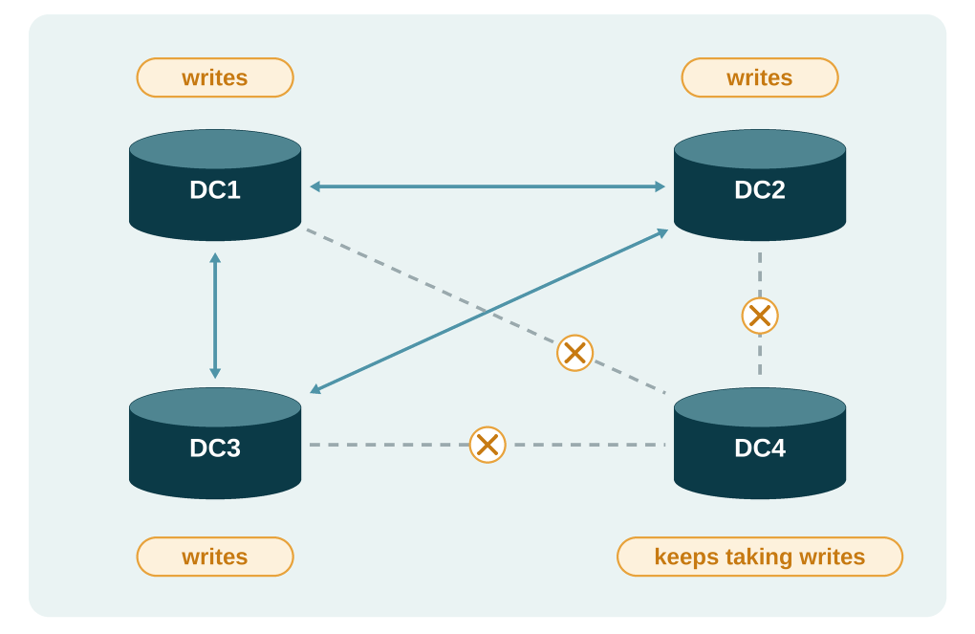
- We cut DC4 off from the other three at the network level.
- DC4 kept accepting writes, while DC1 to DC3 kept converging among themselves.
- When we restored the network, all 12 channels were running again in about four seconds, with no operator action.
- During the disconnection, the same three records were updated at DC4 and at the other sites. After reconnection, our last-writer-wins rule retained DC4’s updates for all three records because they had later timestamps.
A burst of concurrent writes
We sent 250 writes from each site at the same time (1,000 in total), all aimed at just 25 keys, so writes collided constantly. Every conflict was resolved: in both parallel replication modes we tried, conservative and optimistic, all four nodes had converged by the time the writes stopped, with no replication errors.
How do you monitor conflict resolution?
Three checks tell you whether your triggers are firing, replication is healthy, and every node agrees.
1. Check replication health on every node.
SELECT Last_SQL_Errno, Last_SQL_Error
FROM information_schema.SLAVE_STATUS;
For each channel, confirm that both replication threads are running, and inspect Last_SQL_Errno and Last_SQL_Error. Compare GTID positions across nodes to see whether any node is falling behind. On a single replica, SHOW REPLICA STATUS gives the same view.
2. Check that your triggers fire.
SHOW GLOBAL STATUS LIKE 'Executed_triggers';
Compare the counter before and after a controlled conflict. It includes regular triggers, so it isn’t a dedicated conflict count.
3. Confirm that the nodes agree.
Stop writes, wait for replication to catch up, then compare table checksums across nodes, for example with CHECKSUM TABLE <your_table>. Running channels alone doesn’t prove that the data agrees.
What are the best practices for a reliable multi-site setup?
Start with the business outcome your rules must preserve. Design rules that produce the same result across nodes.
- Write a rule for each conflict type per table. Cover inserts, updates, deletes and timestamp ties, and decide which cases should stop replication for investigation. To handle deletes with the same rule as updates, consider logical (soft) deletes: add a tombstone column, such as
deleted TINYINT, and mark a row as deleted by updating it. This preserves the row’s metadata so your rule can compare the deletion with competing updates. - Apply consistent rules on every node. Use the same rules on every participating node and ensure they produce the same result regardless of write origin or arrival order.
- Maintain the metadata your rule needs. For timestamp-based rules, keep clocks synchronized and let the database record the timestamp, using a column default such as
DEFAULT NOW(6) ON UPDATE NOW(6), so the timestamp comes from a database server clock that your DBA keeps in sync and not from application code. If server ID is your tie-break, record the originating server ID too, for example by assigning@@server_idwhen you write the row. - Prevent accidental key collisions. Choose a key-allocation strategy suited to your application. For auto-increment keys, coordinate
auto_increment_incrementandauto_increment_offsetacross writers. Where practical, create shared rows at one site and let them replicate before other sites update them. - Test beyond a single conflict. Include repeated updates, concurrent writes, disconnected sites and reconnection, and verify both replication progress and final data agreement.
Conclusion
Multi-site applications need fast local writes and a consistent way to reconcile competing changes. CD&R in MariaDB Enterprise Server 12.3 lets you define those decisions inside the database, using SQL triggers that reflect your business rules.
Our four-site tests demonstrated automatic conflict resolution during concurrent writes and after a network interruption, with all nodes reaching the same result under the tested policies. To apply this to your application, define the outcome your rules must preserve, test them under realistic conditions, and verify both replication health and data agreement.
Explore the CD&R documentation for configuration details and further examples.
Note: MariaDB is updating its terminology to “source” and “replica”. Some commands in this blog have been updated. You can follow progress on the overall effort here: https://jira.mariadb.org/browse/MDEV-18777.
Frequently Asked Questions
MariaDB CD&R enables multi-site active-active database deployments using standard asynchronous or semi-synchronous replication to automatically detect replication conflicts and resolve them via custom SQL triggers without manual intervention. It is available in MariaDB Enterprise Server 12.3 and later.
CD&R works with standard asynchronous and semi-synchronous MariaDB replication, in primary–replica, multi-source, bidirectional, ring, mesh, and star topologies. You can write at every site without waiting on the others, and you define the rules that settle conflicts with no extra cost of network overhead. Raft Cluster is a single-writer system: all writes go through one leader. That makes commits faster, especially across regions, but it doesn’t give you multi-write capability. Galera Cluster gives you multi-write, so you can write to any node, but because it’s synchronous, every commit waits on all the nodes. Neither needs CD&R: Galera uses certification to detect conflicting transactions, and Raft’s single leader means there are no write conflicts.
No. It retains the winning row and discards the competing version. Use a merge policy when you need to preserve contributions from both writes.
No. It retains the winning row and discards the competing version. Use a merge policy when you need to preserve contributions from both writes.
No. The policy must also produce the same result regardless of which node receives the change or the order updates arrive.
You can deliberately stop the replication SQL thread for investigation. An unhandled trigger error can also stop replication.
With an appropriately configured asynchronous multi-writer architecture, sites can continue accepting local writes. After replication reconnects, CD&R handles supported conflicts according to your rules.
Check replication progress, then compare records or checksums at a consistent point. Running replication threads alone does not prove data agreement.