



Key takeaways
- MariaDB AI RAG simplifies the creation of generative AI applications by turning complex data “plumbing” into a single, easy-to-use REST service.
- The platform automates the most difficult parts of AI development, including document ingestion, smart content splitting, and high-quality response generation.
- By connecting your own data—like internal documents or databases—to AI models, the system eliminates “hallucinations” and provides accurate, context-aware answers.
- The microservice architecture allows teams to scale their AI capabilities independently while keeping their data securely tucked next to their existing MariaDB server.
I recently had the pleasure of speaking at MariaDB Day Brussels 2026, an event where MariaDB enthusiasts like myself gather, learn, and share experiences with peers in the ecosystem. My talk was about a new component in the MariaDB Enterprise Platform called MariaDB AI RAG. This component allows teams not only to standardize RAG pipelines but also to accelerate the development of GenAI applications. In short, and like I said in the intro during my talk in Brussels, with MariaDB AI RAG “you can implement RAG by simply consuming a REST service.” So, let’s see some of the capabilities of this new product in action.
Challenges when implementing RAG in production
Implementing and maintaining RAG pipelines can be complex. There are several moving pieces and non-functional requirements around the “plumbing” in a pipeline like this:

If you have experience implementing and deploying RAG to production, you might have encountered some challenges. And if not, you eventually will! Here are some of these challenges:
- Ingest: supporting multiple formats (including SQL query based ingestion), ingesting from HTTP / file system / S3, extracting metadata, document versioning.
- Chunk: supporting multiple strategies (like fixed-length, recursive, and semantic), chunk size and overlap, extracting metadata.
- Embed: supporting multiple embedding models (proprietary and open-source), handling batching, vector dimensionality, error and retry logic.
- Index: integrating with a vector database, configuring vector indexes.
- Retrieve: supporting multiple strategies (like keyword, semantic, and hybrid search), applying metadata filters.
- Rerank: supporting cross-encoders for precision, re-scoring retrieved results, filtering irrelevant context.
- Generate: supporting multiple LLM models, handling prompt construction and LLM response with streaming for real-time display.
- Observe: tracing end-to-end execution, debugging, evaluating retrieval and generation quality, monitoring usage.
This list is not exhaustive by any means. It only exemplifies the complexity of implementing and operating RAG pipelines in production. MariaDB AI RAG addresses many (if not all!) of the previous challenges by providing a microservice that abstracts away all this complexity.
The architecture of MariaDB AI RAG
The following diagram depicts the architecture of MariaDB AI RAG:
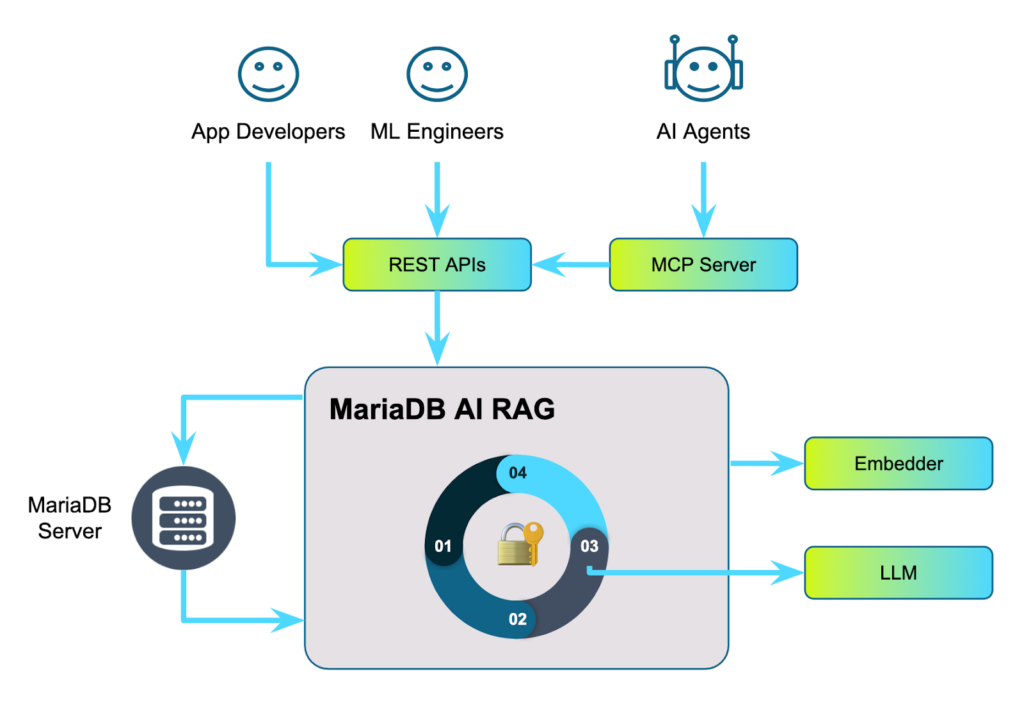
MariaDB AI RAG is an independent process (microservice) that can be scaled both vertically and horizontally, and that lives next to your MariaDB server (or cluster) and AI models. It exposes all its functionality through a set of APIs that application developers and machine learning engineers can use to build their own applications and solutions. It can also be used with the Enterprise MCP Server to allow AI agents to invoke RAG functionality.
Running MariaDB AI RAG
Here’s a simple set up:
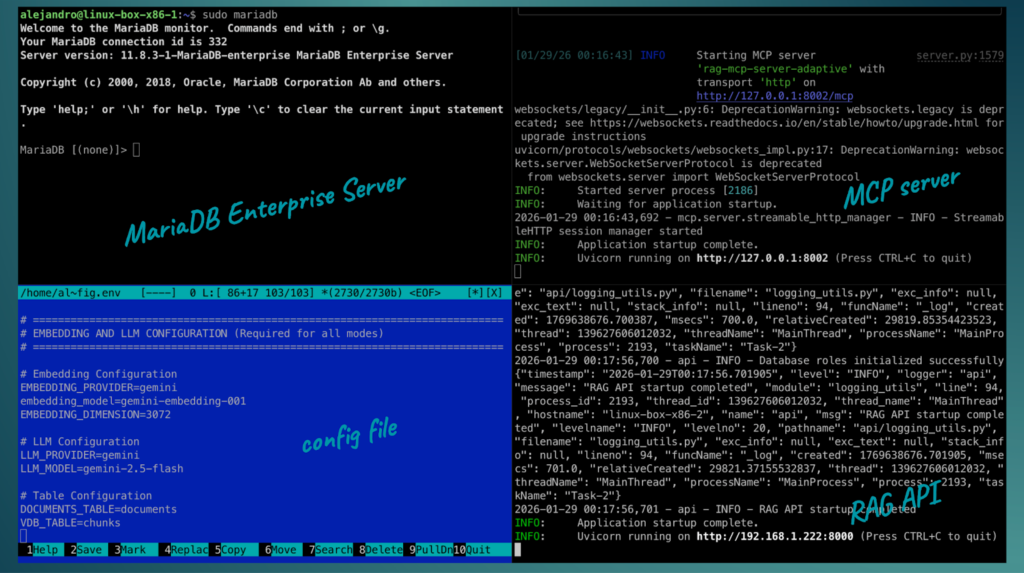
In this example, I have:
- a VM running MariaDB Enterprise Server,
- a VM running Enterprise MCP Server,
- and a VM running MariaDB AI RAG with a custom config file where I set the AI models to use, database connection, and other configurations.
Note: at the time of writing this, MariaDB AI RAG is in beta.
Invoking MariaDB AI RAG endpoints
MariaDB AI RAG provides a Swagger UI instance so you can test and explore the REST API in a browser. However, you can use any tool and any programming language or even curl to invoke the REST endpoints. Here are the available APIs:
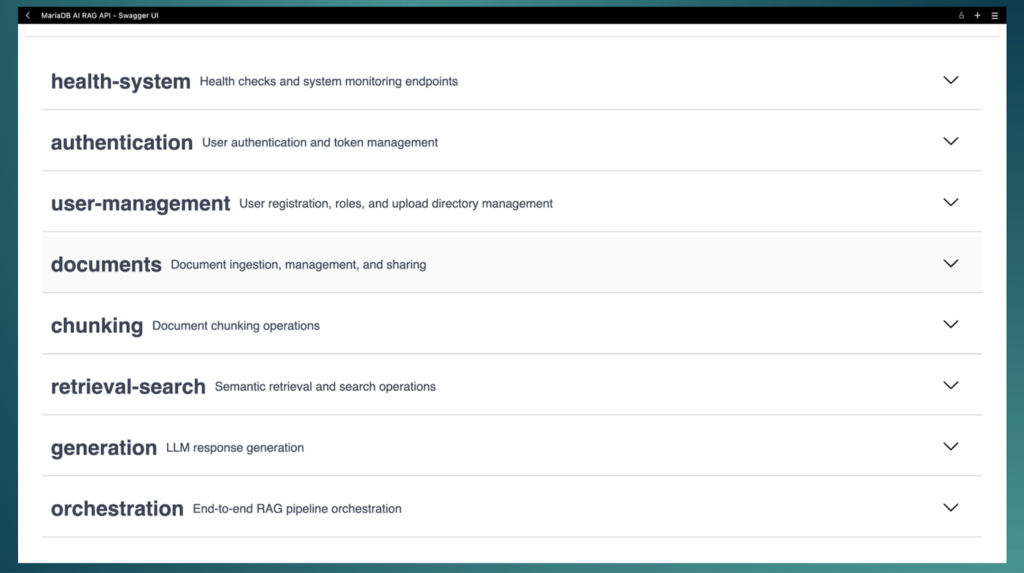
Each API has a set of endpoints for specific steps in the RAG pipeline. For example, a typical application would invoke the documents/ingest or documents/ingest-sql endpoints depending on whether you are ingesting files or data from your relational database, followed by a call to /chunk/all, and finally to /orchestrate/generation to generate the final output by the LLM. There are many different endpoints that allow you to individually run more specific parts of the RAG pipeline at different stages in your application. For this article, I’m going to show an endpoint that invokes the full RAG pipe line in one single call: orchestrate/full-pipeline:
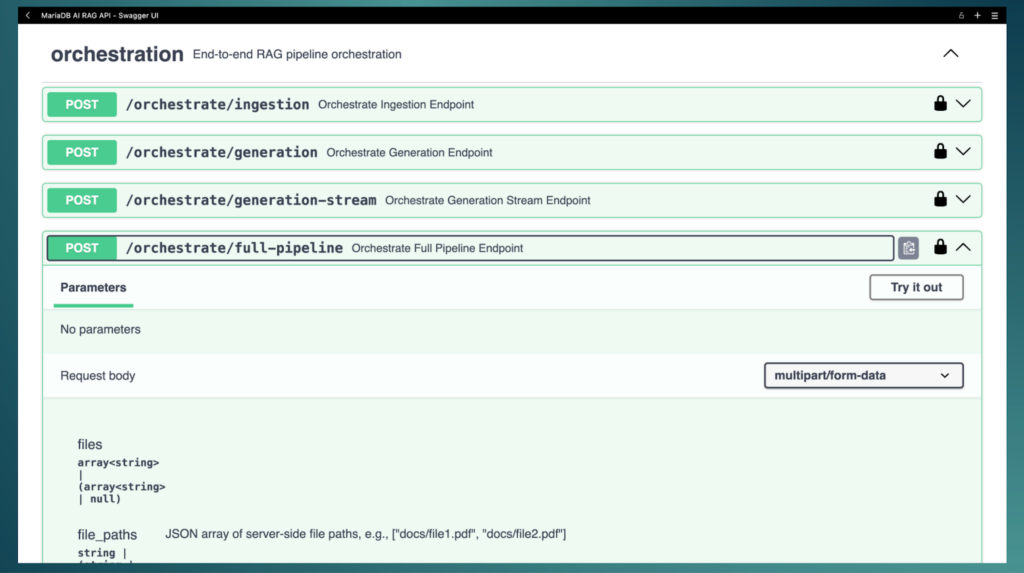
And for this, I decided to use one of my books and ask a question that a pretrained model without RAG wouldn’t be able to answer correctly. In this book, I mention a dog. If I use ChatGPT to find more details about this dog, I get the following:
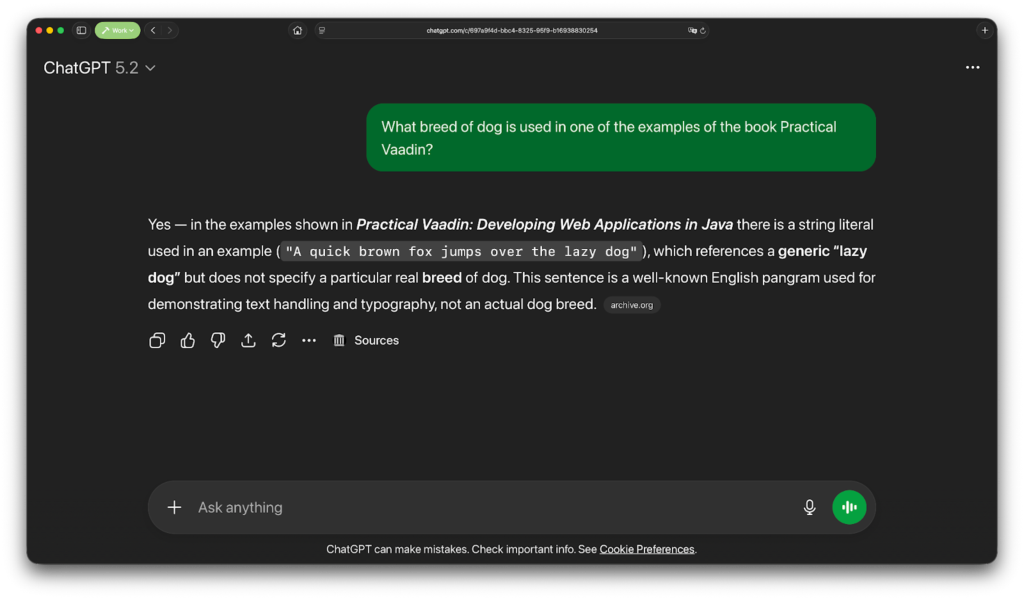
Not the information I’m looking for. Gemini bluntly hallucinates:
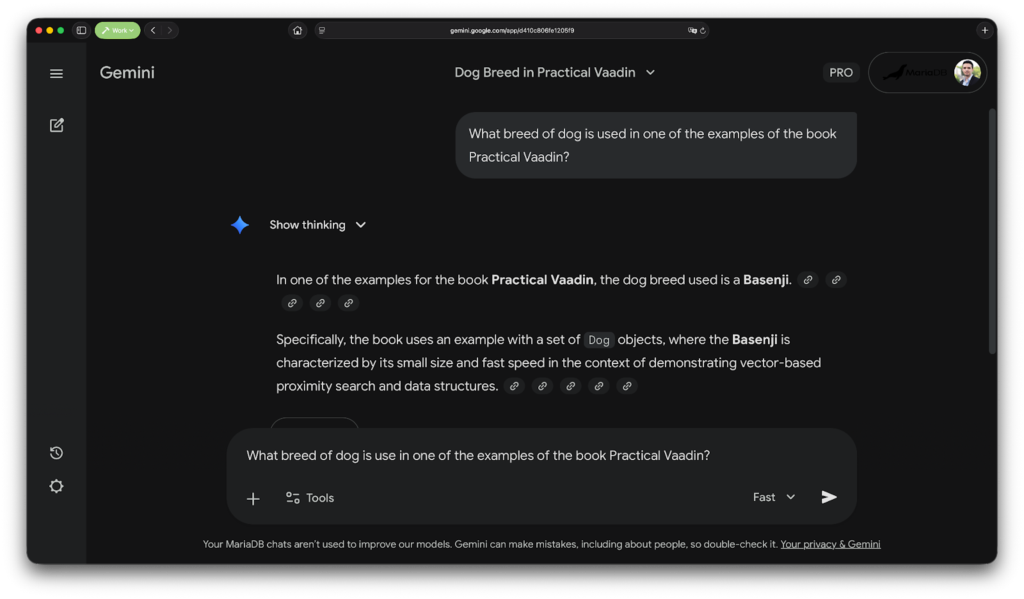
This is expected, as none of these models were trained on the contents of my book. I could have attached a PDF version of my book, but a quick estimate tells me that ChatGPT has around 160-190 pages of context window, so that might not work since my book has 350 pages. Gemini has a larger context window (probably somewhere around 2500-3000 pages) but I would have to upload the file every single time I create a new session if I want to ask things about my book. The upload feature in these chat clients is not really RAG as far as we are concerned in this article.
With MariaDB AI RAG we can chunk the contents, create and store vector embeddings, index them, and search them for retrieving parts that are relevant to a specific question about the book, build a prompt that contains the relevant information, and send it to an LLM to get a precise answer. And all of this (and more!) is handled automatically for us.
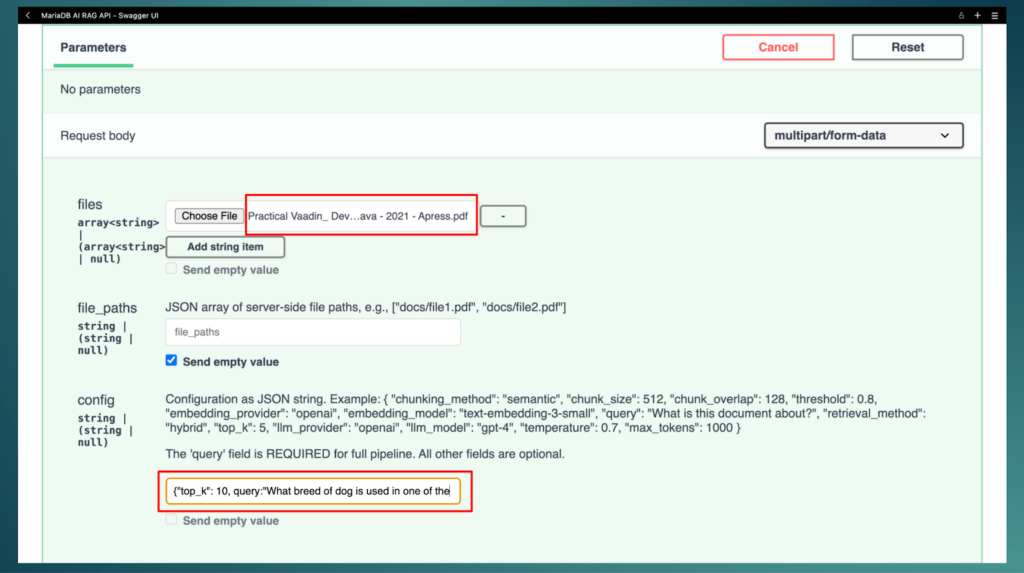
For the book example, invoking the orchestrate/full-pipeline is as simple as uploading the PDF file, (optionally) setting a value for top_k (the number of similar chunks to retrieve), and specifying the query (the question about the dog):
After invoking the endpoint, you get a response body like this (check the response field in the JSON object):
{
  "message": "Successfully processed 1 documents",
  "document_ids": [1],
  "query": "What breed of dog is used in one of the examples of the book Practical Vaadin?",
  "response": "The breed of dog used in one of the examples (specifically in Figure 4-26 and Figure 9-4) of the book \"Practical Vaadin\" is an **English Bulldog**. The dog's name is Draco.",
  "chunks_used": 10,
  "total_processing_time_seconds": 106.10159349441528
}
If we check the book, we find this is an accurate answer:
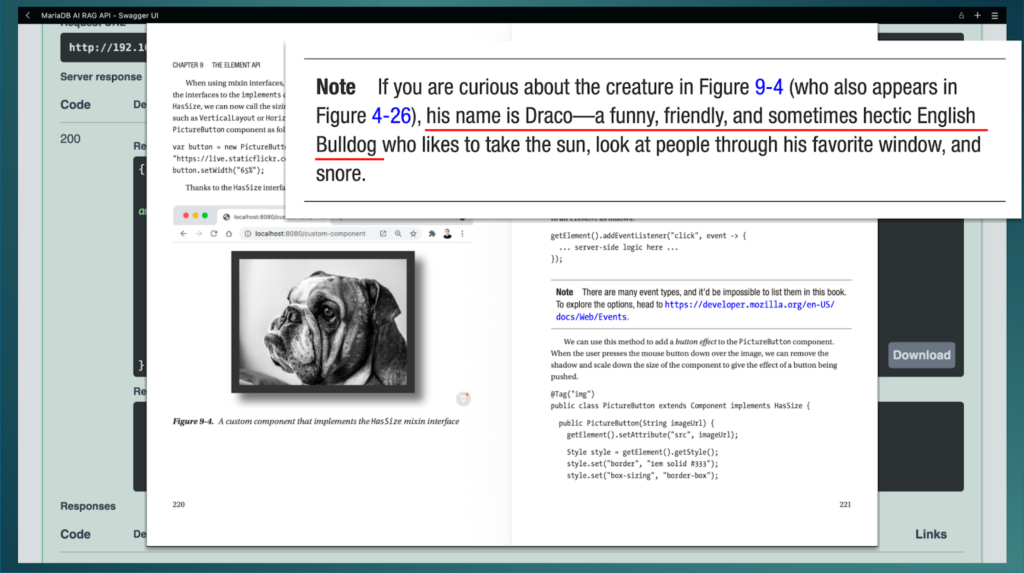
After this, we can invoke the orchestrate/generation endpoint to ask more questions about the contents of the book without having to re-ingest and re-chunk the document.
Final remarks
In this article I showed you only one use case: invoking a full RAG pipe line with ingest (PDF) → chunk (recursive strategy) → embed → index (MariaDB HNSW index) → retrieve (hybrid search) → generate. However, MariaDB AI RAG can do much more than that. For example, it can ingest documents from a directory in the file system (you can create multiple users each with their own directory,) it can handle ingestion from a SQL query instead of files, it can perform semantic chunking (an advanced NLP technique that splits documents based on meaning rather than arbitrary chunk size), it can filter by metadata, and you can monitor the pipeline, and many other features.
MariaDB AI RAG is currently in beta but it’s feature-complete and a trial is planned for the next release.